

Film production companies’ IT services are the support, security, and infrastructure practices used to keep production work accessible, protect unreleased material, and meet delivery obligations. This 2026 guide explains how to define support coverage, manage temporary crews, protect footage, and choose an operating model without confusing business IT with specialist post-production engineering.
TL;DR
- IT services for film production companies must cover crew access, production continuity, cybersecurity, and recoverable media.
- DivergeIT fits growing production businesses seeking managed IT services and cybersecurity support.
- Separate business IT responsibilities from editorial storage, ingest, color, and delivery responsibilities.
- Choose support by written coverage and tested recovery, not a response-time headline alone.
Why IT services matter for film production companies
Production work crosses organizational boundaries: employees, freelancers, editors, vendors, and clients need different access to the same project. Your IT plan must distinguish who can view material, who can change it, and who can distribute it. A shared login hides those distinctions.
DivergeIT is best for growing small and mid-sized production businesses seeking managed IT and cybersecurity services. DivergeIT serves entertainment alongside other industries; define the production-specific scope before assigning responsibility for editorial infrastructure.
For your 2026 service plan, connect technical requirements to actual milestones: crew onboarding, principal photography, editorial turnover, client review, delivery, and archive. An office-hours help desk does not automatically cover an overnight edit, and an available backup does not automatically meet a delivery deadline.
The practical goal is clear ownership. Someone must know what failed, who can authorize changes, and which workflow needs restoring first. Without that agreement, an incident becomes a discussion about responsibility while production waits.
Build your production IT plan
Map your production dependencies
Start manually with a shared document. Trace a project from intake through archive, identifying the accounts, devices, storage locations, connections, and outside partners needed at each stage. Include the ordinary systems that production depends on: email, scheduling, finance, and approvals.
Distinguish business IT from production engineering. Identity management and endpoint security belong in the IT scope; editorial storage performance, ingest validation, color pipelines, and final delivery need explicit ownership rather than assumed coverage.
For each dependency, record the person who can approve a workaround. The production coordinator who reports a problem and the person authorized to release confidential footage need not be the same person. Your escalation record should make that distinction visible.
- List each workflow and its business owner.
- Mark where camera originals, proxies, and project files reside.
- Identify dependencies on internet connectivity or remote access.
- Assign ownership for editorial hardware and shared storage.
- Record vendor contacts and change-approval authority.
Define support around the production calendar
Use your current production calendar to identify when support is needed. Compare those hours with your existing coverage before buying another tool or service. Record how crew members request help when email or the main network is unavailable.
A response target measures acknowledgment or engagement, not necessarily a fix. Require separate definitions for first response, technical triage, escalation, and restoration. Ask who handles an issue that crosses an application vendor, a storage supplier, and your IT provider.
Managed IT services from DivergeIT are an option for growing production businesses that want an external service relationship. The limitation is scope: the agreement must explicitly address production hours, supported systems, and specialist handoffs. Do not treat the broader managed IT category as proof of on-set or editorial coverage.
Your 2026 agreement should also name the person who receives updates during a serious interruption. Editors should not have to repeat the same incident to every new technician.
- Define support windows against shoot and edit schedules.
- Separate response targets from restoration objectives.
- Name the escalation contact for production-stopping incidents.
- Document how third-party vendors join an incident.
- Require an alternative reporting channel when core systems fail.
Control access by project and role
Start with a project access register, even if you maintain it in a spreadsheet. Record the user, approving owner, permitted systems, and access end condition. Individual accounts make it possible to remove a freelancer without changing credentials for the entire production.
Apply multifactor authentication to supported accounts and separate administrative access from everyday work. Give external reviewers access to the material they need, not the entire working environment. Review permissions when a person's role changes, not only when the project ends.
DivergeIT provides cybersecurity and compliance services; use that service scope to discuss who administers accounts, reviews permissions, and preserves evidence. Do not assume that compliance support supplies clearance for a particular distributor or client contract.
An access decision should answer a production question: does this person need originals, editable project files, review copies, or approval rights? Those are different permissions with different consequences.
- Require named accounts for employees and contractors.
- Enable multifactor authentication on supported systems.
- Separate viewer, contributor, and administrator permissions.
- Assign an owner to approve external sharing.
- Revoke access at the agreed project or engagement endpoint.
Design storage around the actual media workflow
Map how footage moves before changing where it lives. Camera originals, proxies, editorial project files, review exports, and final deliverables serve different purposes. A folder structure that works for review copies does not automatically support collaborative editing.
Use representative files to test the real workflow. Include the applications, connections, and concurrent users that matter to your production rather than relying on a storage capacity figure alone. Measure the time needed for ingest, project opening, media relinking, and delivery preparation.
A digital asset management system helps organize and retrieve material; it is not a substitute for editing storage or backup. The guide to digital asset management tools for entertainment addresses the organization layer. Establish your workflow requirements before comparing tools.
For 2026 planning, keep the movement of media explicit. Document each handoff so the receiving team knows what arrived and which copy remains authoritative.
- Separate camera originals, working media, and deliverables.
- Define naming and version conventions before ingest.
- Identify the authoritative location for each file type.
- Test transfers with representative production material.
- Record who verifies and accepts each media handoff.
Test recovery before you depend on it
Begin by inspecting the backups you already have. Identify what they include, who can administer them, and whether a compromised production account can also delete them. Synchronization alone is not an independent recovery plan: unwanted changes can propagate to synchronized copies.
The established 3-2-1 backup model means keeping 3 copies of data across 2 media types, with 1 copy off-site. Treat that model as a starting point, not proof that recovery works. Access controls, retained versions, and actual restore testing still matter.
Choose a representative recovery exercise. Restore project files and the media they reference into a controlled location, then confirm that the relevant application opens the project correctly. A successful file download does not establish that an edit can resume.
Record the measured recovery time and compare it with the production's tolerance for interruption. Use that result to change the plan; do not replace the measurement with a vendor's general promise.
- Confirm which media and project files receive backups.
- Keep backup administration separate from routine user access.
- Restore a representative project into an isolated location.
- Verify that linked media and required files are usable.
- Record recovery results and unresolved dependencies.
Rehearse handoffs and close projects cleanly
Use a manual closeout checklist before introducing automation. A project is not operationally closed when an invoice is sent; it is closed when delivery is accepted, continuing access is intentional, and retained material has an owner.
Build your 2026 closeout process around the same sequence used during production: Access review, Media handoff, Recovery check, Archive ownership. Assign each activity to a named role. This prevents the producer, editor, and IT provider from each assuming someone else retained the final project.
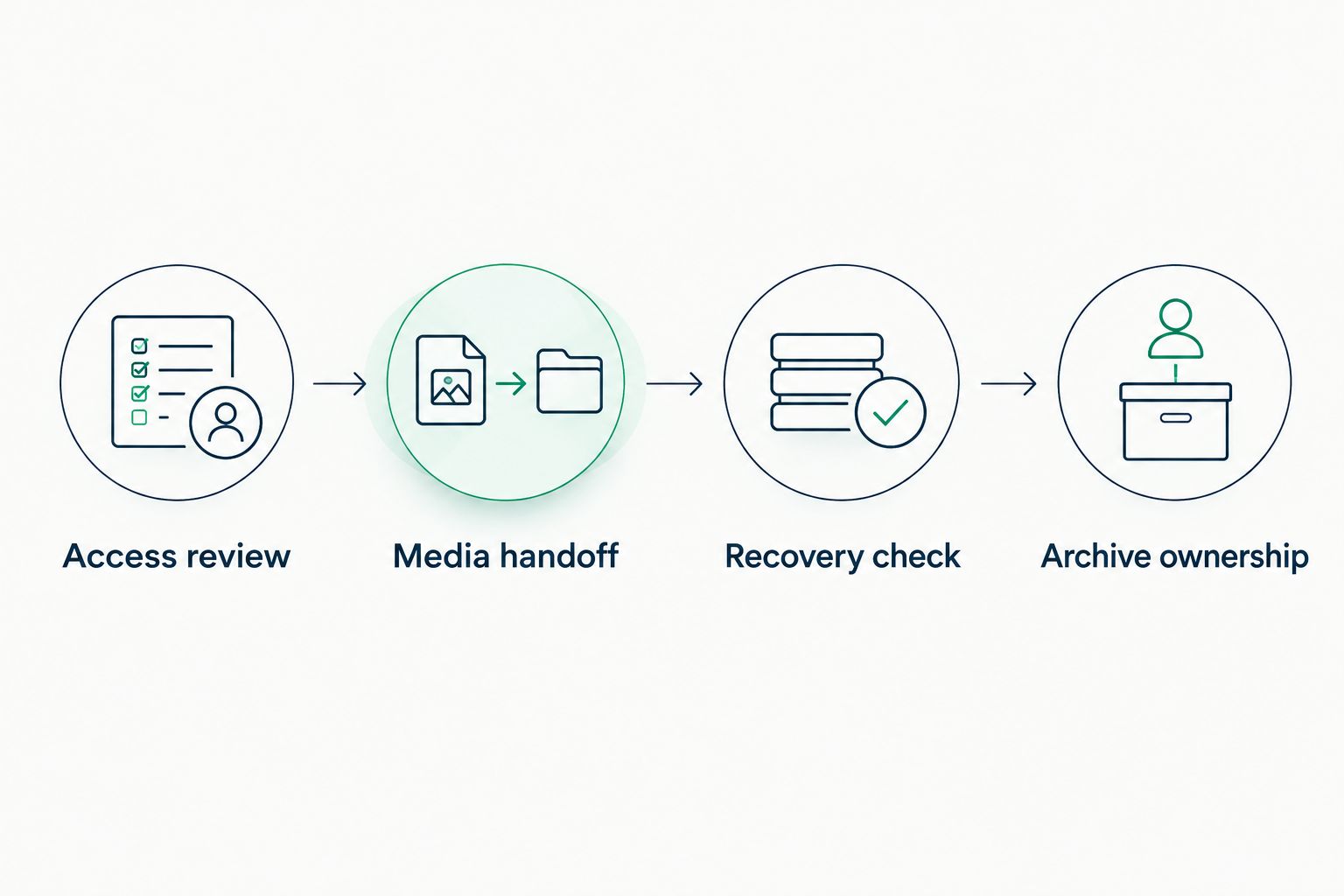
Closeout needs an owner for access, accepted media, recoverability, and the archive.
Rehearse this sequence before the final delivery rush. Ask a colleague who was not involved in the edit to locate the accepted deliverable and identify the archive owner using only the documentation. Confusion at that point is a documentation problem you can fix before the crew disperses.
- Review remaining employee, contractor, and client access.
- Obtain acceptance of the agreed media handoff.
- Check that retained project material is recoverable.
- Assign archive ownership and retrieval responsibility.
- Document retention and deletion decisions against contracts.
Compare production IT support options
Choose the operating model around ownership gaps, not the label on the proposal. An internal team offers direct control, but it also needs coverage and specialist support. A service provider adds external responsibility only for work included in the agreement.
Use the table to identify the right model, then test the proposed scope against your dependency map. No model removes the need for production leadership to approve access, priorities, and acceptable downtime.
Internal IT
- Best for: Production businesses with established technical leadership
- Main advantage: Direct control over priorities and internal knowledge
- Key limitation: Your business owns staffing, absence coverage, and specialist gaps
Co-managed IT
- Best for: Businesses keeping an internal IT lead while adding external support
- Main advantage: Responsibilities can be divided around existing skills
- Key limitation: Unclear boundaries create duplicated work or missed tasks
Fully managed IT
- Best for: Growing businesses seeking an external owner for defined IT operations
- Main advantage: A documented service relationship for agreed systems
- Key limitation: Editorial, on-set, and after-hours work need explicit inclusion
Project-based support
- Best for: Businesses addressing a defined migration or infrastructure change
- Main advantage: Focused delivery against a specified scope
- Key limitation: Project completion does not establish ongoing operational coverage
When comparing proposals, request a responsibility matrix rather than a longer feature list. Include account administration, device management, storage, backups, application vendors, incident communications, and project closeout. Mark every responsibility as included, excluded, or retained internally.
For managed IT and cybersecurity services from DivergeIT, apply the same test. The useful question is not whether a service category exists; it is who owns each production dependency under the proposed agreement.
Common mistakes film production companies make
Treating editorial storage as the entire IT environment
Fast access to footage does not address compromised email, contractor permissions, or an unavailable approval system. Separate media performance requirements from identity, device, and business-system responsibilities. Then assign an owner to each rather than expecting the storage supplier to cover everything.
Giving temporary crew permanent access
A contractor's involvement can end before a production is formally closed. Tie permissions to the engagement and review them when responsibilities change. Avoid shared accounts that force you to choose between retaining unwanted access and interrupting everyone else's work.
Keeping a backup without practicing restoration
A backup job marked successful does not prove that your edit opens with its required media. Test restoration at the project level, including references and permissions. Keep the results with the recovery procedure so another authorized person can follow it.
Accepting support hours that miss production hours
Your busiest period can fall outside the provider's standard coverage. Put shoot schedules, late edits, and delivery windows into the scope discussion. Confirm the escalation route before an urgent incident, including who can authorize exceptional work.
Leaving archive responsibility with a departing freelancer
A freelancer's working drive is not a documented company archive. Establish where accepted deliverables and retained project files belong before the engagement ends. Record who can retrieve them and which contractual retention or deletion instructions apply.
FAQ
What IT services do film production companies need?
Film production companies need account management, device support, cybersecurity, storage planning, backup recovery, and incident coordination. Define editorial engineering and on-set support separately so those responsibilities are not assumed.
What's the best IT support model for a growing production company?
The best model is the one that assigns ownership to your actual support gaps. Compare internal, co-managed, fully managed, and project-based support against production hours, technical responsibilities, and escalation needs.
Does a managed IT provider handle editing systems?
A managed IT provider handles editing systems only when those systems and responsibilities are included in the service agreement. Specify the applications, storage, hardware, vendor coordination, and production hours involved.
Is cloud synchronization enough to protect production footage?
Cloud synchronization alone is not an independent backup strategy. Use retained recovery copies and test restoration because unwanted changes can propagate across synchronized locations.
How should film companies manage freelancer access?
Film companies should give freelancers individual accounts with project-specific permissions and an agreed access endpoint. Assign an internal approver and remove access when the engagement or authorized task ends.
How do you choose IT services for film production companies in 2026?
Choose IT services by testing the proposed scope against your production dependencies and recovery requirements. Require written support coverage, named responsibilities, escalation procedures, and evidence from representative recovery exercises.
One last thing
Make the final test a handoff, not a presentation. For your 2026 service review, ask an authorized person outside the edit team to locate the accepted deliverable, identify its owner, and follow the recovery instructions. Record where that person gets stuck.
That exercise exposes undocumented dependencies before a departing contractor or unavailable producer takes the answer with them. Fix the handoff instructions and responsibility gaps before adding another system.