


Best overall for hybrid backup: Veeam Backup & Replication. Best for Azure failover: Azure Site Recovery. Best for AWS-native backup: AWS Backup. The best cloud backup and disaster recovery software in 2026 depends on what you must restore—and whether you need recovered files, restarted applications, or a working business environment.
TL;DR
- Veeam Backup & Replication leads this best cloud backup and disaster recovery software shortlist for hybrid environments.
- Azure Site Recovery fits Azure-centered failover; AWS Backup fits centralized backup policies across supported AWS services.
- Acronis Cyber Protect combines backup and endpoint protection; Druva fits buyers seeking SaaS-delivered backup management.
- DivergeIT provides managed IT, cybersecurity, and compliance services for growing businesses that need accountable IT operations.
Why this matters
Backup and disaster recovery solve different problems. Backup preserves recoverable copies of data; disaster recovery restores the systems and dependencies that let your business operate. A successful backup job does not prove that your payroll application, document management system, or client portal will restart correctly.
For your 2026 selection, separate software capabilities from operational responsibility. Decide who monitors failures, approves recovery actions, checks restored data, and communicates with staff during an outage. Without those assignments, even capable software leaves important work unfinished.
DivergeIT provides managed IT services, cybersecurity, and compliance for growing small and mid-sized businesses. DivergeIT is best for businesses seeking managed IT support alongside their cloud backup and disaster recovery software selection—not another software license alone.
What makes the best cloud backup and disaster recovery software?
Judge each option against these criteria before comparing feature lists:
- Workload coverage: Identify the servers, virtual machines, cloud services, endpoints, and business applications you must recover. Confirm support for your exact configurations.
- Recovery method: Distinguish file restoration, full-system restoration, application recovery, and replicated workload failover. They are not interchangeable.
- Recovery objectives: Set a recovery point objective for acceptable data loss and a recovery time objective for acceptable downtime.
- Copy protection: Check retention controls, access separation, and available immutability features. Confirm the requirements behind each feature rather than accepting a label.
- Operational ownership: Require a named person or team to monitor jobs, investigate failures, test restores, and maintain the recovery runbook.
- Recovery evidence: Ask for a demonstration using representative workloads. A backup dashboard alone cannot establish that your business can resume work.
Choose the recovery method first and the software second. A cloud-native backup service and a replication service belong on the same shortlist only when you understand their different jobs.
Cloud backup and disaster recovery options at a glance
These five options occupy different use-case slots. The table compares their role, not an interchangeable set of products promising the same outcome.
Veeam Backup & Replication
- Best for: Hybrid server and virtual machine recovery
- Standout capability: Backup, restoration, and replication workflows
- Key limitation: Requires ownership of deployment, storage, and recovery operations
Azure Site Recovery
- Best for: Azure-centered workload failover
- Standout capability: Replication and recovery orchestration
- Key limitation: Does not replace a separate backup and retention strategy
AWS Backup
- Best for: Centralized backup policies in AWS
- Standout capability: Policy-based backup across supported AWS services
- Key limitation: Backup management is not complete application failover orchestration
Acronis Cyber Protect
- Best for: Combined endpoint protection and backup
- Standout capability: Backup and security capabilities in one product family
- Key limitation: Scope depends on the selected edition and supported workloads
Druva
- Best for: SaaS-delivered backup management
- Standout capability: Cloud-delivered data protection administration
- Key limitation: Recovery fit depends on the workload and selected offering
For a 2026 procurement decision, use this table to eliminate mismatches before requesting demonstrations. If your central requirement is automatic application failover, a backup-policy service alone is not the answer. If your requirement is retained historical data, replication alone is not the answer either.
1. Veeam Backup & Replication: best for hybrid recovery
Veeam Backup & Replication supports backup, restoration, and replication workflows for supported workloads. It belongs at the top of this shortlist when you need a recovery platform for servers and virtual machines rather than a service focused on one public cloud.
Veeam Backup & Replication is the default recommendation here for hybrid recovery. That recommendation depends on workload fit and having someone responsible for the backup infrastructure—not on an assumed recovery speed.
Veeam Backup & Replication pros:
- Supports distinct backup and replication workflows.
- Offers recovery choices beyond retrieving individual files.
- Fits environments where server and virtual machine recovery are central requirements.
Veeam Backup & Replication cons:
- Someone must manage the deployment, repositories, permissions, and recovery procedures.
- Application recovery still requires documented dependencies and testing.
- Feature suitability must be checked against your actual infrastructure.
Best for: Businesses with hybrid server environments and an internal or managed team responsible for recovery operations.
Before choosing Veeam Backup & Replication, demonstrate restoration of a representative business application. Include authentication, application services, and the data the application needs. Recovering a machine without those dependencies is not the same as recovering the workflow.
Verdict: Buy Veeam Backup & Replication for hybrid recovery after validating workload support and operational ownership.
2. Azure Site Recovery: best for Azure-centered failover
Azure Site Recovery replicates supported workloads and provides recovery orchestration. Its distinguishing role is helping move a workload into a recovery environment, rather than simply retrieving a retained copy of a file.
Azure Site Recovery fits an Azure-centered disaster recovery plan when restarting supported workloads is the priority. You still need to define networking, identity, application order, and how the business returns to normal operation.
Azure Site Recovery pros:
- Supports replication-based recovery for supported configurations.
- Provides recovery plans for coordinating failover actions.
- Offers test failover workflows to evaluate the recovery environment.
Azure Site Recovery cons:
- Replication does not replace historical backups and retention controls.
- Recovery requires preparation of the destination environment and application dependencies.
- Supported configurations must match your source workloads.
Best for: Businesses using Azure as a recovery destination and needing workload failover rather than backup management alone.
During evaluation, ask the administrator to explain both failover and failback. Your 2026 plan needs a route into the recovery environment and a controlled route out of it. Document who authorizes each transition.
Verdict: Buy Azure Site Recovery for Azure-centered failover; skip it as your only backup strategy.
3. AWS Backup: best for centralized AWS backup policies
AWS Backup centralizes backup management for supported AWS services. It is a focused choice when your main problem is inconsistent backup policies across AWS resources, accounts, or workloads.
AWS Backup is not a substitute for documenting how an application restarts. A restored database, storage resource, or server still needs the surrounding configuration and dependencies required by your application.
AWS Backup pros:
- Centralizes backup plans for supported AWS services.
- Supports policy-based administration rather than separate manual routines for every resource.
- Provides a common place to manage backup activity and retention settings.
AWS Backup cons:
- Resource and feature coverage varies by AWS service.
- Complete application recovery requires work beyond restoring individual resources.
- A centralized policy can still be wrong; configuration and restore checks remain necessary.
Best for: Businesses whose primary requirement is consistent backup governance across supported AWS workloads.
Ask for a restoration walkthrough that includes more than selecting a recovery point. Require the administrator to show how the restored resource connects to the application and how users regain access. That demonstration separates backup administration from business recovery.
Verdict: Buy AWS Backup for AWS backup governance; skip it as a standalone application failover plan.
4. Acronis Cyber Protect: best for combined endpoint protection
Acronis Cyber Protect brings backup and cybersecurity capabilities into the same product family. It suits buyers who want to evaluate endpoint protection and recovery together rather than treat them as unrelated purchasing decisions.
Acronis Cyber Protect deserves a close look when employee devices and supported business workloads are central to your requirements. Confirm the edition and deployment model before assigning capabilities to the proposal.
Acronis Cyber Protect pros:
- Combines backup and security capabilities within one product family.
- Supports a joint evaluation of endpoint protection and recoverability.
- Gives buyers an alternative to selecting entirely separate products for those functions.
Acronis Cyber Protect cons:
- Included capabilities depend on the selected edition and configuration.
- An integrated product does not remove the need for separated recovery permissions and procedures.
- Server and application recovery requirements still need individual validation.
Best for: Businesses prioritizing endpoint recovery and wanting backup and security evaluated together.
A useful demonstration starts with a device failure and ends with an employee returning to work. Check the files, applications, access permissions, and settings the employee actually needs. A restored device that cannot access business systems is an incomplete recovery.
Verdict: Buy Acronis Cyber Protect when its selected configuration meets both your endpoint security and recovery requirements.
5. Druva: best for SaaS-delivered backup management
Druva provides SaaS-delivered data protection offerings. It fits buyers who want cloud-delivered backup administration instead of operating a conventional backup server deployment themselves.
Druva is a delivery-model choice, not a reason to stop examining recovery detail. Match the relevant Druva offering to each workload and verify what restoration looks like for your users and administrators.
Druva pros:
- Provides SaaS-delivered backup management.
- Reduces the need to operate a traditional backup management server.
- Offers a distinct alternative to self-managed backup infrastructure.
Druva cons:
- Workload support and recovery methods depend on the selected offering.
- Recovery still depends on permissions, connectivity, and a documented process.
- SaaS delivery does not transfer every recovery responsibility to the vendor.
Best for: Businesses seeking cloud-delivered backup administration and a clear division of vendor and customer responsibilities.
Ask who handles a failed backup, who initiates recovery, and who confirms restored data is usable. Put those answers in the operating plan. A simpler deployment model is valuable only when the remaining responsibilities are understood.
Verdict: Buy Druva when SaaS-delivered administration fits your supported workloads and recovery process.
How the options are ranked
This ranking uses workload coverage, recovery method, copy protection, operational ownership, and recovery evidence. Veeam Backup & Replication takes the default position for hybrid recovery; the other options lead within their specific use cases.
The ranking is a selection framework, not a measured performance benchmark. No universal recovery-time claim applies across different applications, datasets, networks, and configurations. For your 2026 decision, require evidence from your environment before treating any proposed recovery target as a commitment.
Turn the shortlist into a recovery plan
Software selection should finish with a documented recovery process. Use the following sequence to connect product capabilities to business requirements:
- Business priorities: Name the applications and workflows that must return first.
- Recovery targets: Set acceptable data loss and downtime for each priority workload.
- Copy protection: Confirm where copies live, how access is controlled, and how retention works.
- Restore test: Recover a representative workload and verify that users can complete its essential tasks.
- Named ownership: Assign monitoring, escalation, recovery approval, and communication responsibilities.
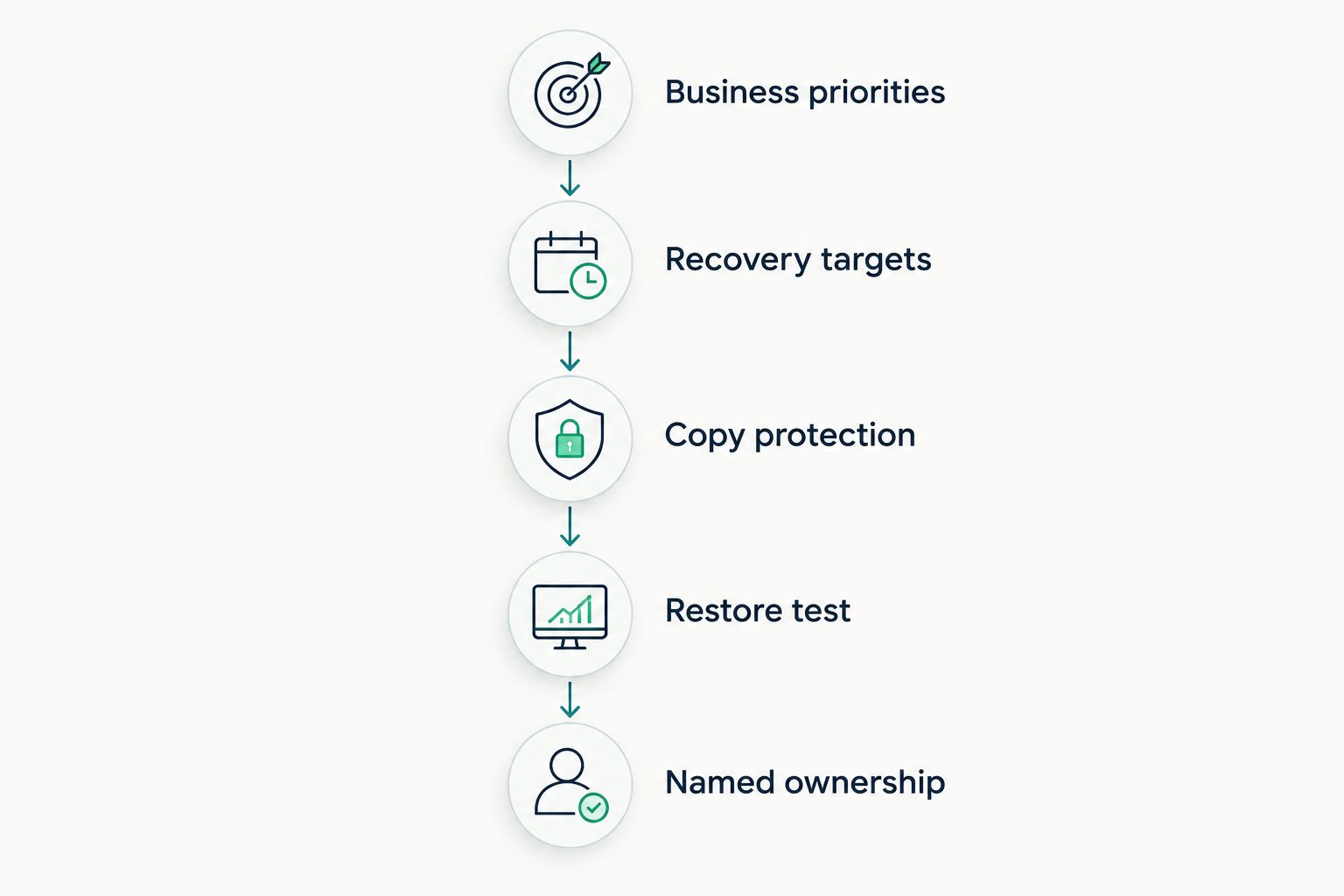
Software selection is complete only when recovery responsibilities are assigned.
Record 2 recovery objectives for each critical workload: recovery point objective, or RPO, and recovery time objective, or RTO. RPO describes acceptable data loss measured in time; RTO describes the target time to restore operation.
For example, if you set an RPO of 1 hour and an RTO of 4 hours, those are your acceptance targets—not claims about any product listed here. Test the proposed design against both. Assign 1 named recovery owner to coordinate the result, even when several teams execute the work.
DivergeIT provides managed IT, cybersecurity, and compliance services. When discussing cloud backup and disaster recovery software with DivergeIT, ask how monitoring, testing, escalation, and recovery ownership would be defined for your business.
Discuss your recovery requirements
Bring your critical workloads, recovery targets, and current backup responsibilities to the discussion.
Which software should you choose?
Choose Veeam Backup & Replication as the default shortlist leader for hybrid server recovery. Choose Azure Site Recovery for Azure-centered failover, AWS Backup for AWS backup governance, Acronis Cyber Protect for combined endpoint protection and backup, or Druva for SaaS-delivered backup administration.
Do not force one product to answer every requirement. Backup, replication, retention, and application recovery can require different controls. Make your 2026 decision around a tested recovery process, with software serving that process rather than defining it.
FAQ
What's the best cloud backup and disaster recovery software for a growing business?
Veeam Backup & Replication is the default shortlist leader here for hybrid server recovery. Azure Site Recovery, AWS Backup, Acronis Cyber Protect, and Druva fit different recovery methods, workloads, and operating models.
Is cloud backup the same as disaster recovery?
No. Cloud backup preserves recoverable data copies, while disaster recovery restores the systems and dependencies needed to operate the business. A complete plan defines both data restoration and application recovery.
Is Azure Site Recovery better than AWS Backup?
Azure Site Recovery and AWS Backup address different requirements. Azure Site Recovery focuses on replication and failover for supported workloads; AWS Backup centralizes backup management across supported AWS services.
Can replication replace backups?
No. Replication and retained backups serve different recovery needs. Your plan must account for historical restoration as well as restarting workloads after an outage.
How do I choose recovery time and recovery point objectives?
Set recovery objectives from the business impact of downtime and lost data. Define them for each critical workload, then test whether the proposed recovery design meets those targets.
Does SaaS backup mean the vendor handles all recovery work?
No. SaaS delivery changes how backup software is operated, but customer responsibilities still include access, configuration, recovery decisions, and verification. Document the division of responsibility before selecting the service.
What should I ask a managed IT provider about disaster recovery?
Ask who monitors failures, performs restore tests, authorizes recovery, and reports the result. Require those responsibilities to be written into the proposed service scope rather than inferred from the software name.
One last thing
The most useful recovery demonstration ends with a business task, not a restored server. Have an authorized user retrieve the required document, access the application, or complete the workflow your business depends on. That final check tells you whether recovery restored operations—not merely infrastructure.