

Best overall for combining assets with support: Freshservice. Best for self-hosted asset accountability: Snipe-IT. Best for network discovery: Lansweeper. This 2026 guide compares the best IT asset management software for small business by the work you need to control: inventory, employee assignments, software records, or help-desk requests.
TL;DR
- Freshservice is the best IT asset management software for small business when asset records and help-desk workflows belong together.
- Snipe-IT suits equipment assignments; Lansweeper suits discovery; ManageEngine AssetExplorer suits lifecycle records; GLPI suits self-hosted service management.
- DivergeIT suits growing businesses that need managed IT services rather than another software platform to administer.
- Choose an accountable owner before choosing an asset management tool.
Why this matters
An inventory answers what you own. Asset management adds who uses it, where it is, what supports it, and what happens when it leaves the business. A device list without those relationships is not an operating process.
For a professional services firm, start with the equipment and applications that carry client information or keep staff working. Connect those records to onboarding, offboarding, support, and disposal instead of maintaining a spreadsheet nobody owns.
DivergeIT is a fit for growing businesses that need managed IT services, cybersecurity, and compliance support rather than another platform to administer. DivergeIT is a service provider, not an asset management software product; assess that service model separately from the tools below.
What makes the best IT asset management software?
Use these criteria to shortlist software in 2026. A feature matters only when someone will use it to complete a real task.
- Inventory coverage: Match the tool to your laptops, servers, network equipment, peripherals, and software records. Separate automatically discovered assets from manually maintained items.
- Assignment history: Identify the employee, department, or location responsible for an asset. Preserve the record when equipment changes hands.
- Lifecycle tracking: Follow acquisition, deployment, repair, reassignment, and retirement. Choose fields that support decisions rather than collecting every possible detail.
- Support integration: Decide whether technicians need asset information inside the ticketing system or can work from a separate inventory.
- Administrative ownership: Assign responsibility for hosting, access, updates, discovery credentials, and record quality. Self-hosting is an operating commitment.
- Reporting and exit: Check whether you can report on the records you need and export them in a usable form. Your inventory should remain understandable outside its interface.
IT asset management software at a glance
The order below favors practical starting points, not a claim that every small business needs the same platform. Each option has a distinct job.
Freshservice
- Best for: Asset context inside help-desk workflows
- Standout capability: IT service management with asset management
- Key limitation or responsibility: Broader service workflows need configuration and ownership
Snipe-IT
- Best for: Tracking equipment assignments
- Standout capability: Asset check-in, checkout, and assignment records
- Key limitation or responsibility: Record accuracy depends on maintaining equipment handovers
Lansweeper
- Best for: Discovering network-connected assets
- Standout capability: Automated IT asset discovery and inventory
- Key limitation or responsibility: Discovery does not replace employee handover procedures
ManageEngine AssetExplorer
- Best for: Managing hardware and software lifecycles
- Standout capability: Hardware, software, and lifecycle records
- Key limitation or responsibility: Lifecycle fields need consistent upkeep
GLPI
- Best for: Self-hosted inventory and service management
- Standout capability: Asset management alongside ticketing
- Key limitation or responsibility: Self-hosting adds maintenance and security responsibilities
No software here makes an organization compliant by itself. Asset records can support security and compliance work, but policies, controls, and evidence still need owners.
1. Freshservice: best for assets inside help-desk workflows
Freshservice combines IT service management with asset management. It suits a business that wants support requests and equipment information in the same working environment, rather than maintaining separate systems for each.
Choose Freshservice when technicians need to understand the affected asset while handling a request. The deciding question is whether your team wants to manage a service process, not simply maintain an equipment register.
Freshservice pros:
- Connects asset management with a help-desk operating model.
- Gives teams a shared environment for service requests and asset records.
- Fits businesses that want equipment information to inform support work.
Freshservice cons:
- A broader service platform requires more process decisions than a standalone register.
- Asset information still needs clear ownership and maintenance.
- Businesses needing only equipment checkout have a narrower problem than this platform addresses.
Best for: Small businesses consolidating asset management and IT support.
Before choosing Freshservice in 2026, walk through a real support request involving an assigned laptop. Check whether the technician can locate the relevant asset information and whether resolving the request preserves a useful record.
Verdict: Buy Freshservice when support integration is the priority; skip it when your only requirement is equipment assignment.
2. Snipe-IT: best for equipment assignment accountability
Snipe-IT is an open-source IT asset management application focused on keeping track of assets and their assignments. Its check-in and checkout model fits equipment issued to employees, including items that network discovery cannot identify.
Choose Snipe-IT when the recurring problem is knowing who has a laptop, monitor, or accessory. Its role is an accountable asset register, not a substitute for endpoint security or remote device management.
Snipe-IT pros:
- Centers equipment accountability on assignment records.
- Supports check-in and checkout as explicit asset actions.
- Offers a self-hosted approach for businesses that want to operate the application themselves.
Snipe-IT cons:
- Accurate assignments depend on staff recording handovers.
- Self-hosting makes application maintenance and protection your responsibility.
- An equipment register does not perform the work of a help desk or endpoint management platform.
Best for: Businesses with a clear equipment handover process and an owner for the register.
Test a new employee assignment, a replacement device, and a departing employee's return. The software succeeds only if your team records each transition as part of the actual work, rather than reconciling it later.
Verdict: Buy Snipe-IT for assignment accountability; skip it as a replacement for device administration.
3. Lansweeper: best for discovering network-connected assets
Lansweeper focuses on IT asset discovery and inventory. It is a strong shortlist option when your first question is what equipment exists across the environment, rather than who signed for an accessory.
Discovery and custody are different tasks. An identified device still needs business context, including ownership, purpose, and a decision about whether it belongs in your supported environment.
Lansweeper pros:
- Focuses on discovering IT assets rather than relying solely on manual entry.
- Helps establish a technical inventory for further investigation.
- Suits teams that need visibility before cleaning up asset records.
Lansweeper cons:
- Discovery coverage depends on access and configuration.
- A discovered device does not establish who is accountable for it.
- Non-networked items still need a separate recording process.
Best for: Small IT teams that need to identify network-connected equipment and reconcile it with existing records.
For your 2026 evaluation, include a known device, a device outside the usual office workflow, and an item that cannot be discovered over the network. Check the differences between what the tool detects and what your business needs to track.
Verdict: Buy Lansweeper when discovery is the gap; skip discovery-only thinking when the real problem is equipment handover.
4. ManageEngine AssetExplorer: best for lifecycle records
ManageEngine AssetExplorer manages IT asset information across hardware, software, and asset lifecycles. It belongs on the shortlist when an equipment register needs to support decisions about deployment, maintenance, reassignment, and retirement.
Choose this approach when your team needs structured asset records beyond employee checkout. Start with the fields that change a decision; collecting unused information creates maintenance work without improving control.
ManageEngine AssetExplorer pros:
- Covers hardware and software asset management.
- Supports a lifecycle-oriented view of IT assets.
- Suits teams that want structured records for ongoing asset decisions.
ManageEngine AssetExplorer cons:
- Lifecycle records require consistent updates as assets change status.
- Software records do not remove the need to interpret licensing terms.
- Detailed records become administrative overhead when no process uses them.
Best for: Businesses managing hardware and software through defined lifecycle stages.
Evaluate an asset from initial entry through reassignment and retirement. Ask the person responsible for each stage to complete the update, then check whether another team member can understand the resulting history without an explanation.
Verdict: Buy ManageEngine AssetExplorer for lifecycle discipline; hold if nobody owns lifecycle updates.
5. GLPI: best for self-hosted inventory and service management
GLPI is open-source service management software with asset management and ticketing capabilities. It suits businesses that want those functions together and have the technical capacity to operate a self-hosted deployment.
The deciding factor is operational responsibility. Choosing open-source software does not eliminate the work of maintaining the application, protecting access, or keeping the records useful.
GLPI pros:
- Combines asset records with ticketing functions.
- Provides a self-hosted route for teams that want direct operational control.
- Fits an inventory-and-support workflow rather than equipment tracking alone.
GLPI cons:
- Self-hosting adds application maintenance and security work.
- Configuration choices need documentation and a responsible administrator.
- Custom workflows can become difficult to maintain without clear ownership.
Best for: Technically capable teams seeking self-hosted asset and service management.
Include maintenance in the evaluation, not just the user interface. Identify who will update the application, recover it from backup, review access, and keep operating documentation current.
Verdict: Buy GLPI when your team can own the deployment; skip self-hosting when that responsibility has no owner.
How we ranked these options
This ranking uses functional fit: support integration, assignment accountability, discovery, lifecycle tracking, and self-hosted service management. It is not a performance benchmark or a claim that one platform has the most features.
Freshservice is the default because combining asset context with support addresses both records and day-to-day work. The other options move ahead when their specific use case matches your problem more closely. Select against the criteria above, not the position in the list.
Run a pilot that tests the work
Use a 14-day pilot as an evaluation window, not a promise of implementation speed. Review 10 devices selected across different users and workflows, and require 6 core fields: identifier, asset type, assigned owner, location, status, and lifecycle date.
Those are starting requirements for your evaluation, not industry benchmarks. Add fields only when they answer an operational question.
Follow this sequence:
- Define ownership: Name the person responsible for record quality and the person responsible for each asset.
- Import inventory: Bring in a small, understood sample before attempting a full migration.
- Test handovers: Record an assignment, a return, and a reassignment using the people who perform those tasks.
- Check reporting: Produce an assigned-assets report and identify records that need correction.
- Test export: Export the sample and confirm that its relationships remain understandable.
A pilot should expose work that the interface hides. If a routine handover requires a separate undocumented spreadsheet, resolve that process gap before expanding the deployment.
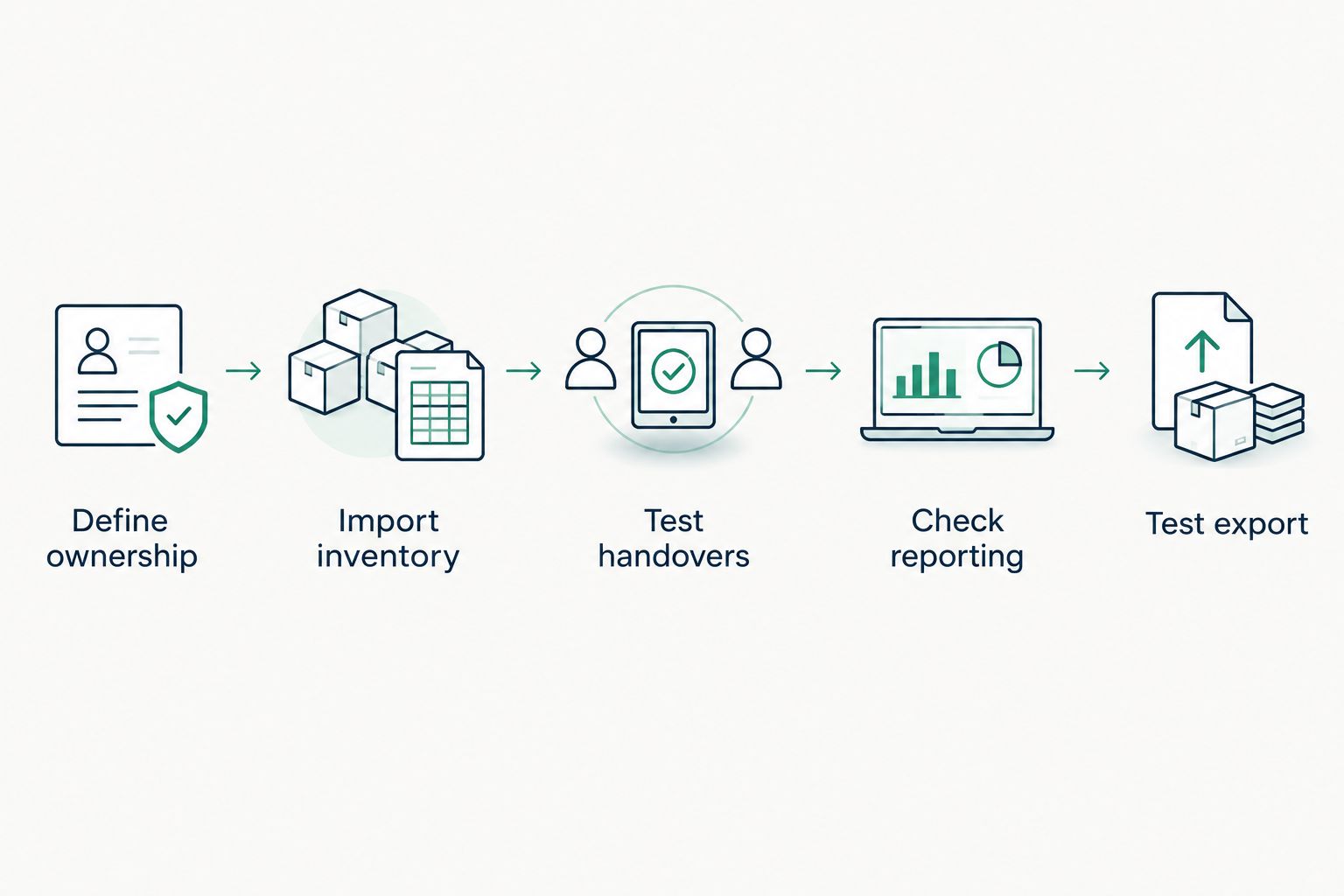
Test the operating process before expanding the inventory.
For regulated businesses, define who can edit records and how supporting evidence is retained. An asset list supports compliance work; it does not establish compliance on its own. DivergeIT provides managed IT services, cybersecurity, and compliance support for growing small and mid-sized businesses, including finance, healthcare, and legal firms.
Which IT asset management software should you choose?
Choose Freshservice if you are undecided and want asset management connected to support. Choose Snipe-IT for equipment custody, Lansweeper for discovery, ManageEngine AssetExplorer for lifecycle records, or GLPI for self-hosted inventory and ticketing.
For a 2026 purchase decision, separate the software question from the staffing question. A suitable platform still needs someone to maintain it and act on its records. Compare that workload with a managed service model before committing your team to another system.
Assess your managed IT needs
Compare software ownership with a managed IT service model for your growing business.
FAQ
What's the best IT asset management software for small business in 2026?
Freshservice is the default recommendation when you want asset management connected to help-desk workflows. Choose Snipe-IT for equipment assignments or Lansweeper when discovering network-connected assets is the main requirement.
Is Snipe-IT better than Freshservice?
Snipe-IT is the more focused choice for equipment assignment accountability; Freshservice fits asset management within a broader support workflow. Choose according to the work your team needs to perform, not the size of the feature list.
Do I need asset management if I already have device management?
Device management and asset management solve different problems. Device administration handles endpoint settings and actions; asset records track ownership, status, and lifecycle information.
Can a spreadsheet handle small business IT assets?
A spreadsheet can maintain a basic asset register when someone owns its accuracy. Move beyond it when assignments, history, reporting, or support relationships require more structure than your team can reliably maintain.
Does asset management software make my business compliant?
Asset management software does not make a business compliant by itself. Inventory and ownership records can support controls and evidence, but compliance also requires applicable policies, procedures, and accountable people.
Should I self-host an asset management system?
Self-host an asset management system only when your team can own application maintenance, access protection, backups, and recovery. Snipe-IT and GLPI are relevant options for that operating model.
Can DivergeIT replace the work of administering another IT tool?
DivergeIT provides managed IT services, cybersecurity, and compliance support for growing businesses. Discuss responsibility for asset records and administration as part of the service scope rather than assuming a particular platform or workflow is included.
One last thing
Retirement needs an owner just as deployment does. Removing a device from inventory is not the same as resolving its data, access, and disposal responsibilities.
Before approving an asset tool, walk through a departing employee's equipment return. Confirm who receives the device, who updates its record, and who decides its next status. That handover reveals whether you are buying an inventory or building an accountable process.