


Best for outsourced response ownership: DivergeIT. Best for direct operational control: an internal service desk. Best for keeping an existing IT lead involved: co-managed support. This 2026 guide ranks help desk delivery models by response accountability, because software routes the request, but people provide the response.
TL;DR
- For IT help desk software ranked by response time, prioritize accountable human response over automated ticket acknowledgments.
- DivergeIT is the recommended managed IT support option for growing businesses seeking outsourced response ownership.
- An internal service desk fits businesses that want direct control over staffing, priorities, and escalation.
- Measure first human response, qualified technical engagement, and resolution separately before choosing help desk software.
Why response time matters
A ticket confirmation tells you the system received a request. It does not tell you that someone understands the problem, owns the next action, or can restore access. For a financial firm, healthcare practice, law firm, or entertainment business, that distinction belongs in the buying criteria.
DivergeIT's stated service commitments include a 15-minute response in writing and a live expert in 5 minutes. Those are separate commitments, not interchangeable measurements. Confirm the applicable channel, coverage hours, priority definitions, and contractual terms before treating either as your operating standard.
For your 2026 shortlist, compare the same event across every proposal: when the request arrives, when a human responds, and when a qualified person starts troubleshooting. A fast acknowledgment cannot substitute for technical engagement.
What makes the best response-focused help desk
Judge the delivery model before selecting the interface. These criteria determine whether a response-time promise means anything operationally:
- Human response: Define whether the clock stops at an automated receipt, a human message, or a live technical conversation.
- Coverage: Match the response commitment to your working hours, locations, and after-hours needs.
- Qualified ownership: Identify who can diagnose the issue and who owns escalation when the first responder cannot resolve it.
- Priority rules: Separate an individual inconvenience from an interruption affecting a business-critical workflow.
- Reporting: Require timestamps and ticket histories that let you check performance against the agreed definition.
- Business context: Confirm how responders learn your applications, access rules, and security requirements.
Choose the response model you can hold accountable, then choose the software that supports it. A feature checklist cannot answer who picks up a blocked employee's request.
Response-focused help desk options at a glance
This is a ranking by operational fit, not a measured software-speed leaderboard. Each option has a distinct role; the order favors outsourced accountability for growing businesses seeking an external support partner.
1. Managed help desk
- Best for: Outsourced response ownership
- Standout approach: An external provider owns the agreed support process
- Key limitation: Contract scope determines the boundary of responsibility
2. Internal service desk
- Best for: Direct operational control
- Standout approach: Your business controls staffing and escalation
- Key limitation: Your business must provide coverage and backup
3. Co-managed support
- Best for: Supplementing an existing IT lead
- Standout approach: Internal and external teams divide responsibilities
- Key limitation: Unclear handoffs create disputed ownership
4. Self-service knowledge base
- Best for: Repeatable, low-risk requests
- Standout approach: Employees follow documented instructions
- Key limitation: Documentation cannot replace technical intervention
1. Managed help desk: best for outsourced response ownership
A managed help desk assigns an external provider responsibility for an agreed support scope. Ticketing software records requests, while the service agreement defines response obligations, escalation, and coverage.
DivergeIT provides managed IT services, cybersecurity, and compliance services for growing small and mid-sized businesses. That makes the managed-service model relevant when you want an outside team rather than another application for your staff to administer.
Managed help desk pros:
- Gives you a provider to hold accountable for the contracted support process.
- Lets your business define response expectations without building the entire staffing model internally.
- Creates a contractual place to specify escalation, reporting, and support boundaries.
Managed help desk cons:
- Support outside the agreed scope requires a separate ownership decision.
- A response commitment does not establish a resolution deadline.
- The provider needs accurate information about your systems and business priorities.
Best for: A growing business that wants outsourced support ownership and written response expectations.
Ask the provider to walk through a realistic access problem from request to closure. Identify who responds, who verifies identity, who approves access changes, and who communicates progress. Do not accept a ticket demonstration as proof of the service process.
Verdict: Buy managed support when external accountability is the primary requirement.
2. Internal service desk: best for direct operational control
An internal service desk combines your own support staff with ticketing software and documented procedures. You control the queue, staffing decisions, escalation path, and relationship between IT priorities and business operations.
This option suits a business that wants to manage support delivery directly. The software still needs configuration, but staffing and operating discipline determine what happens after a request arrives.
Internal service desk pros:
- Keeps priority decisions within your organization.
- Gives your team direct access to internal process owners.
- Lets you align support workflows with your own approval structure.
Internal service desk cons:
- Your organization owns leave coverage, workload balancing, and backup arrangements.
- Buying software does not supply additional technical expertise.
- Your team must maintain routing rules, documentation, and reporting.
Best for: A business with internal technical leadership that wants direct control over service delivery.
Before selecting a platform, name the queue owner and the backup owner. Then map which issues the team can resolve itself and which require a vendor or specialist. A queue with no escalation owner is an unresolved operating problem, regardless of the interface.
Verdict: Buy software for an internal service desk only after assigning staffing and escalation ownership.
3. Co-managed support: best for supplementing an existing IT lead
Co-managed support divides responsibility between your internal IT function and an external provider. Your internal lead retains defined responsibilities while the partner handles an agreed portion of support or technical work.
The key buying document is the responsibility map. Define where each request goes and who remains accountable when a ticket crosses the boundary between teams.
Co-managed support pros:
- Keeps your internal IT lead involved in business-specific decisions.
- Allows you to assign outside support to a defined coverage gap.
- Separates responsibilities without requiring every task to move externally.
Co-managed support cons:
- Ambiguous boundaries leave employees unsure where to request help.
- Separate queues require an agreed method for sharing ticket status.
- Escalations need an owner on both sides of the handoff.
Best for: A business with an existing IT lead that needs a defined extension of support, not a replacement for internal ownership.
Use a written handoff example during evaluation. For an application login failure, identify who checks the account, who contacts the application vendor, and who updates the employee. Require agreement on which team owns the request while another team investigates.
Verdict: Buy co-managed support when you can define the division of responsibility before onboarding.
4. Self-service knowledge base: best for repeatable, low-risk requests
A self-service knowledge base gives employees documented steps for approved tasks. It complements a help desk by making instructions accessible without requiring a live conversation for every request.
Use it for procedures your IT team has approved and can keep current. Do not turn documentation into a barrier that prevents employees from reaching support when instructions fail.
Self-service knowledge base pros:
- Gives employees a consistent set of approved instructions.
- Makes routine procedures available without a live handoff.
- Provides a place to document prerequisites and escalation paths.
Self-service knowledge base cons:
- Instructions need an owner who checks and updates them.
- Employees cannot use documentation to fix every access or device problem.
- A published article does not prove that a request was resolved.
Best for: Repeatable, low-risk tasks with clear instructions and an accessible route to human help.
Make the escalation route visible within each article. If the documented steps fail, the employee should know how to request assistance and what information to include.
Verdict: Buy self-service capability as a support layer; skip it as a substitute for accountable technical support.
How to compare response time without rewarding empty speed
For a 2026 evaluation, use a 30-day evaluation window as a planning choice, not an industry benchmark. Record comparable requests and assess them against your business requirements. Keep ordinary support tests separate from security incidents, which require their own reporting and response procedures.
Use the following sequence for each agreed test:
- Define urgency: Describe the affected workflow and the business impact before assigning a priority.
- Start clock: Record when the request enters the agreed support channel.
- Reach expert: Record when a qualified person begins substantive troubleshooting, separately from any acknowledgment.
- Record outcome: Capture the resolution, escalation, or next action and identify its owner.
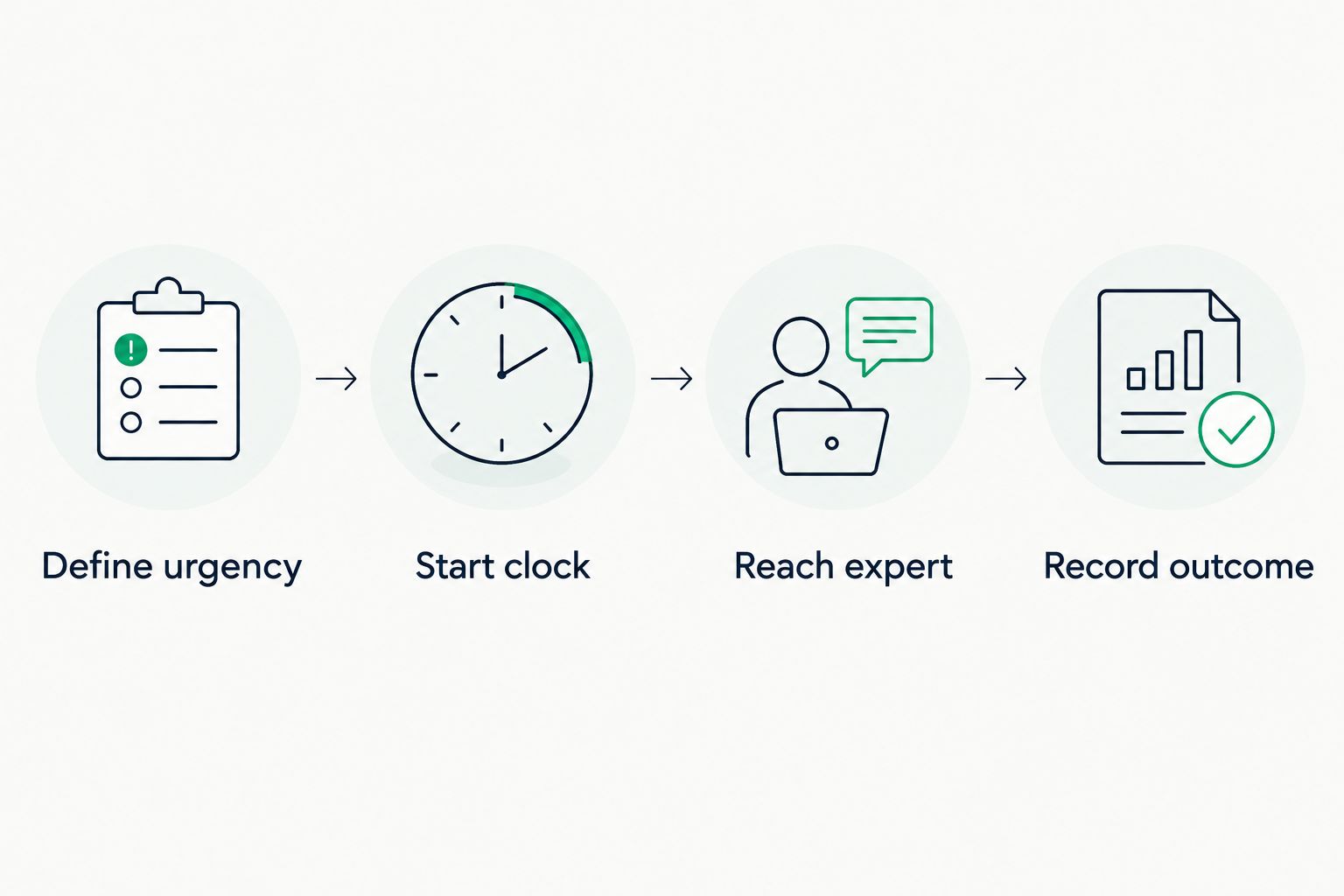
Record technical engagement separately from the initial acknowledgment.
Use the same definitions across every option. If one report measures automated receipts and another measures human engagement, the resulting ranking compares different events.
Inspect the individual ticket histories as well as the summary. An average alone does not show which requests waited longest, whether critical work received attention, or whether the first responder transferred the issue without taking ownership.
For each proposal, document these questions:
- Does the clock run during business hours, outside them, or both?
- What event starts and stops each response measurement?
- What happens while a ticket waits for employee input?
- Who owns vendor escalations and progress updates?
- Can you inspect the underlying timestamps?
- What happens when the agreed response commitment is missed?
How the options are ranked
The ranking prioritizes outsourced response ownership, direct control, supplemental coverage, and repeatable self-service—in that order for a business seeking an external support partner. It uses the criteria above: human response, coverage, ownership, priority rules, reporting, and business context.
DivergeIT appears first as the managed-service option because the business provides managed IT support and states concrete response commitments. This placement is a recommendation by service fit, not a claim that its software outperforms another platform in a controlled speed test.
Which help desk approach should you choose?
Choose DivergeIT managed IT support if your primary requirement is an external team accountable for response. Confirm the written service scope before you sign, including what the response commitment measures and how escalation works.
Choose an internal service desk if you want to own staffing and execution. Choose co-managed support if your IT lead needs a clearly defined partner. Use a knowledge base to support approved routine tasks, not to replace assistance.
For your 2026 decision, write the acceptance criteria before reviewing demonstrations. Require a named owner, a defined response event, an escalation path, and reporting you can inspect. The interface comes after those decisions.
FAQ
What's the best IT help desk software ranked by response time?
Choose by documented human-response performance and service accountability, not software alone. A meaningful comparison uses the same coverage hours, priority definitions, and response event for every option.
Is an automated ticket reply a help desk response?
An automated reply confirms receipt, but it does not establish human technical engagement. Record acknowledgment and qualified response separately when evaluating support.
What response commitments does DivergeIT state?
DivergeIT states a 15-minute response in writing and a live expert in 5 minutes. Confirm the applicable channels, coverage, scope, and contractual terms before using those commitments as your service standard.
Is managed help desk support better than an internal team?
Managed support fits businesses seeking external response ownership; an internal team fits businesses seeking direct operational control. Choose according to who should own staffing, escalation, and service delivery.
Does a fast first response mean fast resolution?
No, first response and resolution measure different events. Track when qualified troubleshooting begins and when the issue is resolved, with escalation recorded separately.
What should a small business ask during a help desk demo?
Ask the provider to trace a realistic request from submission through resolution or escalation. Require clear answers about coverage, ownership, timestamps, and what happens when a response commitment is missed.
How should we evaluate help desk response time in 2026?
Define the response event, coverage hours, and priority rules before comparing results. Inspect ticket histories alongside summary reports so that acknowledgments and technical engagement remain separate.
One last thing
Add an unresolved-ticket walkthrough to your 2026 selection process. Ask the prospective team to show how it communicates when the first responder cannot fix the problem.
The useful answer identifies the next owner and next action—not merely the next status label. That is the operating detail to settle before signing.