


Best overall for approved promotional assets: Bynder. Best for production media: iconik. Best for open-source control: ResourceSpace. This 2026 guide compares the best digital asset management tools for entertainment by workflow, access control, search, and the work required to keep your library usable.
TL;DR
- Bynder leads the best digital asset management tools for entertainment shortlist for approved marketing assets.
- iconik is the production-media pick; Adobe Experience Manager Assets suits Adobe-centered enterprise publishing.
- Canto suits straightforward promotional libraries; ResourceSpace suits teams that want open-source control.
- DivergeIT provides managed IT and cybersecurity services, not a digital asset management product.
Why this matters
Entertainment teams handle different kinds of assets: production footage, publicity stills, artwork, trailers, and approved campaign files. A system built to distribute finished marketing material does not automatically fit an editor searching production footage. Choose the workflow first, then the tool.
Permissions matter as much as previews. Your team needs to distinguish material that collaborators can review from material they can download, modify, or distribute. A searchable file is not necessarily a cleared file.
DivergeIT is best for growing entertainment businesses seeking managed IT and cybersecurity services alongside their digital asset management selection. Keep those services separate from the software purchase: the DAM organizes assets, while your operating plan must also address identities, devices, backups, and support.
What makes the best entertainment DAM tool?
Use these criteria to assess your 2026 shortlist. A polished demonstration is not a substitute for completing your actual workflow.
- Workflow fit: Decide whether your priority is production media, approved promotional assets, or enterprise publishing. Require the vendor to demonstrate that specific path.
- Search and metadata: Test how users find files by project, title, campaign, asset type, and approval status. Search quality depends on the information attached to each asset.
- Review and version control: Establish how reviewers identify the current file, distinguish revisions, and keep unfinished work separate from approved material.
- Access and distribution: Check who can view, download, upload, and share. Test an external collaborator account rather than relying on an administrator's view.
- Rights and lifecycle: Make ownership, usage restrictions, and retirement status part of your evaluation. A metadata field alone does not enforce a licensing agreement.
- Administration and exit: Examine identity management, integrations, exports, and operational ownership. Your team must be able to maintain the system and retrieve its data.
Entertainment DAM tools at a glance
The order below reflects workflow fit, not measured performance. Each recommendation owns a different job; the first row is the default for a finished-asset marketing library, not every entertainment business.
Bynder
- Best for: Approved promotional assets
- Standout capability: Brand-oriented asset organization and distribution
- Key limitation: Marketing DAM is not a substitute for production editing
iconik
- Best for: Distributed production media
- Standout capability: Media asset management across storage locations
- Key limitation: Storage and workflow design still need ownership
Adobe Experience Manager Assets
- Best for: Adobe-centered enterprise publishing
- Standout capability: Asset management within the Adobe Experience Manager environment
- Key limitation: Implementation requires deliberate platform administration
Canto
- Best for: Straightforward promotional libraries
- Standout capability: Visual asset organization and sharing
- Key limitation: Production-specific workflows need separate evaluation
ResourceSpace
- Best for: Open-source control
- Standout capability: Open-source DAM with configurable metadata
- Key limitation: Greater control brings maintenance responsibility
1. Bynder: best entertainment DAM for approved promotional assets
Bynder is a digital asset management platform built around organizing and distributing brand assets. For an entertainment marketing team, that makes it a strong starting point for approved artwork, publicity photography, and campaign materials. It belongs on the shortlist when finding the right finished file is the main problem.
Structure the demonstration around a release campaign. Ask a marketer to find approved artwork, distinguish it from an earlier revision, and share the intended files with an outside partner. That exercise is more useful than browsing a vendor's sample library.
Bynder pros:
- Brand-oriented organization fits finished promotional assets.
- A central library gives teams a defined place to retrieve approved material.
- Asset distribution fits marketing handoffs to agencies and partners.
Bynder cons:
- A marketing DAM does not replace editing or production-media management.
- Approval labels lose value when nobody owns the approval process.
- Rights-sensitive distribution requires more than an attractive preview.
Best for: Entertainment marketing teams organizing approved promotional files across campaigns and collaborators.
Ask the vendor to show how your approval status and partner permissions work together. Do not accept a demonstration in which every user has unrestricted access.
Verdict: Buy Bynder for a finished-asset marketing workflow; skip it as a substitute for production editing.
2. iconik: best entertainment DAM for distributed production media
iconik is a media asset management platform that catalogs media across storage locations. Its production-oriented approach makes it relevant when your challenge is finding and collaborating around footage rather than publishing a brand library. Evaluate it against the storage and media workflows your team already uses.
Start with a producer looking for a specific clip. Then examine how an editor reaches the underlying media and how a reviewer accesses the material they need. Search, review, and source-file access are separate steps; require the demonstration to connect them.
iconik pros:
- Media-focused cataloging matches footage discovery.
- Its approach accommodates media stored in different locations.
- Production collaboration is a clearer fit than a purely promotional library.
iconik cons:
- Cataloging media does not remove responsibility for the underlying storage.
- Source-file access still depends on your storage and network arrangements.
- A production catalog needs a deliberate process for identifying approved promotional exports.
Best for: Production teams that need to find and collaborate around media across storage locations.
Define who maintains the connection between the catalog and the source material. A searchable record without dependable access to its file is not a completed workflow.
Verdict: Buy iconik when production-media discovery is the main requirement; hold if your only need is distributing finished campaign files.
3. Adobe Experience Manager Assets: best for enterprise publishing
Adobe Experience Manager Assets is Adobe's enterprise digital asset management offering. It belongs on the shortlist when asset management is part of a broader Adobe Experience Manager publishing environment. The decision should account for platform ownership, not just an asset librarian's requirements.
Ask the implementation team to demonstrate the path from an approved source asset to its intended publishing destination. Include metadata, permissions, revisions, and retirement. A successful upload proves little about the rest of that lifecycle.
Adobe Experience Manager Assets pros:
- Asset management sits within the Adobe Experience Manager environment.
- It fits evaluation alongside enterprise content-publishing requirements.
- Teams can plan asset governance and publishing as connected responsibilities.
Adobe Experience Manager Assets cons:
- Platform configuration and administration require clear ownership.
- A basic file-sharing requirement does not justify a broad implementation by itself.
- Integrations and publishing rules need validation in your own environment.
Best for: Entertainment organizations managing assets within an Adobe-centered enterprise publishing program.
Evaluate this option with your publishing and IT owners together. Selecting it only through a marketing demonstration leaves implementation questions unanswered.
Verdict: Buy Adobe Experience Manager Assets when the wider publishing architecture supports the choice; skip it for a simple standalone library.
4. Canto: best entertainment DAM for straightforward promotional libraries
Canto is a digital asset management platform for organizing and sharing visual assets. It is a practical shortlist option when your team needs a defined library for photography, graphics, and finished promotional material. Keep the evaluation centered on everyday retrieval and sharing.
Have a campaign coordinator upload material, apply your metadata, and locate an approved file without help from the demonstrator. Then repeat the task with an external collaborator. The administrator's experience should not stand in for either user's experience.
Canto pros:
- Visual asset organization fits promotional libraries.
- Asset sharing supports handoffs of finished material.
- A focused library evaluation keeps the decision tied to everyday tasks.
Canto cons:
- Production footage management needs a separate workflow assessment.
- Search still depends on consistent naming and metadata.
- Approval and usage restrictions require defined operating rules.
Best for: Entertainment teams whose immediate requirement is organizing and sharing finished promotional assets.
Do not choose Canto solely because the demonstration looks easy. Choose it when your users can complete their actual tasks and an administrator can maintain the rules behind them.
Verdict: Buy Canto for a straightforward promotional library; hold when production-media workflows dominate the requirements.
5. ResourceSpace: best entertainment DAM for open-source control
ResourceSpace is an open-source digital asset management system with configurable metadata. It deserves consideration when your team wants control over how the DAM is configured and operated. That control needs a named technical owner.
Separate the appeal of open-source software from the responsibilities of running it. Ask who handles updates, access administration, backups, and recovery. Evaluate hosting and support arrangements as part of the selection rather than treating them as later decisions.
ResourceSpace pros:
- Open-source software gives technical teams access to the code.
- Configurable metadata supports a deliberately designed asset catalog.
- Deployment and administration can be evaluated against your operating requirements.
ResourceSpace cons:
- Configuration and maintenance need accountable ownership.
- Custom changes create work that your team must maintain.
- Open-source licensing does not eliminate hosting, support, or administration work.
Best for: Entertainment organizations with the technical capacity to own an open-source DAM deployment.
Require your technical owner to demonstrate recovery and export alongside asset search. Control is useful only when your organization can exercise it reliably.
Verdict: Buy ResourceSpace when technical ownership is established; wait when maintenance and recovery responsibilities remain unassigned.
How these recommendations are ranked
This 2026 ranking uses the criteria above: workflow fit, search, review, access, rights, and administration. Bynder leads the finished promotional-asset use case; iconik leads the production-media use case. Adobe Experience Manager Assets, Canto, and ResourceSpace address distinct architectural or operating needs.
The ranking is a selection framework, not a benchmark test. Move the tool that matches your primary workflow to the top of your own shortlist. Then require evidence from a demonstration using your material.
Run a pilot that exposes operational gaps
For your 2026 evaluation, use these recommended test counts as a checklist, not vendor performance benchmarks. Choose representative files that include an approved asset, an earlier version, and material with restricted usage.
Role access
Create 3 user roles: administrator, internal contributor, and external collaborator. Attempt the same search, download, and sharing tasks with each role. Record whether the results match the access policy you intended.
Asset retrieval
Run 2 retrieval exercises: locate an approved promotional file and locate source material for a production task. Record the steps users take, where they need help, and whether they select the correct version. Do not substitute the vendor's sample files for your own.
Data export
Complete 1 export test that includes files and their associated metadata. Examine whether your team can interpret the export without the original interface. Document which relationships or workflow information need separate preservation.
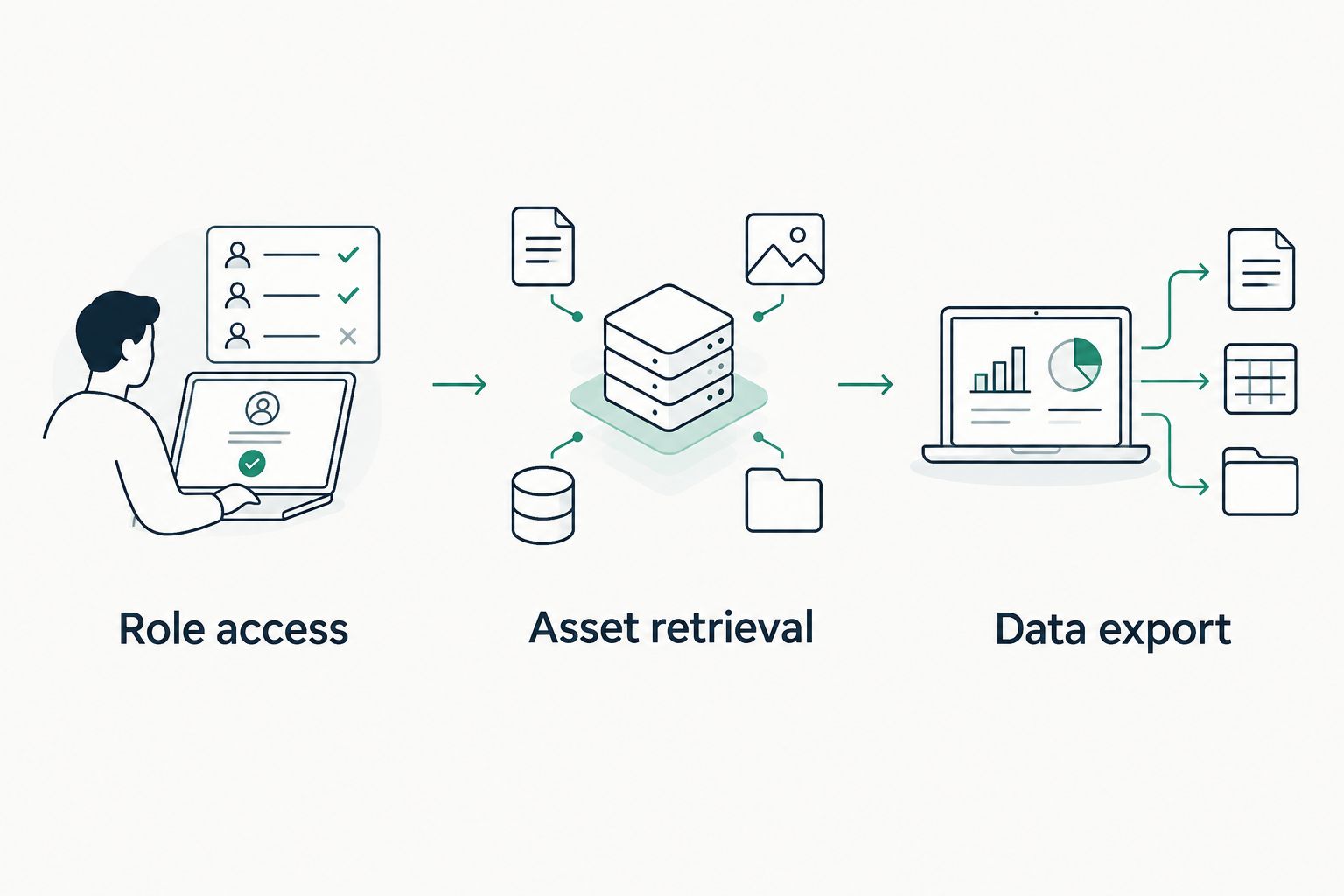
Test permissions, retrieval, and exit before committing to a DAM.
Give every unresolved issue an owner before signing off. DivergeIT provides managed IT and cybersecurity services for growing businesses; those disciplines belong in the DAM operating plan, alongside the content team's responsibilities.
Which entertainment DAM should you choose?
Choose Bynder by default when your main job is distributing approved promotional assets. Choose iconik instead when your main job is finding production media. Those are different requirements, not interchangeable descriptions of the same purchase.
For your 2026 decision, choose Adobe Experience Manager Assets when the enterprise publishing environment supports it, Canto when a straightforward promotional library fits, and ResourceSpace when technical control has an accountable owner. Hold the purchase if nobody can define access rules, approval ownership, or recovery responsibilities.
FAQ
What's the best digital asset management tool for entertainment?
Bynder is the default pick for approved entertainment marketing assets, while iconik is the production-media pick. Choose by the workflow you need to complete rather than treating all DAM platforms as interchangeable.
Is iconik better than Bynder for video production?
iconik is the better shortlist fit when your priority is cataloging and finding production media across storage locations. Bynder is the stronger starting point for organizing and distributing finished brand and campaign assets.
What's the difference between DAM and media asset management?
Digital asset management covers organizing, finding, and distributing digital assets; media asset management focuses on media-oriented workflows. The categories overlap, so demonstrate your footage, review, and delivery requirements instead of deciding from the label alone.
Should an entertainment team choose Adobe Experience Manager Assets?
Choose Adobe Experience Manager Assets when asset management belongs within your Adobe-centered enterprise publishing architecture. A standalone promotional library needs its own justification for that platform's implementation and administration.
Is ResourceSpace a good choice for a small entertainment company?
ResourceSpace is a good shortlist option when the company has an accountable technical owner for its open-source DAM deployment. Assign hosting, updates, access administration, and recovery before selecting it.
Does a DAM replace cloud backup?
A DAM does not replace a defined backup and recovery plan. Establish how files, metadata, permissions, and necessary configuration will be restored after loss or disruption.
Can DivergeIT help with the IT side of digital asset management?
DivergeIT provides managed IT services, cybersecurity, and compliance services for growing small and mid-sized businesses, including entertainment businesses. Discuss your DAM operating requirements separately from the software vendor's product features.
One last thing
Test what happens when an asset is no longer approved. Search for it, open an existing shared link, and attempt a download through an external account. Your 2026 selection should account for withdrawing material, not just adding it to the library.
A system that helps users find files still needs rules that distinguish usable material from retired or restricted material. Make that distinction visible in your pilot and assign responsibility for maintaining it.