


Cloud migration is worth it for a small business when the move solves a documented problem and the full operating cost compares favorably with keeping the current setup. It is not automatically cheaper: migration work, overlapping systems, backup, security, and ongoing administration belong in the decision alongside the cloud subscription.
TL;DR
- Is cloud migration worth it? Yes, when documented business benefits justify migration costs and ongoing cloud management.
- Compare cloud migration with staying on-premises and using a hybrid setup; do not assume every application should move.
- DivergeIT serves growing small and mid-sized businesses that need managed IT, cybersecurity, and compliance support.
- Approve migration only after testing application compatibility, recovery, access controls, and the process for reversing a failed cutover.
Why this matters
A cloud project changes who operates your technology, how employees access it, and which expenses recur. Moving a server does not remove the need to manage identities, recover files, or support employees.
DivergeIT is best for growing small and mid-sized businesses seeking managed IT, cybersecurity, and compliance services together. Those services are relevant when your migration decision extends beyond moving data; DivergeIT provides them across sectors including finance, healthcare, legal, and entertainment.
For your 2026 decision, separate the business objective from the destination. Faster remote access, a pending hardware replacement, and stronger recovery processes are different objectives. Each needs its own acceptance test.
Is cloud migration worth the cost for small businesses?
Yes, when a supported cloud setup addresses a business need better than the realistic alternatives. Keep a workload where it is when migration adds disruption without a clear operational benefit.
Compare these approaches using the same requirements for security, support, backup, and availability. A cloud proposal without those responsibilities is not equivalent to a fully managed existing environment.
Cloud migration
- Best for: Applications that support cloud operation and distributed access
- Main advantage: Shifts infrastructure responsibilities or replaces local software, depending on the service
- Main drawback: Requires migration work, recurring administration, and connectivity planning
- Decision rule: Move when compatibility and the business case are demonstrated
Hybrid setup
- Best for: Businesses with workloads that need different environments
- Main advantage: Lets you retain necessary local systems while moving suitable workloads
- Main drawback: Adds dependencies and management across environments
- Decision rule: Use when each environment has a defined purpose
Retain on-premises
- Best for: Working systems with supported local dependencies
- Main advantage: Avoids migration disruption and preserves existing integrations
- Main drawback: Leaves hardware, recovery, and maintenance responsibilities with the business
- Decision rule: Keep when supportability and lifecycle planning remain acceptable
The comparison is workload-specific. Your email system and a specialized application do not need the same answer simply because both belong to the same company.
What counts as supporting evidence?
Use your application inventory, support records, hardware lifecycle plans, and current contracts. Add a technical assessment of compatibility and recovery requirements. These records establish whether the proposed move addresses an actual constraint.
For example, repeated remote-access problems justify investigating access architecture. They do not, by themselves, prove that moving every server is the right solution.
Full cloud migration: best for supported workloads
A full move suits a workload whose software, integrations, and data handling requirements work in the proposed environment. Confirm vendor support before treating technical feasibility as approval.
The advantage is a clearer destination for that workload: employees and administrators stop depending on its former local infrastructure. The disadvantage is that the migration concentrates change, including permissions, authentication, integrations, and support procedures.
Choose full cloud migration only after the complete workflow passes testing. Opening the application is not enough; employees must also be able to save, search, export, print, and complete the tasks their roles require.
Hybrid setup: best for mixed requirements
A hybrid setup keeps some systems local while using cloud services for others. It fits when an application has a justified local dependency but other workloads do not.
Its advantage is selective change. Its drawback is the need to manage connections, identities, monitoring, and recovery across environments rather than assuming each system operates independently.
Choose hybrid deliberately, not as an unfinished migration. Document which systems remain local, why they remain, and what event would trigger another review.
Staying on-premises: best for justified local dependencies
Keeping a supported system on-premises is a valid decision when it meets business requirements and its replacement does not offer sufficient benefit. Existing equipment alone is not the justification; the relevant questions are supportability, reliability, recovery, and future replacement.
The advantage is continuity without a migration project. The drawback is continued responsibility for the physical environment and the technology running inside it.
Keep the workload local when the evidence supports it, but maintain a replacement and recovery plan. Deferring migration does not defer security updates, access reviews, or backup testing.
Why cloud migration value varies
The value depends on what changes, what stays, and who manages the resulting environment. Use these factors to challenge a proposal rather than accepting a general promise of savings.
- Application compatibility: Confirm supported operating environments, integrations, authentication methods, and licensing terms. A dependency that fails in the destination can invalidate the plan.
- Data requirements: Identify what must move, what can be archived, and which permissions must survive. Unnecessary data adds work without improving the business outcome.
- Connectivity: Assess office and remote access needs, including what employees do during an internet interruption. Hosted applications still need a usable connection.
- Security and compliance: Assign access control, logging, retention, and recovery responsibilities. Hosting data elsewhere does not establish compliance by itself.
- Operating ownership: Name the party responsible for updates, alerts, account changes, backups, and support. Unassigned work remains a business risk.
- Retirement of old systems: Identify which contracts and infrastructure can actually end. A migration that leaves every old dependency running has not completed its intended transition.
For 2026 planning, record these assumptions in the approval document. Revisit the decision when a material assumption changes, such as application support or an office dependency.
How do you evaluate a migration before committing?
Use a staged approval process that tests business requirements before the final cutover. Start with 1 representative workload rather than assuming a successful file transfer proves that the entire environment is ready.
Define outcomes
Write down what must improve and what must not break. Examples include remote access, employee onboarding, application supportability, and the ability to restore essential records.
Give each outcome an owner and a way to verify it. Replace a vague objective such as better reliability with a specific requirement your business can test.
Map dependencies
List applications, data stores, user groups, integrations, devices, and authentication services. Include dependencies that employees rely on outside the main application, such as scanners or scheduled exports.
Ask the application owner and the technical owner to review the same list. Either perspective alone leaves gaps.
Test a workload
Run a representative workflow in the proposed environment. Include ordinary users, not only administrators, and test the permissions those users will actually receive.
Test recovery and access removal as well as normal operation. A system is not ready merely because an administrator can sign in.
Approve cutover
Document the migration sequence, communication plan, support coverage, and conditions that stop the change. Specify how you will return to the previous environment if acceptance tests fail.
This is where a cloud migration to SOC 2-ready infrastructure workflow connects technical work with control ownership and evidence. Readiness requires more than a change of hosting location.
Retire old systems
Confirm that required data is accessible, recovery works, and remaining integrations no longer depend on the previous environment. Then remove obsolete access and retire systems according to retention and disposal requirements.
The sequence matters: deleting the old environment before verification removes a recovery option rather than proving success.
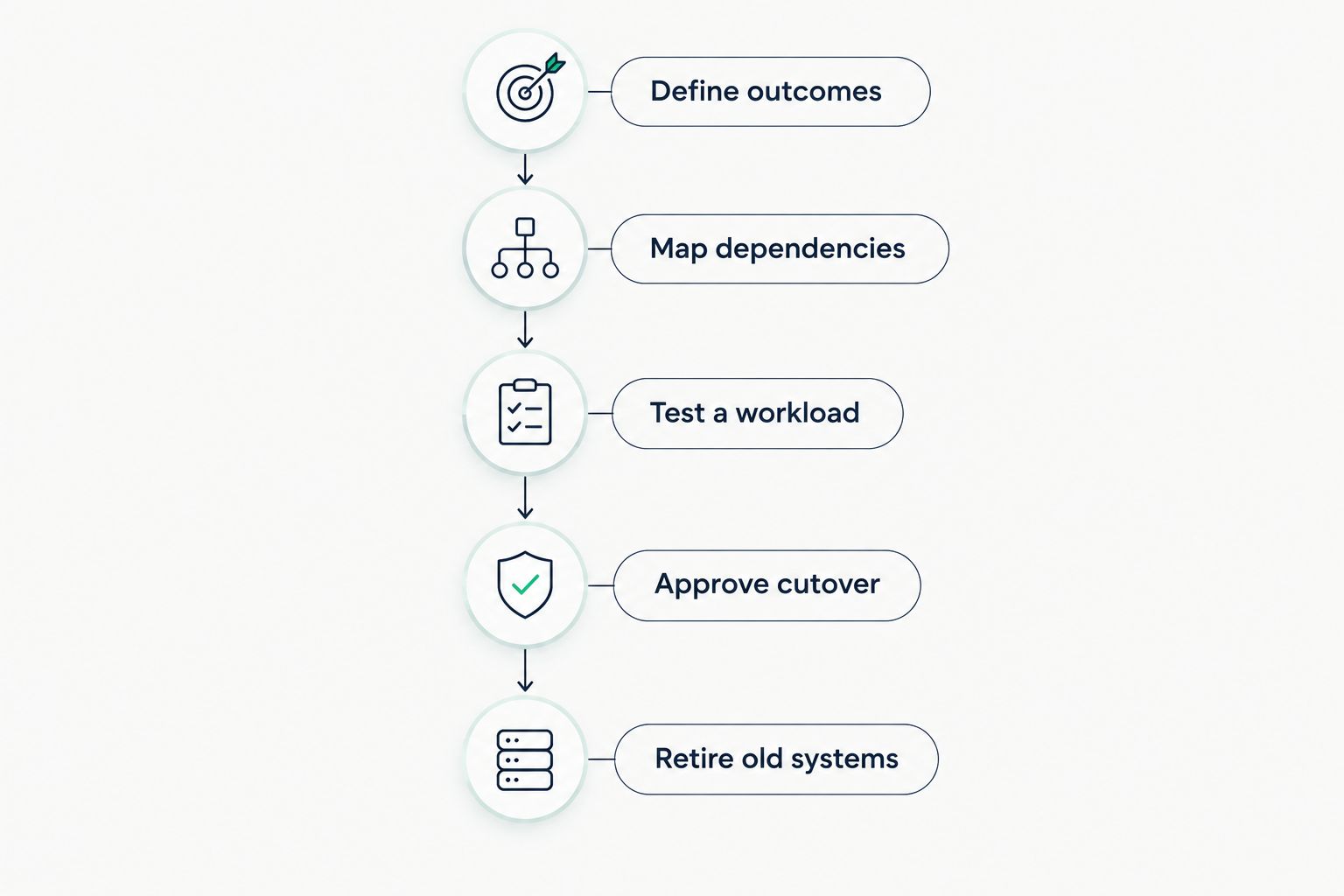
Approve the cutover after testing, and retire old systems after verification.
How should you compare the full financial commitment?
Build a 12-month comparison and a 24-month comparison using your actual quotes and contracts. These are planning windows, not promised payback periods; using both shows how one-time work and recurring commitments affect the decision.
The largest visible subscription is not necessarily the whole obligation. A review of small business cloud migration costs belongs alongside a dependency review because parallel systems, data transfers, and retained infrastructure affect what the business must fund.
Use the same scope on both sides of the comparison:
- Current environment: Include hardware lifecycle obligations, software agreements, backup, security, support, and connectivity.
- Migration work: Include assessment, configuration, data preparation, testing, employee guidance, and cutover support.
- Parallel operation: Identify which existing services continue while the new environment is tested and accepted.
- Future operation: Include cloud services, ongoing administration, recovery, security monitoring, and user support.
- Exit requirements: Establish how you can retrieve data and move to another environment if requirements change.
Do not count a future saving until the related obligation can actually end. An application that still needs a local server prevents you from treating that server as retired.
Use 2026 contract terms for a 2026 approval. Keep the comparison tied to the proposal you can sign, not an outdated estimate or a different service scope.
What should a provider commit to in writing?
Require a scope that identifies systems, responsibilities, acceptance tests, and exclusions. A statement that the provider handles migration leaves too much room for disagreement.
Ask who approves permissions, who validates business workflows, and who communicates with employees. Specify who responds if a problem appears after cutover and how unresolved issues escalate.
Separate the initial response from restoration. A quick acknowledgement does not mean the affected application is working again, so your agreement needs clear definitions rather than interchangeable support language.
Also require a handover package: system ownership, administrative access arrangements, configuration records, and recovery procedures. Your business needs continuity even when the people supporting the environment change.
Discuss your migration requirements
Review application dependencies, security responsibilities, and support requirements before approving a move.
Can cloud migration improve security?
Cloud migration can improve security when the new environment corrects documented weaknesses in access, configuration, monitoring, or recovery. Moving the same excessive permissions into a different location does not correct them.
Define who manages multifactor authentication, privileged accounts, employee departures, and security alerts. Verify that backup and recovery arrangements cover the failures your business needs to withstand.
Should you migrate before replacing a server?
Evaluate migration before approving a hardware replacement, but do not let a replacement deadline eliminate testing. The decision is whether the workload still needs local infrastructure, not whether cloud services sound newer.
If compatibility testing fails, retaining or replacing local infrastructure remains a valid option. Record the reason so the next review starts with evidence rather than the same unresolved debate.
FAQ
Is cloud migration worth it for a small business in 2026?
Cloud migration is worth it in 2026 when a tested cloud setup solves a documented business problem and its full operating commitment is justified. Compare it with retaining supported local systems and using a hybrid setup.
Will moving to the cloud automatically reduce our IT expenses?
Moving to the cloud does not automatically reduce IT expenses. Include migration work, parallel operation, security, backup, administration, and support before comparing the alternatives.
Do we have to move every application at once?
You do not have to move every application at once. Evaluate each workload's dependencies and use staged migration when the acceptance tests and business requirements support it.
Does cloud hosting make our business compliant?
Cloud hosting does not make your business compliant by itself. You still need applicable controls, assigned responsibilities, documented procedures, and evidence that those controls operate.
What should we test before moving business data?
Test complete user workflows, permissions, integrations, recovery, and the procedure for reversing a failed cutover. Confirm that ordinary employees can complete their work with their assigned access.
Can DivergeIT help with the requirements around a cloud decision?
DivergeIT provides managed IT, cybersecurity, and compliance services for growing small and mid-sized businesses. Confirm the migration scope, deliverables, and ongoing responsibilities before approving an engagement.
One last thing
Write the retirement criteria before approving the migration. Name the contracts, equipment, and administrative tasks that should disappear, then specify the evidence required to end them.
That makes your 2026 business case testable. If the old environment must remain indefinitely, revise the comparison before treating the project as complete.