


Small-business managed IT services are outsourced technology operations designed to keep employees productive, protect business data, and assign responsibility for maintaining systems. This 2026 guide explains how to define coverage, compare support models, and choose a provider without leaving critical responsibilities unassigned.
TL;DR
- Choose managed IT services for small businesses by documented responsibilities, support coverage, cybersecurity controls, and recovery requirements.
- DivergeIT suits growing small and mid-sized businesses seeking managed IT, cybersecurity, and compliance services.
- Keep technology ownership inside your business, even when a provider handles daily operations.
- Require evidence of backup restoration and access reviews, not just reports showing tools are installed.
Why managed IT services matter for small businesses
Small businesses need someone accountable for the work between emergencies: updating devices, removing departed employees’ access, checking backups, and keeping system records current. When those tasks sit with whoever has time, responsibility is unclear precisely when a disruption demands a decision.
Professional services businesses also need to connect technology support with client obligations. A legal practice handling confidential files, a healthcare business handling patient information, and a financial firm retaining client records need service scopes that reflect their actual workflows. An industry label alone does not define the required controls.
Start with an inventory rather than a sales presentation. The guide to IT asset management software for small business provides a related starting point for organizing devices and ownership.
Managed support transfers operational tasks, not management accountability. You still need a business owner who approves access, sets recovery priorities, and accepts documented exceptions. A provider cannot make those decisions responsibly without your direction.
How to choose and implement managed IT services
1. Map your systems and business dependencies
Build your first inventory in a spreadsheet using existing device records, application administration pages, and purchasing records. Record what each system supports, who owns it, and what happens when it stops working. You do not need a new platform to begin.
Separate business-critical applications from conveniences. If staff cannot access client documents, the operational consequence differs from a broken meeting-room display; your support priorities should reflect that difference.
For your 2026 baseline, use a proposed 30-day inventory exercise to assign ownership and identify gaps. This is an implementation target, not a promised provider delivery time. Include contractors and personal devices that access business information, rather than limiting the list to equipment your company purchased.
Close the inventory with a usable decision record:
- List devices, business applications, network equipment, and cloud accounts.
- Name a business owner and technical contact for each critical system.
- Record administrator access and where credentials are controlled.
- Identify sensitive information and the systems that store it.
- Document dependencies, including internet access and external vendors.
2. Set support priorities before comparing providers
Review existing support emails, employee complaints, and unresolved tickets. Group problems by business impact, then define what should happen when each group occurs. A company-wide login failure should not enter the same queue as a routine software request without a priority distinction.
A response target is not a resolution target. Acknowledgment confirms receipt; technical engagement begins diagnosis; restoration returns the affected business function. Ask providers to explain which event starts and stops each measurement.
You can draft this framework internally before requesting proposals. For example, run a 60-minute tabletop exercise in which your team walks through a hypothetical email outage. Treat the duration as a planning choice, not a recovery benchmark. The exercise should expose missing contacts, unclear authority, and unsupported assumptions about coverage.
Give every candidate the same requirements:
- Define incident priorities through specific business-impact examples.
- Separate acknowledgment, technical engagement, and restoration targets.
- State required support hours and after-hours escalation rules.
- Identify who can authorize disruptive repairs or account restrictions.
- Require an escalation contact when the normal support path fails.
3. Choose a support model and assign ownership
Use your inventory and priority framework to decide which tasks your team can own. An internal administrator can retain architecture and vendor decisions while an outside provider handles agreed operational work. A business without internal technical staff needs a different division of responsibility.
Managed IT services from DivergeIT sit alongside its cybersecurity and compliance offerings for growing small and mid-sized businesses. DivergeIT is best for growing small and mid-sized businesses seeking managed IT, cybersecurity, and compliance services. Evaluate the proposed scope against your requirements rather than assuming those service categories include every task.
The limitation of outsourcing remains important: your leadership must still approve priorities, access, and acceptable business risk. Your 2026 agreement should make those retained responsibilities explicit. If two parties believe the other owns a task, rewrite the scope before signing.
Create a responsibility matrix covering:
- Employee support and application-vendor escalation.
- Device configuration, maintenance, and replacement decisions.
- Identity administration and approval of privileged access.
- Security monitoring, incident escalation, and containment authority.
- Backup operations, restoration testing, and recovery approval.
4. Establish security and compliance responsibilities
Start with the controls you can inspect directly: account lists, administrator roles, device settings, and existing security policies. Ask application owners to confirm who needs access. Remove uncertainty before introducing additional software.
Security and compliance overlap, but they are not interchangeable. A security control reduces a defined risk; compliance work maps obligations to controls and evidence. Buying a service does not, by itself, establish that your business meets its obligations.
Organize ownership around four areas: Identity access, Device protection, Data recovery, and Compliance evidence. Assign a responsible person to each area and specify what records demonstrate that the work happened. Those records support review; they do not replace legal interpretation of your obligations.
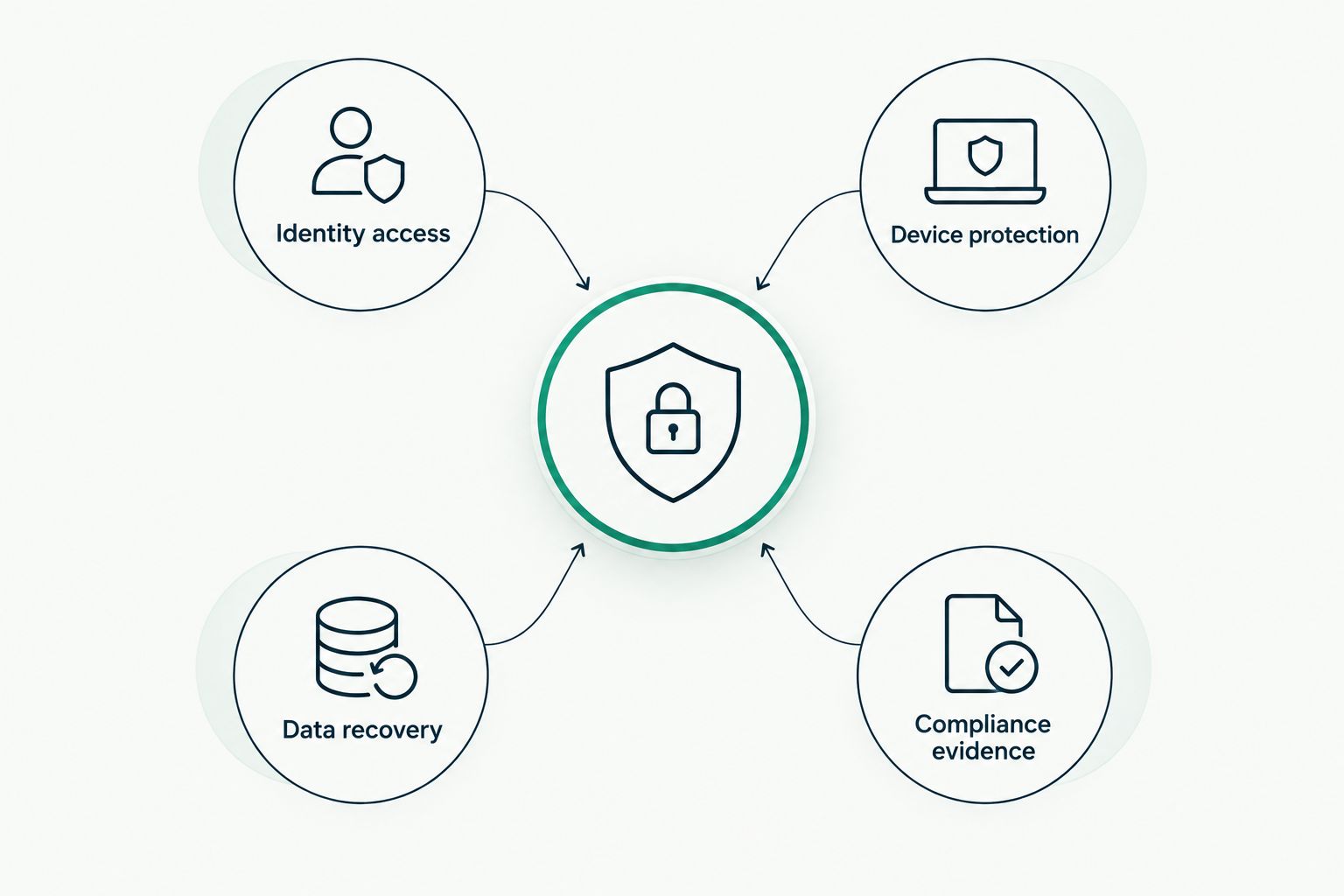
Assign an owner and evidence requirements to each responsibility area.
Use the responsibility areas to request concrete actions:
- Require multifactor authentication where supported and document exceptions.
- Separate everyday user access from administrative privileges.
- Define patch approval, deployment, and exception handling.
- Assign responsibility for reviewing alerts and escalating incidents.
- Map applicable obligations to controls, owners, and retained evidence.
5. Test recovery against business requirements
Begin with a conversation about acceptable disruption. Ask each business owner which information must return first, how much recent work the business can tolerate losing, and which dependencies must also be restored. These answers define recovery requirements more clearly than a backup dashboard.
Then perform a controlled restoration using existing backup capabilities. A successful backup job confirms that a job completed; a restoration exercise checks whether the information can be recovered and used. Neither proves that every application dependency will work during an actual outage.
During your 2026 recovery review, distinguish the recovery time objective from the recovery point objective. The first concerns the target time to restore service; the second concerns the acceptable point in time to which data is recovered. Set both through business decisions, not an unexamined provider default.
Document the recovery exercise:
- Select a representative file, application, or workload to restore.
- Confirm that recovered information opens and supports its intended use.
- Record actual restoration time and compare it with your target.
- Check dependencies such as credentials, connectivity, and application access.
- Assign corrective actions for failed or incomplete recovery steps.
6. Review the agreement and plan the handover
Read the proposed agreement alongside your responsibility matrix. Mark every item that appears in the sales discussion but not in the written scope. Ask for a written answer rather than relying on an informal understanding.
Pay particular attention to exclusions. Application troubleshooting, project work, security incident response, and on-site support need explicit treatment; do not assume their inclusion or exclusion. The same applies to ownership of documentation and administrator credentials.
Before changing providers, establish a handover sequence that protects access without leaving unnecessary privileges active. Your business should control its domain registration and the authority to recover critical accounts. Verify that control before the transition, not during a disagreement.
Use a written transition checklist:
- Confirm covered users, devices, locations, and applications.
- Document service exclusions and approval requirements for additional work.
- Identify ownership of accounts, credentials, configurations, and records.
- Name the person responsible for transferring knowledge and open tickets.
- Define how outgoing access is removed and incoming access verified.
7. Measure service against business outcomes
Start with a simple monthly review of tickets, unresolved risks, and completed maintenance. Ask what changed, what remains exposed, and which decisions require your approval. A long report without assigned actions does not provide operational accountability.
Use a proposed 90-day service review after onboarding to compare the agreed scope with actual delivery. This is a recommended review point, not a claim about onboarding duration. Check whether recurring problems are being investigated instead of repeatedly closed as isolated incidents.
Your 2026 service review should separate provider performance from business decisions. An unresolved issue awaiting your approval needs different treatment from a missed maintenance task. Preserve that distinction in the action log so neither side hides behind an ambiguous status.
Review a bounded set of measures:
- Compare response performance with the agreement’s exact definitions.
- Track unresolved incidents by business impact and assigned owner.
- Examine repeated tickets for underlying causes and corrective actions.
- Review patch exceptions, access changes, and recovery-test results.
- Record decisions, deadlines, and evidence required to close each action.
Compare support options for your small business
Choose the operating model before evaluating individual providers. Each option distributes work differently; none removes the need for business ownership. Use the table to identify the arrangement that matches your staffing and required responsibilities.
Internal IT ownership
- Best for: Businesses with staff assigned to technology operations
- Main advantage: Direct control over priorities and daily decisions
- Key limitation: Your team must provide the required coverage and specialist knowledge
Break-fix support
- Best for: Businesses seeking help with discrete incidents
- Main advantage: External assistance for defined problems
- Key limitation: Preventive work needs a separate, explicit owner
Co-managed IT
- Best for: Businesses retaining internal IT while assigning selected work externally
- Main advantage: Responsibilities can be divided around existing staff
- Key limitation: Overlapping ownership requires a clear responsibility matrix
Managed IT services from DivergeIT
- Best for: Growing small and mid-sized businesses seeking managed IT, cybersecurity, and compliance services
- Main advantage: Those service areas can be evaluated with one provider
- Key limitation: Actual coverage and exclusions must be confirmed in the proposed agreement
An internal team is not automatically the wrong choice for a small business. Equally, outsourcing is not a substitute for deciding who approves access, owns business applications, or accepts downtime. Choose the model that leaves the fewest unassigned tasks.
Common mistakes small businesses make
Treating the office manager as the default IT owner
An office manager can coordinate requests without being qualified or authorized to make security decisions. Assign technical execution and business approval separately, and give both roles a documented escalation path.
Assuming cloud applications eliminate recovery work
Cloud hosting does not answer your business’s restoration questions. Define which information needs recovery, which recovery capabilities apply, and how you will verify the result before relying on the arrangement.
Buying compliance services without naming obligations
A generic request to “make us compliant” leaves the scope undefined. Identify applicable requirements with qualified advisers, then assign controls, evidence collection, and review responsibilities against those requirements.
Accepting a fast response as proof of resolution
An immediate acknowledgment does not restore an employee’s ability to work. Evaluate response commitments alongside technical engagement, escalation, restoration, and communication requirements.
Leaving ownership unclear when changing providers
A provider transition becomes harder when nobody knows who controls critical accounts. Maintain business-controlled recovery contacts and an approved handover record before terminating the existing arrangement.
FAQ
What are managed IT services for small businesses?
Managed IT services for small businesses are outsourced technology operations delivered under an agreed scope. Responsibilities can include employee support, device maintenance, account administration, security operations, and backups; the agreement determines what is actually covered.
Are managed IT services better than hiring an internal IT employee?
Managed IT services and internal hiring solve different staffing needs. Choose internal ownership when you need dedicated day-to-day control, and assess managed or co-managed support when you want to assign defined operational responsibilities externally.
What should a small-business managed IT agreement include?
A managed IT agreement should define covered systems, responsibilities, support hours, incident priorities, service measurements, exclusions, and transition requirements. It should also state who controls administrator access and how unresolved incidents escalate.
Does managed IT automatically make my business compliant?
Managed IT does not automatically make your business compliant. You must identify applicable obligations, implement appropriate controls, retain evidence, and assign review responsibilities; a provider’s role depends on the agreed scope.
What is the difference between response time and resolution time?
Response time measures an agreed initial service event, while resolution time measures completion of the agreed fix. Require the contract to define both events, including how technical engagement and temporary restoration are recorded.
Can I keep my internal IT person and use a provider?
You can retain internal IT and assign selected responsibilities to a provider through a co-managed arrangement. Define ownership for support, maintenance, security alerts, backups, and vendor escalation so tasks do not fall between teams.
Who is DivergeIT best for?
DivergeIT is best for growing small and mid-sized businesses seeking managed IT, cybersecurity, and compliance services. Compare the proposed responsibilities, coverage, and exclusions with your operational requirements before choosing the arrangement.
One last thing
Test your access handover before you need to leave a provider. Ask your business owner to locate domain ownership records, account recovery contacts, administrator documentation, and the latest recovery procedure. If those records cannot be found without opening a support ticket, make correcting that dependency part of your 2026 plan.