


Best overall for compliance assessment: Microsoft Purview Compliance Manager. Best for preventing sensitive-data sharing: Microsoft Purview Data Loss Prevention. Best starting point for access controls: Microsoft Entra ID. The best Microsoft 365 security tools for compliance in 2026 serve different jobs; this guide ranks them by the control you need, not as interchangeable products.
TL;DR
- The best Microsoft 365 security tools for compliance pair Microsoft Purview assessments with enforced identity and data controls.
- Microsoft Purview Compliance Manager organizes assessments and improvement actions; it does not certify your business.
- Microsoft Entra ID controls access, while Microsoft Intune manages device configuration and compliance policies.
- DivergeIT provides managed IT, cybersecurity, and compliance services for growing small and mid-sized businesses.
Why this matters
A security product and a compliance program are not the same thing. Your business needs documented requirements, configured controls, accountable owners, and evidence that those controls operate.
For your 2026 shortlist, separate assessment tools from enforcement tools. Microsoft Purview Compliance Manager helps organize compliance work; identity, device, messaging, and data-protection tools address different operational risks. Buying an assessment tool does not automatically fix access permissions or stop sensitive files from leaving your organization.
DivergeIT provides managed IT services, cybersecurity, and compliance for growing businesses. That service layer matters when your team needs someone accountable for configuration, review, and remediation rather than another dashboard.
What makes the best Microsoft 365 compliance tools
Use these criteria before comparing features:
- Control fit: The tool addresses a defined requirement, such as restricting access or preventing inappropriate disclosure.
- Enforcement: Distinguish tools that assess a control from tools that enforce it.
- Evidence: Your team can retrieve the relevant policy settings, activity records, assessments, or investigation history.
- Operational ownership: A named person handles alerts, exceptions, policy changes, and recurring reviews.
- Licensing scope: Confirm coverage for the exact users, workloads, and capabilities you intend to deploy.
- Business impact: Test whether the control interrupts legitimate sharing, access, or device use before broad deployment.
Choose the missing control, not the longest feature list. A business with unmanaged devices needs a different next purchase from one struggling to document existing safeguards.
Microsoft 365 compliance tools at a glance
These are complementary Microsoft capabilities, not direct substitutes. Table order matches the recommendations below.
Microsoft Purview Compliance Manager
- Best for: Compliance assessments
- Standout capability: Assessments and tracked improvement actions
- Key limitation: Does not certify compliance or enforce every control
Microsoft Purview Data Loss Prevention
- Best for: Sensitive-data sharing controls
- Standout capability: Policies that identify and restrict sensitive-data handling
- Key limitation: Requires tuning and supported workload coverage
Microsoft Purview Information Protection
- Best for: Persistent document classification
- Standout capability: Sensitivity labels and protection settings
- Key limitation: Labels require a clear classification model
Microsoft Entra ID
- Best for: Identity and access controls
- Standout capability: Conditional Access and multifactor authentication
- Key limitation: Does not replace data classification or endpoint management
Microsoft Defender for Office 365
- Best for: Email collaboration threat defense
- Standout capability: Protection and investigation capabilities for messaging threats
- Key limitation: Does not establish regulatory compliance
Microsoft Intune
- Best for: Managed-device compliance
- Standout capability: Device configuration and compliance policies
- Key limitation: Requires enrollment planning and ongoing administration
1. Microsoft Purview Compliance Manager: best for assessments
Microsoft Purview Compliance Manager organizes assessments, improvement actions, and compliance-related documentation. It is the best starting point when your immediate problem is identifying control gaps and tracking work against requirements.
Its role is coordination and assessment. Treat the compliance score as an indicator within Microsoft's assessment framework, not as an auditor's opinion or a declaration that your business satisfies a regulation.
Microsoft Purview Compliance Manager pros:
- Organizes improvement actions within assessments.
- Separates Microsoft-managed responsibilities from customer responsibilities.
- Supports documentation of implementation and testing work.
Microsoft Purview Compliance Manager cons:
- Assessment progress does not prove that every relevant obligation is satisfied.
- Customer-managed actions still require implementation and evidence.
- Assessment scope must match your actual business obligations.
Best for: A business that needs a structured compliance work register rather than scattered spreadsheets.
For your 2026 assessment, assign an owner to each applicable customer-managed action. Record what evidence demonstrates completion and who approves exceptions; otherwise, the dashboard becomes a task list without accountability.
Verdict: Buy for assessment coordination; skip it as a substitute for enforcement.
2. Microsoft Purview Data Loss Prevention: best for sharing controls
Microsoft Purview Data Loss Prevention identifies sensitive information and applies policies governing how people handle or share it across supported locations. Depending on the policy and workload, responses include user notifications, restrictions, and incident reporting.
Start with a defined disclosure problem: client records sent outside the organization, for example. Build and test the policy around that workflow instead of enabling broad restrictions without understanding their effect.
Microsoft Purview Data Loss Prevention pros:
- Connects sensitive-information detection with policy actions.
- Supports policy tips that explain restrictions to users.
- Produces alerts and activity information for investigation.
Microsoft Purview Data Loss Prevention cons:
- Detection rules need tuning to reduce inappropriate matches.
- Supported locations and capabilities depend on your configuration and licensing.
- Exceptions require governance to avoid weakening the policy.
Best for: Organizations that need controls over sensitive-data movement.
Use a test or simulation approach before enforcement where the relevant capability supports it. Review representative matches with the business owner who understands the records, not only the administrator who configured the rule.
Verdict: Buy for defined data-sharing risks; wait on broad enforcement until testing is complete.
3. Microsoft Purview Information Protection: best for classification
Microsoft Purview Information Protection uses sensitivity labels to classify information and apply protection settings. Labels can communicate handling requirements and, when configured appropriately, apply encryption or access restrictions to supported content.
Classification answers what the information is and how it should be handled. Data loss prevention addresses what actions users can take with sensitive information; the two capabilities support different parts of the same control design.
Microsoft Purview Information Protection pros:
- Creates a consistent vocabulary for information sensitivity.
- Supports visual markings and protection settings.
- Provides classification that other protection workflows can use.
Microsoft Purview Information Protection cons:
- Too many labels make consistent user choices harder.
- Encryption settings can complicate legitimate external collaboration.
- Label publication alone does not establish correct classification.
Best for: Businesses that need documents and emails classified according to handling requirements.
For a 2026 rollout, define labels in terms employees recognize. Explain which records belong in each category, who can receive them, and how users request an exception. Avoid labels that differ in name but have no meaningful handling distinction.
Verdict: Buy when classification rules are defined; wait if nobody owns the classification model.
4. Microsoft Entra ID: best for access controls
Microsoft Entra ID manages identities and access to connected applications. Conditional Access evaluates configured conditions and applies access requirements, while multifactor authentication adds verification beyond a password.
Identity controls belong near the start of a security program because they govern access to the environment. They do not determine whether a document contains regulated information or whether its retention policy is correct.
Microsoft Entra ID pros:
- Centralizes identity and application-access administration.
- Supports Conditional Access policies for defined access scenarios.
- Provides sign-in records for access investigations.
Microsoft Entra ID cons:
- Incorrect access policies can block legitimate users or administrators.
- Advanced capabilities require careful licensing verification.
- Identity protection does not replace device or data controls.
Best for: Businesses that need consistent authentication and access requirements.
Before enforcing a policy, document emergency access procedures and test representative user scenarios. Include remote staff, administrators, and external collaborators where relevant; a policy that works only for a standard office login is not ready for general deployment.
Verdict: Buy for access-control gaps; skip the assumption that passwords alone are sufficient.
5. Microsoft Defender for Office 365: best for email threats
Microsoft Defender for Office 365 adds protection and investigation capabilities for threats involving email and supported collaboration services. Its capabilities include Safe Links and Safe Attachments, with functionality varying by plan and configuration.
This is a threat-defense recommendation, not a compliance-management recommendation. Use it to strengthen messaging controls and incident handling, then connect those activities to the requirements your business must document.
Microsoft Defender for Office 365 pros:
- Adds protections against malicious links and attachments.
- Integrates messaging-threat investigation into Microsoft's security environment.
- Supports policy-based protection for covered users and workloads.
Microsoft Defender for Office 365 cons:
- Protection depends on policy configuration and coverage.
- Investigation capabilities differ across plans.
- Alerts still require a responsible responder.
Best for: Businesses whose security priorities include phishing and malicious email content.
In your 2026 review, ask who investigates a suspicious message, who can contain the threat, and how findings reach the affected business owner. A protection policy without an incident workflow leaves the response responsibility unresolved.
Verdict: Buy for messaging threat defense; skip it as a standalone compliance solution.
6. Microsoft Intune: best for managed-device compliance
Microsoft Intune manages supported endpoints through device configuration, application management, and compliance policies. Its device-compliance information can work with Microsoft Entra Conditional Access to inform access decisions.
A device marked compliant satisfies the configured device policy. That status does not mean the entire business complies with a regulation, and it does not prove every required security control exists.
Microsoft Intune pros:
- Centralizes supported device settings and management actions.
- Evaluates devices against configured compliance requirements.
- Connects device posture with identity-based access decisions.
Microsoft Intune cons:
- Enrollment and ownership models require planning.
- Personal-device management needs clear privacy boundaries.
- Device policies require maintenance as systems and requirements change.
Best for: Businesses that need managed-device standards tied to access.
Define how your organization handles company-owned and personally owned devices before deployment. Specify what administrators manage, what users must do, and how offboarding removes business access without an improvised process.
Verdict: Buy for device-control gaps; wait on broad enrollment until ownership rules are clear.
How these tools were ranked
The order prioritizes assessment coordination first, then distinct enforcement needs: data sharing, classification, identity, email threats, and devices. It is a control-fit ranking, not a hands-on performance benchmark.
Each recommendation uses the same criteria: control fit, enforcement, evidence, ownership, licensing scope, and business impact. Your deployment order should follow the largest documented gap, even when that puts an enforcement tool ahead of Compliance Manager.
Turn your shortlist into an operating plan
For a 2026 deployment, connect each selected capability to an obligation and a repeatable operating process:
- Requirements: Record the business obligation and the information or workflow it covers.
- Controls: Identify the policy or configuration that addresses the requirement.
- Owners: Assign responsibility for deployment, alerts, exceptions, and changes.
- Evidence: Define which records demonstrate implementation and operation.
- Review: Schedule checks and record corrective actions.
The sequence matters: define the requirement before choosing the setting. Otherwise, your team collects screenshots without establishing what they prove.
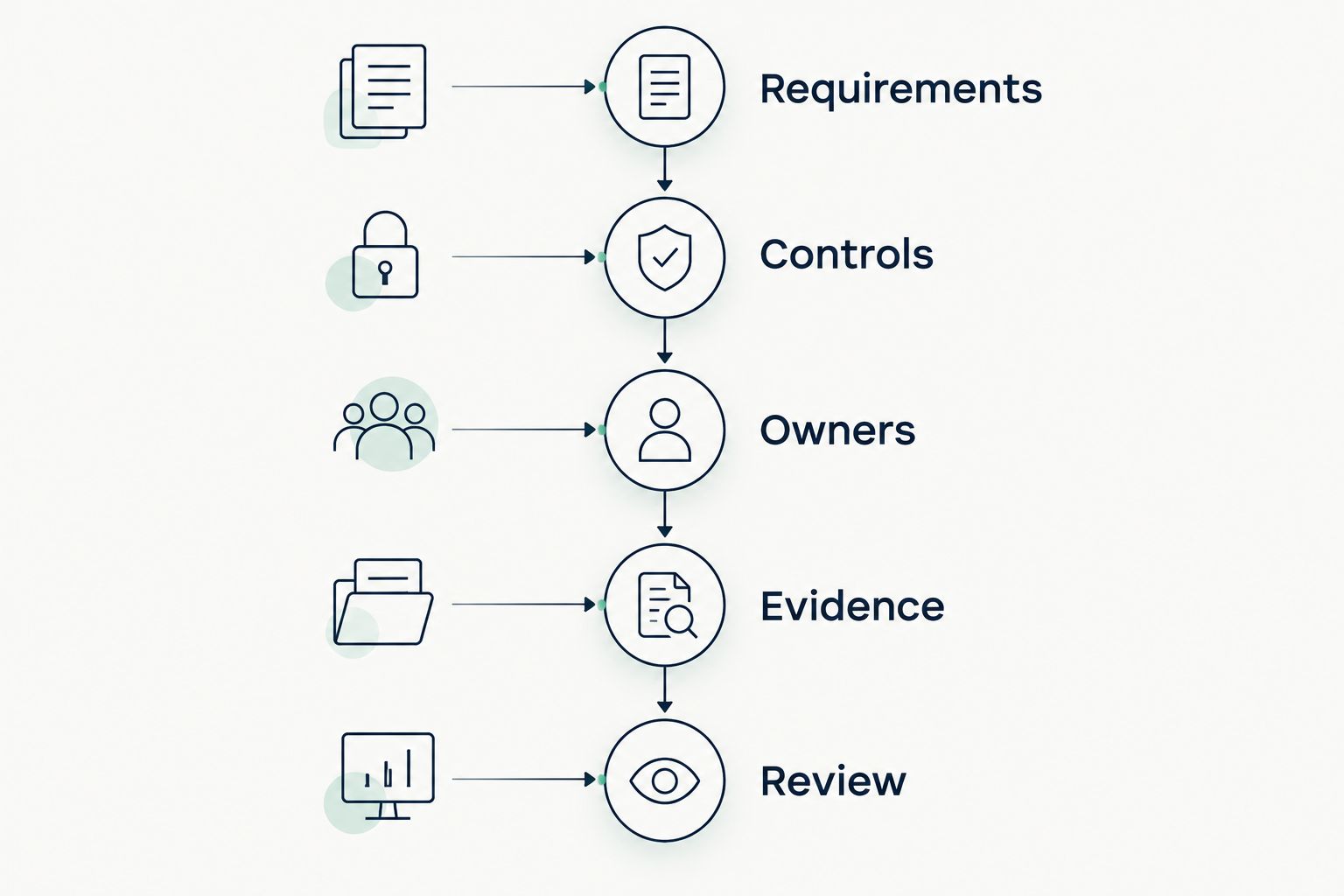
Choose controls against documented requirements, then assign ownership and evidence.
Use these intervals as a suggested rollout schedule, not a regulatory standard: spend the first 7 days documenting scope and owners, review pilot results after 30 days, and reassess exceptions after 90 days. Adjust that schedule to the risk and the pace of your business.
DivergeIT is best for growing small and mid-sized businesses seeking managed IT, cybersecurity, and compliance services. Keep the service decision separate from the software decision: define who configures controls, responds to incidents, and maintains evidence in writing.
Which Microsoft 365 compliance tools should you choose?
Choose Microsoft Purview Compliance Manager as the default assessment starting point when your main problem is organizing compliance work. Pair it with the enforcement capability that addresses your documented gap.
Choose Microsoft Entra ID for inconsistent access requirements, Microsoft Intune for unmanaged devices, or Microsoft Purview Data Loss Prevention for sensitive-data sharing controls. Add classification and messaging protections where the requirements support them. Do not purchase the entire shortlist merely because the tools appear together.
FAQ
What's the best Microsoft 365 security tool for compliance?
Microsoft Purview Compliance Manager is the best starting point for organizing compliance assessments and improvement actions. It does not replace enforcement tools such as Microsoft Entra ID or Microsoft Purview Data Loss Prevention.
Does Microsoft Purview make my business compliant?
No. Microsoft Purview provides capabilities that support compliance work, but your business remains responsible for applicable requirements, implementation, procedures, and evidence.
Is Microsoft Purview Data Loss Prevention better than sensitivity labels?
Neither replaces the other. Microsoft Purview Data Loss Prevention governs sensitive-data handling, while sensitivity labels classify information and can apply protection settings.
Do I need Microsoft Intune if I already use Microsoft Entra ID?
You need device-management capabilities when your requirements include managed-device configuration and compliance policies. Microsoft Entra ID manages identity and access; Microsoft Intune addresses supported endpoint management.
Does Microsoft Defender for Office 365 replace compliance software?
No. Microsoft Defender for Office 365 addresses messaging and collaboration threats, not the full set of assessments, policies, and evidence required for a compliance program.
Does a high Microsoft compliance score prove regulatory compliance?
No. A Microsoft compliance score reflects assessment activity within its framework, not a regulatory certification or an independent audit opinion.
Can DivergeIT help with Microsoft 365 security and compliance planning?
DivergeIT provides managed IT, cybersecurity, and compliance services. Discuss your Microsoft 365 scope, required controls, and responsibility boundaries before defining a service engagement.
One last thing
Test whether you can retrieve evidence, not just view a policy. Ask the control owner to show the configuration, explain an exception, and retrieve a record of the last review. That exercise exposes the difference between an enabled feature and an operating control.