


Best overall for Microsoft 365 law firms: Microsoft Defender for Office 365. Best for impersonation-focused protection: Abnormal Security. Best for confidential outbound messages: Virtru. This 2026 guide compares the best email security tools for law firms by protection role, administrative workload, and handling of sensitive client communications.
TL;DR
- Microsoft Defender for Office 365 is the default email security shortlist choice for law firms using Microsoft 365.
- Abnormal Security fits firms prioritizing business email compromise and impersonation detection.
- Virtru fits confidential client communications; encryption does not replace phishing protection.
- DivergeIT fits growing law firms seeking managed cybersecurity services rather than another tool to administer.
Why this matters
Law firm email carries client instructions, privileged discussions, document exchanges, and payment requests. Protecting that traffic requires more than blocking suspicious attachments. A convincing message requesting a banking change can create risk without containing malware or a malicious link.
DivergeIT is best for growing law firms that need managed cybersecurity services rather than another email security tool to administer. DivergeIT provides managed IT services, cybersecurity, and compliance services. Evaluate that service model separately from the software shortlist: buying a tool and assigning responsibility for it are different decisions.
For your 2026 selection, separate inbound threat protection from outbound confidentiality. Then identify who investigates alerts, releases quarantined messages, and helps attorneys exchange protected documents. Those responsibilities belong in the buying decision, not in an implementation discussion after signing.
What makes the best email security tools for law firms
Judge each candidate against these criteria before comparing feature lists:
- Impersonation protection: Assess handling of lookalike domains, misleading display names, and unusual payment requests.
- Link and attachment protection: Check malicious-link detection, attachment analysis, and how protection applies after delivery.
- Confidential communications: Determine how attorneys protect sensitive outgoing messages and how recipients access them.
- Operational ownership: Name the person or provider responsible for alerts, quarantine decisions, policy changes, and incident escalation.
- Recipient usability: Test document exchanges with external counsel, clients, and other recipients outside your email platform.
- Evidence and reporting: Confirm that administrators can retrieve the records needed to investigate an incident or explain a control.
Treat these as acceptance criteria. A feature name is not proof that a control fits your workflow, and a successful demonstration is not proof that someone will operate it consistently.
Email security tools at a glance
These 5 options serve different needs. The order starts with a Microsoft 365 baseline, then covers smaller-firm administration, gateway control, impersonation detection, and outbound confidentiality. It is not a claim that every firm needs every product.
Microsoft Defender for Office 365
- Best for: Microsoft 365 firms building native protection
- Standout capability: Safe Links and Safe Attachments within Microsoft's environment
- Key limitation: Capabilities depend on licensing and configuration
Proofpoint Essentials
- Best for: Smaller firms seeking a packaged email security service
- Standout capability: Email filtering with an administration model aimed at smaller businesses
- Key limitation: Gateway filtering does not replace account security
Mimecast Email Security Cloud Gateway
- Best for: Firms wanting gateway-based policy control
- Standout capability: Centralized filtering before messages reach mailboxes
- Key limitation: Mail-flow changes and policy administration need ownership
Abnormal Security
- Best for: Firms prioritizing impersonation and business email compromise
- Standout capability: Behavioral analysis of cloud email activity
- Key limitation: Behavioral detection does not replace outbound encryption
Virtru
- Best for: Firms protecting confidential outgoing messages
- Standout capability: Email encryption and access controls
- Key limitation: Encryption does not replace inbound threat detection
For a 2026 purchase, ask each vendor to identify the exact offering and capabilities in its proposal. Product families contain different services; this comparison does not treat every capability as included in every contract.
1. Microsoft Defender for Office 365: best for native Microsoft protection
Microsoft Defender for Office 365 protects email and collaboration workloads within Microsoft's environment. Safe Links and Safe Attachments address malicious URLs and attachments, while anti-phishing policies support protection against impersonation. It belongs first on the shortlist when your law firm already uses Microsoft 365.
The advantage is operational fit. Your administrator can work within Microsoft's security environment instead of introducing a separate gateway solely to establish an email protection baseline. The limitation is that licensing and policy choices still determine what your firm actually receives.
Microsoft Defender for Office 365 pros:
- Fits firms already administering Microsoft 365.
- Provides named controls for links, attachments, and phishing.
- Connects email protection with Microsoft's broader security environment.
Microsoft Defender for Office 365 cons:
- Available capabilities vary by license.
- Policies and exceptions require active administration.
- Email protection does not eliminate the need to secure accounts.
Ask your administrator to show the policies applied to partners, finance staff, and shared mailboxes. A license assignment alone does not demonstrate that those users receive the intended protection.
Best for: Microsoft 365 law firms establishing native email security.
Verdict: Buy if Microsoft 365 is your email platform and someone owns configuration and response.
2. Proofpoint Essentials: best for smaller-firm administration
Proofpoint Essentials is an email security offering aimed at smaller businesses. Its filtering addresses threats and unwanted messages before they reach users. For a smaller law firm, the buying question is whether its administration and support arrangement fits the people available to run it.
Keep the proposal specific. Proofpoint offers multiple products, so a demonstration of a capability elsewhere in its portfolio does not establish that the same capability belongs in your Essentials contract.
Proofpoint Essentials pros:
- Targets smaller-business email security needs.
- Provides centralized filtering and quarantine administration.
- Offers a distinct option when your firm wants protection outside its native email platform.
Proofpoint Essentials cons:
- Optional capabilities depend on the proposed package.
- Filtering cannot secure a compromised account by itself.
- Quarantine handling adds an administrative responsibility.
Have an attorney and an administrator review the quarantine workflow together. The administrator needs control; the attorney needs a workable way to recover legitimate messages without creating broad exceptions.
Best for: Smaller law firms seeking a packaged email filtering service.
Verdict: Buy if the proposed package fits your requirements and quarantine ownership is clear.
3. Mimecast Email Security Cloud Gateway: best for gateway policy control
Mimecast Email Security Cloud Gateway filters email through a gateway before delivery to the firm's mailboxes. That architecture suits firms that want a separate control point for email inspection and policy enforcement.
The trade-off is administration. Routing changes, filtering rules, and exceptions become part of the environment your team must maintain. Evaluate the gateway itself rather than assuming that every service in Mimecast's wider portfolio is included.
Mimecast Email Security Cloud Gateway pros:
- Establishes a separate email filtering layer.
- Supports centralized policies for inbound and outbound traffic.
- Gives administrators a dedicated place to manage email security rules.
Mimecast Email Security Cloud Gateway cons:
- Deployment involves mail-flow planning.
- Policy tuning and exceptions require continuing attention.
- A gateway does not replace identity or endpoint protection.
Include application-generated messages in the deployment review. Document systems, scanners, and other senders need an agreed routing and authentication approach, not improvised exceptions after users report failures.
For your 2026 evaluation, request a migration plan with named responsibilities and a rollback procedure. That is a procurement requirement, not a claim about installation time.
Best for: Law firms seeking gateway-based email policy control.
Verdict: Buy if you need a separate control point and can support its administration.
4. Abnormal Security: best for impersonation-focused protection
Abnormal Security analyzes cloud email activity and behavioral context to identify threats, including business email compromise. This approach addresses suspicious relationships and requests, rather than relying only on harmful links or attachments.
That distinction matters when a message appears to come from a partner, client, or familiar counterparty. Your evaluation should include messages that ask someone to act, disclose information, or change payment details without presenting an obviously dangerous file.
Abnormal Security pros:
- Focuses on behavioral signals relevant to impersonation.
- Addresses threats that do not depend on malicious attachments.
- Works with cloud email through platform integrations.
Abnormal Security cons:
- Integration permissions need security review.
- Detection does not replace independent payment verification.
- Outbound encryption remains a separate requirement.
Ask the evaluator to explain each alert in language your incident owner understands. A useful alert must support a decision: restore the message, investigate the sender, or escalate the incident.
Do not approve a demonstration based only on obvious phishing examples. Include a plausible payment-change request and examine the investigation workflow.
Best for: Cloud-email law firms prioritizing impersonation and business email compromise.
Verdict: Buy if impersonation is your priority and incident handling is assigned.
5. Virtru: best for confidential outbound email
Virtru provides email encryption and access controls for sensitive communications. It belongs on the shortlist when your main problem is protecting outgoing client information, not filtering incoming threats.
Encryption protects a different part of the workflow. It does not determine whether the recipient should receive the information, and it does not replace the review needed before sending privileged or otherwise sensitive material.
Virtru pros:
- Focuses on protecting outgoing email content.
- Provides controls over access to protected messages.
- Supports a dedicated workflow for confidential communications.
Virtru cons:
- Does not replace inbound phishing or malware protection.
- Protected messages introduce a recipient-access workflow.
- Attorneys still need rules for recipients and permitted disclosures.
Test the recipient experience before selecting an encryption workflow. Use an external recipient who does not share your firm's email environment, and check document access as well as the message itself.
For 2026, put the sending policy in plain language: which information requires protection, who can authorize exceptions, and where staff obtain help.
Best for: Law firms needing controlled confidential outbound communications.
Verdict: Buy for outbound confidentiality; skip it as a stand-alone phishing defense.
How these tools are ranked
The ranking follows the criteria above: protection role, platform fit, operational ownership, and recipient usability. Microsoft Defender for Office 365 leads for Microsoft 365 firms because it establishes a native starting point. The other entries hold distinct use-case slots rather than competing for an unsupported universal score.
This is a capability-based shortlist, not a laboratory detection-rate ranking. No recommendation depends on unpublished testing, customer counts, or assumed performance results. DivergeIT's managed cybersecurity services address the ownership question separately from the choice of email security tool.
Run a workflow review before choosing
Use these 4 checks to turn your 2026 shortlist into a decision. Apply the same requirements to each finalist so the demonstrations remain comparable.
Platform fit
Confirm the supported email platform, required permissions, and proposed message routing. Identify shared mailboxes and application senders before approving a design. Record which controls remain with your current platform and which move to the new service.
Threat handling
Review a phishing message, an impersonation attempt, and a suspicious attachment. Ask the administrator to show detection, investigation, and message recovery. Judge whether the assigned incident owner can explain and complete the workflow.
Client access
Send a protected message to an external test recipient. Check opening, attachment access, replies, and help requests. Keep inbound threat testing and outbound confidentiality testing as 2 separate workflows; success in one does not prove success in the other.
Response ownership
Name the owner for alerts, quarantine releases, policy changes, and escalations. Write down response commitments and coverage in the service agreement. Do not confuse acknowledging an incident with resolving it.
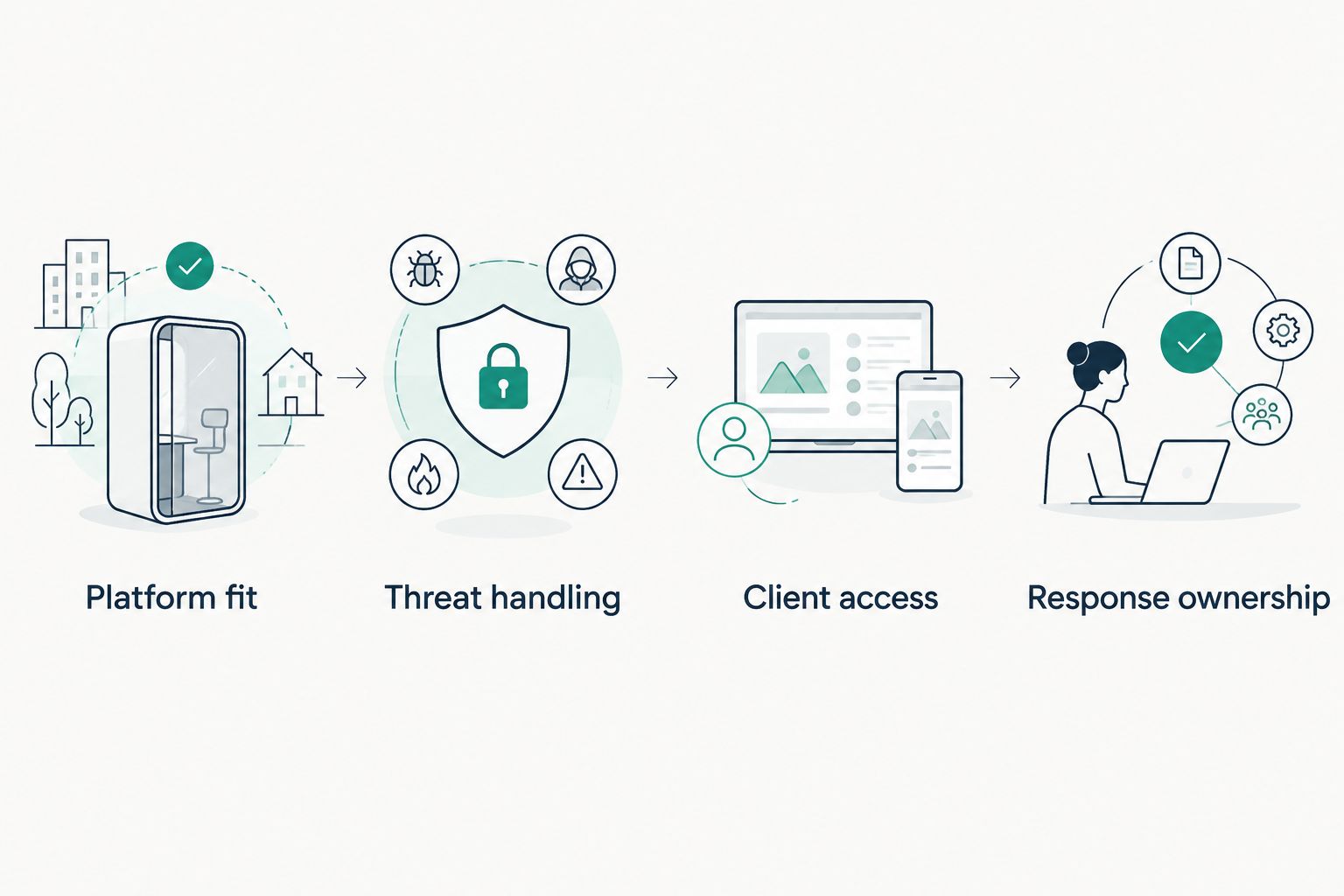
Choose the tool only after confirming both its workflow and who will operate it.
A successful review ends with a written decision, not just a feature checklist. Record the selected controls, the remaining gaps, and the person accountable for each gap. If an unanswered requirement affects confidential communications or incident response, hold the purchase until the proposal addresses it.
Which email security tool should your law firm choose?
Start with Microsoft Defender for Office 365 if your firm uses Microsoft 365. Verify licensing, configuration, and operating responsibility before adding another product. Choose a separate tool to close a defined gap, not because its feature list is longer.
- Choose Proofpoint Essentials for a smaller-business filtering model.
- Choose Mimecast Email Security Cloud Gateway for a separate gateway control point.
- Choose Abnormal Security when impersonation detection is the central requirement.
- Choose Virtru when confidential outbound communications need encryption and access controls.
DivergeIT's managed cybersecurity services belong in the decision when your firm needs operational responsibility addressed alongside email security tools. Keep the software requirements and service commitments explicit. Neither substitutes for the other.
FAQ
What's the best email security tool for a law firm using Microsoft 365?
Microsoft Defender for Office 365 is the default shortlist choice for a law firm using Microsoft 365. Verify the required license, applied policies, and incident-response ownership before adding separate tools.
Is email encryption enough to protect a law firm?
No. Email encryption protects message confidentiality, but it does not replace phishing detection, account security, or independent verification of payment requests.
Is Abnormal Security better than a secure email gateway?
The choice depends on the protection requirement. Abnormal Security emphasizes behavioral detection, while a secure email gateway provides a separate filtering and policy-control point; assess both against the same workflows.
What's the best option for confidential client emails?
Virtru belongs on the shortlist for confidential outbound email because it provides encryption and access controls. Test the external recipient experience before adopting the workflow.
Does an email security tool make a law firm compliant?
No. A tool supports particular controls, but compliance also depends on the firm's applicable obligations, policies, implementation, and evidence.
Should a small law firm manage email security itself?
Manage email security internally only when a named owner can configure policies, review alerts, and handle incidents. A firm without that capacity should evaluate managed cybersecurity services alongside its software choices.
What should a law firm ask for before signing an email security contract?
Ask for the exact product scope, supported integrations, deployment responsibilities, and written response commitments. Require a demonstration of threat handling and confidential client communications rather than relying on feature names.
One last thing
A message can pass technical inspection and still request an unauthorized action. Require independent verification of banking-detail changes through an established contact channel, not the contact details supplied in the requesting email. Put that rule in the firm's payment process; no product comparison replaces it.