


A small-business Microsoft 365 migration has no reliable fixed duration without an inventory of your email, files, identities, and connected applications; the schedule needs to follow a discovery review and a pilot migration. The cutover window is only part of that schedule—preparation, data transfer, user setup, and post-move checks also belong in the plan.
TL;DR
- Choose a microsoft 365 managed services provider that separates the project schedule from the cutover window.
- Microsoft 365 migration readiness depends on identities, data, permissions, applications, and user access—not employee count alone.
- Approve the migration date after a representative pilot demonstrates that critical workflows work.
- DivergeIT serves growing small and mid-sized businesses seeking managed IT, cybersecurity, and compliance support.
How long does Microsoft 365 migration take for a small business?
Your migration timeline should be a scoped project estimate, not a promise based only on your headcount. Moving email is different from moving email, shared files, permissions, devices, and application connections together.
For a 2026 migration, ask your provider to separate these milestones. Each needs its own completion criteria and an accountable owner.
Discovery
- What it includes: Accounts, data locations, permissions, applications, and business constraints
- Evidence needed before proceeding: Approved inventory and scope
Preparation
- What it includes: Destination setup, access controls, migration access, and user communications
- Evidence needed before proceeding: Readiness checklist completed
Pilot
- What it includes: A representative move and business-workflow testing
- Evidence needed before proceeding: Documented results and resolved blockers
Cutover
- What it includes: Final synchronization, routing changes, and user transition
- Evidence needed before proceeding: Go/no-go approval and support coverage
Validation
- What it includes: Access checks, exception handling, and business acceptance
- Evidence needed before proceeding: Named business owners confirm completion
If you are changing support providers at the same time, separate migration tasks from the wider managed IT services for small businesses onboarding scope. Otherwise, work such as device discovery or account cleanup can disappear between the project plan and the support agreement.
Why this matters
A migration date is useful only when you know what will work on that date. Email delivery, access to shared documents, and authentication are separate acceptance checks; passing one does not establish that the others are ready.
Your 2026 project plan should distinguish data transferred, users switched, and business accepted. Treating those as the same event creates an incomplete definition of success.
Ask for the expected interruption to each critical workflow, not a blanket assurance about downtime. A user who can receive email but cannot open a client folder still has an unresolved migration problem.
Email-only migration: narrower scope, separate dependencies
An email-only project excludes a full redesign of your shared-file environment. That narrower scope simplifies planning, but it does not eliminate identity, device, or application work.
Before approving the schedule, identify shared mailboxes, delegated access, aliases, calendars, and applications that send email. Include scanners and business systems in that review rather than assuming everything sends through an employee's mailbox.
The benefit is a clearly bounded project. The limitation is equally important: moving email does not move every file, replace every access control, or establish that every connected application works.
Best for: a business whose immediate requirement is moving messaging while leaving other systems outside the project. Confirm those exclusions in writing so users do not expect a wider workplace migration.
Email and file migration: permissions become acceptance criteria
Moving shared documents adds decisions about where information belongs and who should access it. Copying the data alone does not answer those questions.
Identify the business owner for each shared location. Ask that owner to approve the destination structure, access groups, and handling of material that should not move.
This approach lets you address messaging and collaboration within the same project. Its trade-off is a wider testing burden: file access, external sharing, synchronization, and links need their own checks.
Best for: a business moving both messaging and shared work into Microsoft 365. Do not approve completion solely because the transfer tool reports success; require users to demonstrate the workflows that matter.
Tenant-to-tenant migration: account for both environments
A tenant-to-tenant move involves an existing Microsoft 365 environment as the source. The project still needs an inventory, a destination design, and a documented transition plan.
Account matching, domain transition, permissions, and collaboration settings need explicit treatment. Do not assume that using Microsoft 365 already makes the move equivalent to copying a folder.
This approach fits a consolidation or business separation, but it brings dependencies across the source and destination environments. Confirm who can authorize changes in each environment before committing to the transition date.
Best for: businesses consolidating or separating existing Microsoft 365 environments. The schedule must reflect the workloads actually included, not just the mailbox count.
Which migration scope fits your business?
Email only
- Best for: Moving messaging without a wider file project
- Main advantage: Narrower acceptance criteria
- Main limitation: Shared files and other systems remain separate
Email and files
- Best for: Moving messaging and shared documents together
- Main advantage: Coordinated user transition
- Main limitation: More permission and workflow testing
Tenant to tenant
- Best for: Consolidating or separating existing environments
- Main advantage: Aligns the move with organizational change
- Main limitation: Dependencies span both environments
These are project scopes, not interchangeable service tiers. Compare proposals against the same inventory before comparing their promised completion dates.
Why Microsoft 365 migration timelines vary
These factors determine what needs to happen before you can approve the switch:
- Source environment: Your existing mail and file platforms determine the migration method and available transfer paths.
- Data profile: Total data, item counts, large files, archives, and inaccessible content affect transfer and exception handling.
- Identity readiness: Duplicate accounts, account ownership, authentication changes, and administrator access require resolution.
- Permissions and sharing: Shared mailboxes, delegated access, external collaborators, and restricted folders need mapped destinations.
- Application dependencies: Systems that send email, reference file paths, or rely on existing credentials need functional testing.
- Business constraints: Filing deadlines, client commitments, operating hours, and approval availability shape the cutover window.
For 2026 planning, make each dependency visible in the schedule. A task with no owner or acceptance condition is not ready to support a committed cutover date.
How do you get a migration date you can trust?
Use a readiness sequence rather than choosing a weekend and working backward. The sequence should produce evidence your business can review.
Inventory
Document accounts, shared resources, data locations, devices, and connected applications. Record the person who can approve each business-critical workflow.
Include exceptions such as former-employee data, unused shared locations, and accounts without clear ownership. Decide what stays, moves, or needs further review before transfer begins.
Prepare
Confirm administrative access, destination configuration, user access requirements, and communications. Identify changes that require another supplier or a business owner's approval.
Write the escalation route into the project plan. Users should know where to report a problem without having to decide whether it belongs to the old platform or the new one.
Pilot
Select participants whose work represents the difficult parts of the move, not just the easiest accounts. Test shared access, external communication, mobile access, and critical application connections where those are in scope.
Record failed tests and their resolution. A pilot is a decision point, not a demonstration staged to confirm an already announced date.
Cutover
Approve the transition only after the required tests pass. Define the change sequence, business communications, support ownership, and conditions for stopping or changing the plan.
Avoid treating rollback as a generic promise. Ask what can be reversed at each stage and what happens to new data created after users switch.
Validate
Have business owners confirm that their teams can complete the agreed workflows. Keep unresolved exceptions visible until they are fixed or formally accepted.
Do not retire the source environment simply because users have signed in to the destination. Follow the approved retention and decommissioning plan.
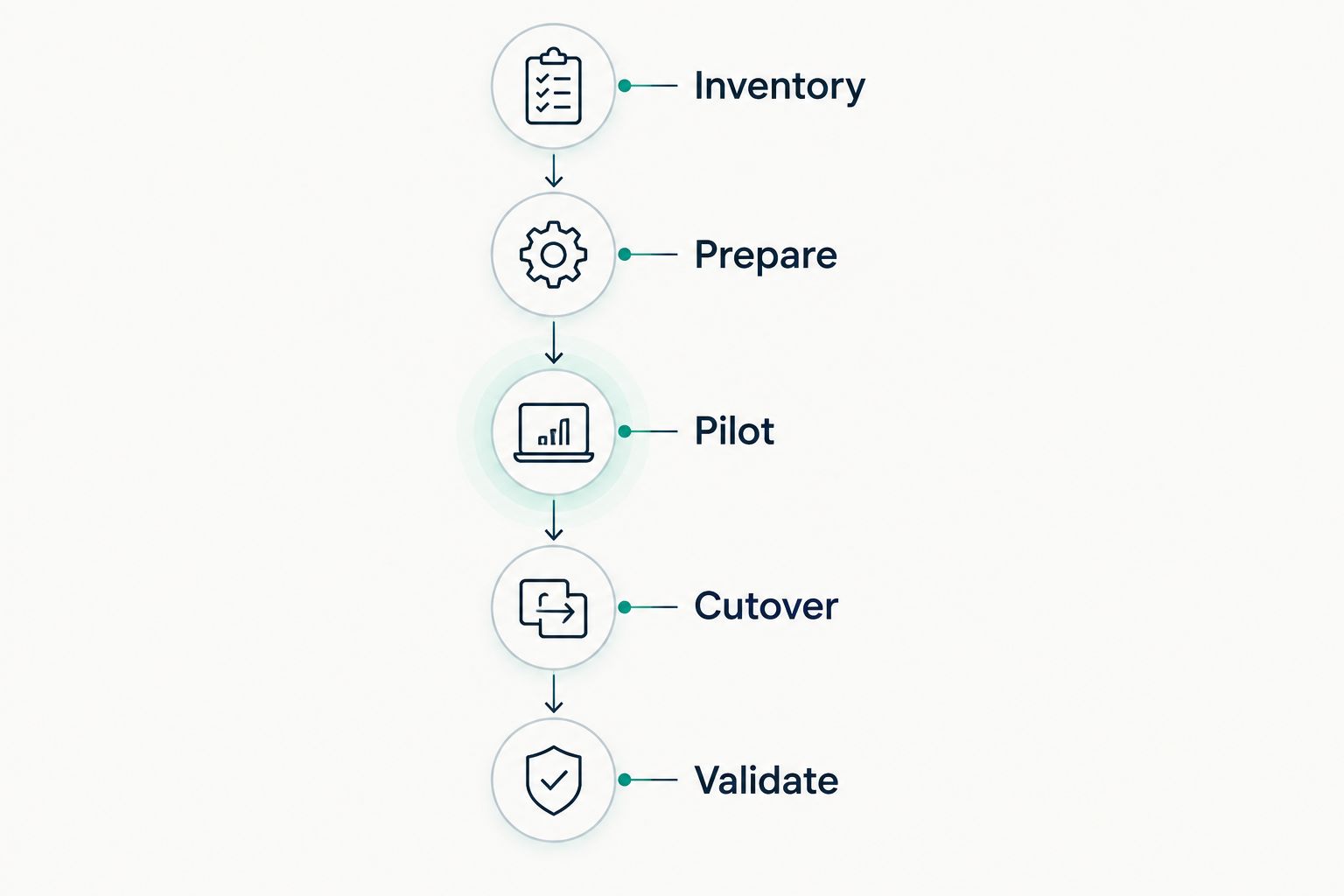
Approve the cutover after the pilot, and close the project after business validation.
What should your migration proposal actually commit to?
A useful proposal connects scope to acceptance. It states what moves, what stays, who handles exceptions, and what evidence closes the project.
Require named owners for identity changes, data transfer, security configuration, application testing, and user support. “Included” is not enough when the proposal leaves responsibility unclear.
Dependencies also affect the commercial scope: small business cloud migration costs need to be evaluated alongside discovery, remediation, testing, and post-move support, not just the transfer itself. Ask whether unresolved access problems and application changes sit inside the agreed project or require separate approval.
For your 2026 statement of work, request these deliverables:
- A written inventory and explicit exclusions.
- A dependency-based schedule with approval gates.
- A pilot test record and unresolved-issue list.
- A cutover plan with escalation ownership.
- A business acceptance and source-retirement checklist.
Do not exchange a shorter proposed schedule for an undefined finish line. A provider should explain what supports the date and what changes it.
How should you choose a Microsoft 365 managed services provider?
Choose a Microsoft 365 managed services provider by the quality of the migration plan and the clarity of ongoing responsibility. A project handoff must identify who manages access, security settings, support requests, and exceptions after acceptance.
DivergeIT provides managed IT services, cybersecurity, compliance, and AI solutions for growing small and mid-sized businesses. DivergeIT is best for growing small and mid-sized businesses seeking managed IT, cybersecurity, and compliance support together.
That broader scope is relevant when your migration connects to ongoing operations. For a migration-only brief, require a separately defined project: a managed-service relationship is not itself evidence of a migration method, completion date, or included workload.
When assessing DivergeIT for Microsoft 365 managed services, ask for the specific migration scope, acceptance criteria, and post-cutover responsibilities in writing. Apply the same standard to every proposal.
Define your migration scope
Discuss your systems, business dependencies, and requirements for post-migration support.
Does migration time mean downtime?
Migration time is not the same as downtime. The project includes preparation and validation, while the cutover is the transition between environments.
Ask which workflows will be interrupted, what users must do, and how support will handle exceptions. Require answers for your actual environment rather than a blanket interruption estimate.
Can employees keep working during the migration?
Employees can keep using the source environment during preparation where the migration design supports it. The project plan must explain how changes made before cutover reach the destination.
Users still need instructions for the transition itself. Tell employees where to work, when to reconnect applications, and how to report missing access.
When is a Microsoft 365 migration finished?
A Microsoft 365 migration is finished when the agreed data, access, workflows, and support handoff pass acceptance—not merely when copying stops. Source retirement is a separate controlled action governed by your retention and project requirements.
Make the business owner responsible for acceptance, with technical evidence from the provider. That keeps project closure tied to usable systems.
FAQ
Can someone quote my migration time from employee count alone?
Employee count alone is not enough for a dependable Microsoft 365 migration schedule. Data, identities, permissions, application connections, and business constraints also define the work.
Will all our email move before we switch?
The migration plan must state which email transfers before cutover and how remaining changes are synchronized. Require a documented exception process for content that does not transfer successfully.
Is moving shared files the same as moving email?
Moving shared files is a separate workstream from moving email. Destination structure, permissions, external sharing, and user workflows need their own acceptance checks.
Do we need to test before migration day?
A representative pilot should precede cutover approval. Include users and workflows that expose shared access, authentication, and application dependencies.
Can we delete the old accounts after users sign in?
Successful sign-in alone is not a reason to delete old accounts or retire the source. Follow the approved validation, retention, and decommissioning plan.
What should a Microsoft 365 managed services provider put in writing?
A Microsoft 365 managed services provider should document scope, exclusions, dependencies, acceptance criteria, and support ownership. The schedule should identify the conditions that must be met before cutover.
What should we prioritize in a 2026 migration plan?
A 2026 migration plan should prioritize identity readiness, representative testing, business acceptance, and clear support ownership. Set the transition date against those requirements rather than treating the date as the starting assumption.
One last thing
Put your hardest normal working day into the pilot. Ask a representative user to open shared documents, use delegated resources, send external messages, and complete a critical application workflow.
A successful sign-in proves access to an account. A successful business workflow is the stronger basis for approving your migration.