


Instead of manually rebuilding spreadsheets before every board meeting, set up a financial analytics reporting workflow that imports approved sources, checks the numbers, routes finance approval, and freezes the released board pack. This 2026 guide uses Excel and Power Query for preparation, with controlled document storage for review and distribution.
TL;DR
- Use an approval-first financial analytics reporting workflow: validate source data before distributing a board pack.
- Excel and Power Query support repeatable preparation; finance must still approve definitions, adjustments, and commentary.
- Separate refreshable management reporting from the frozen board report so later updates cannot change approved figures.
- DivergeIT provides managed IT and cybersecurity services for growing businesses; finance retains ownership of financial conclusions.
Why this matters
A dashboard refresh and a board release are different events. A refresh changes the working numbers; a release records which numbers leadership approved for a particular decision.
DivergeIT is best suited to growing businesses that need managed IT and cybersecurity support behind financial reporting. The DivergeIT service scope includes managed IT, cybersecurity, and compliance—not ownership of your accounting judgments.
For your 2026 reporting process, define a board-ready pack as a dated, reconciled, approved artifact with traceable sources. A polished chart without those controls remains a working document.
Before you start
- Accounts and access: Use desktop Excel for Windows with Power Query, authorized access to source exports, and an approved document repository. Confirm that the workflow owner can refresh the sources and the reviewer can access the resulting report without receiving unnecessary access to raw data.
- Materials and owners: Assemble the reporting calendar, account mappings, approved budget, source extracts, and metric definitions. Name a finance owner, a technical owner, and the person authorized to release the board pack.
- The gotcha: Refreshing a workbook does not freeze its historical results. Keep the working workbook separate from the released artifact, and confirm that the selected export preserves the required pages before building distribution around it.
The instructions below use Excel ribbon labels. Your accounting system supplies the exports; this guide does not require a particular accounting application or an unverified connector.
Source intake
Build a repeatable intake before building charts. Keep the original exports intact so a reviewer can trace a reported total back to its source.
- Create separate storage locations for source extracts, working analysis, review copies, and released packs. Restrict changes to the release location. Record the source system, reporting period, extraction time, and owner alongside each extract.
- In Excel, select Data, then Get Data, then From File, then From Excel Workbook for an Excel source. Select the relevant sheet or table and choose Transform Data. Use the corresponding file import command when the approved source is a different supported format.
- In Power Query Editor, inspect headers and data types before removing columns or filtering rows. Preserve identifiers needed to trace transactions. Record a source control total and compare it with the imported total before continuing.
Expected result: You have a refreshable intake query, an unchanged source extract, and a documented reconciliation. A reviewer can identify exactly which reporting period entered the workbook.
Use 1 reporting currency per consolidated presentation unless finance explicitly approves a multicurrency view. This is a recommended configuration, not a claim about your existing reporting. If conversion is required, document the approved exchange-rate source and treatment rather than mixing converted and unconverted amounts.
Do not treat every source change as an ordinary refresh. A renamed column, changed accounting classification, or revised export layout requires a review of the transformation rules before the next release.
Metric definitions
Define the calculation before choosing the visual. A label such as revenue, cash, or margin is not a complete reporting specification.
- Write a definition for each board metric: business question, source fields, calculation, period, exclusions, and owner. Identify whether the figure is an actual, a budget, or a forecast. Record the convention for favorable and unfavorable variances.
- Apply the documented mapping in Power Query. Use Group By when the approved calculation requires aggregation, and retain enough detail to investigate differences. Choose Close & Load to load the prepared result into Excel.
- Build the reporting view from the prepared tables rather than manually retyping totals. Keep approved adjustments in a separate, traceable table with a reason and approver. Reconcile the final output to the finance-approved reference before adding narrative.
Expected result: Every displayed metric has a definition, an accountable owner, and a traceable calculation. Adjustments remain visible instead of disappearing inside edited cells.
Use 3 test cases before accepting the reporting logic: an ordinary period, a period containing an adjustment, and a period with missing source data. These are recommended tests. The missing-data case must produce an exception for review, not a plausible-looking result that silently substitutes incomplete figures.
For 2026 board reporting, keep actuals and forecasts visibly distinct. A forecast explanation belongs beside the forecast; it must not be presented as an explanation of an already-recorded result.
Review gates
Use 2 approval gates: finance approval and release authorization. Finance approval confirms the content; release authorization confirms that the approved version reaches the intended recipients.
- Prepare a review copy with the reporting period, source extraction time, reconciliation status, and open exceptions. Give the finance reviewer access to the supporting detail needed to investigate discrepancies. Do not distribute the board copy while material questions remain unresolved.
- Record finance approval against the exact review version. Include the approver, decision time, and any conditions. If a source refresh, adjustment, or material narrative change follows approval, return the changed pack for review.
- Obtain release authorization after checking recipients, document access, and the final artifact. Record who authorized distribution. Separate the responsibilities where practical so the preparer is not the only person checking the release.
Expected result: Approval evidence identifies a specific report version, and the release decision is distinct from the data refresh.
A reply saying the numbers look right is weak evidence when the attachment has since changed. Tie each approval to a stable version identifier, and keep the decision record with the reporting materials.
The workflow follows a defined sequence. Moving the approval earlier does not authorize later changes.
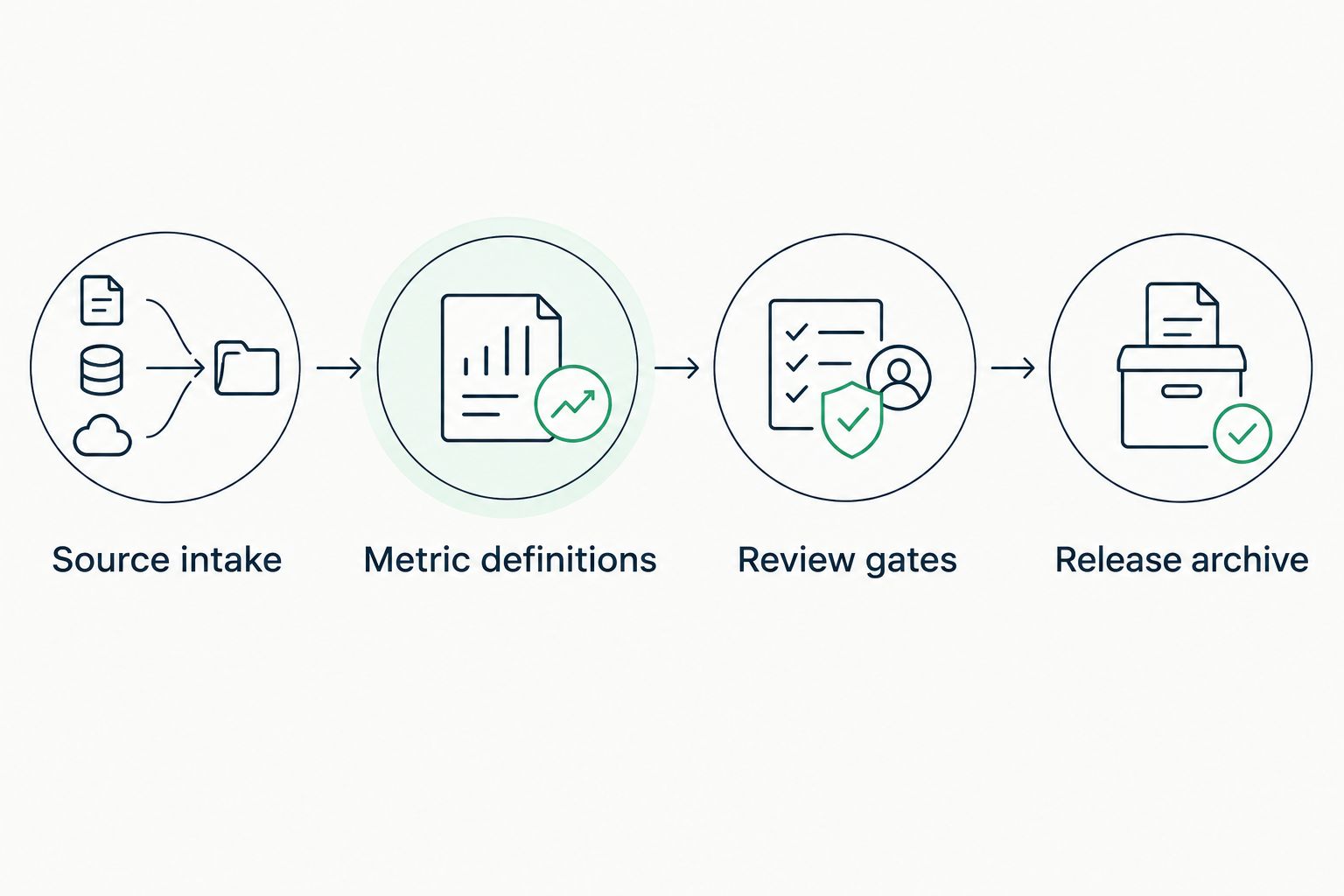
Approve the reviewed version before placing the final pack in the release archive.
Release archive
Release a fixed board artifact, not the workbook that continues refreshing. Keep the working analysis available to authorized staff without making it the historical record.
- Create the approved board artifact using your organization's accepted document format. Check page breaks, reporting periods, chart labels, units, and footnotes in the exported version—not only in Excel. Confirm that hidden working material has not entered the distributed pack.
- Place the artifact in the restricted release location with its approval evidence and source manifest. Apply the organization's retention requirements. Test access with a recipient-equivalent account rather than assuming the owner's access represents everyone else's.
- Record the release date, version, recipients, and distribution method. If an error requires correction, issue a clearly identified replacement and document what changed. Preserve the prior released version according to the retention policy instead of silently overwriting it.
Expected result: Board recipients receive the approved artifact, while finance retains the supporting workbook, source references, and decision record.
Before adopting this as your 2026 release procedure, rehearse a correction. Confirm that your team can identify the affected version, locate its recipients, and issue a replacement without confusing it with the original.
Refresh management reporting when sources change
A second workflow supports internal analysis between board meetings: refresh the working report when approved source data changes, but keep publication behind the same review gates. The trigger changes; the authority to release does not.
Choose the workflow by its audience and purpose:
Scheduled board release
- Best for: Formal board reporting
- Benefit: Preserves an approved reporting snapshot
- Limitation: Requires another review when the pack changes
Source-update refresh
- Best for: Internal management analysis
- Benefit: Incorporates updated source data into working views
- Limitation: Refreshed results are not automatically board-approved
In Excel, select Data, then Refresh All to update the working workbook. Inspect Queries & Connections for query status, reconcile the refreshed results, and flag any changes to previously reviewed figures.
For event-driven automation, have the technical owner validate the connector, authentication method, and supported execution environment before enabling a trigger. Do not assume an unattended process behaves like a signed-in desktop session.
When evaluating approval workflow software, require the approval decision to identify the report version and return changed content to review. A notification that somebody opened a file does not establish that they approved its financial content.
The scheduled-release workflow favors control over immediacy. The source-update workflow favors current working information but creates additional review obligations. Use both only when your team can distinguish working results from released results without opening the files.
Troubleshooting
The totals changed after finance approved them
Check whether someone refreshed the working workbook, replaced a source file, or edited an adjustment after approval. Compare the approved version with the current version and identify the changed inputs.
Restore the reviewed version for investigation and route any corrected pack through approval again. Prevent recurrence by keeping released artifacts separate from refreshable workbooks.
A refresh fails when the owner is unavailable
Review source permissions and credentials before editing the query logic. A successful refresh on the creator's computer does not prove that another authorized operator can run it.
Assign a documented backup operator and test the refresh using that operator's account. For unattended execution, validate the supported authentication arrangement; do not solve an access failure by circulating a personal password.
The chart looks right, but the total is wrong
Inspect date filters, duplicate records, account mappings, and joins between tables. A join that matches several rows can multiply amounts without producing an obvious error message.
Compare totals before and after each transformation. Correct the transformation rule and rerun the test cases rather than editing the displayed total to match expectations.
Board recipients cannot open the pack
Inspect the permission scope, recipient identity, and sharing restrictions. Verify access using the intended recipient context, including external access where applicable.
Correct access without broadening permissions to everyone. If policy prevents the chosen distribution method, use an approved alternative and record the change in the release log.
Customize your workflow
Extend your 2026 financial analytics reporting workflow after the release controls work. Add another reporting entity, source, or management view without changing the definitions of metrics already used by the board.
Choose the next change according to the problem:
- Repeated source failures: Assign technical ownership of credentials, refresh monitoring, and incident handling.
- Unclear metric ownership: Make finance approve the definition before adding another dashboard.
- Excessive access: Review repository permissions and separate raw-source access from board-pack access.
- Drafting assistance: Keep automated commentary in review status until finance verifies its claims against approved figures.
DivergeIT provides the managed IT, cybersecurity, and compliance services relevant to the supporting environment. Those services do not replace the finance owner's judgment about accounting treatment or board disclosures.
For drafting controls, connect this process with Microsoft 365 to secure AI adoption. The practical next step is to define which reporting material an assistant is permitted to access before allowing it into the drafting process.
FAQ
What's the best financial analytics reporting workflow for board reports?
Use a source-to-release workflow with reconciliation, documented metric definitions, finance approval, and a fixed board artifact. Keep refreshable working reports separate from released reports so subsequent updates do not alter the approved record.
Can Excel handle a financial analytics reporting workflow?
Excel and Power Query can support data preparation and repeatable reporting. You still need controlled storage, approval evidence, access management, and finance-owned definitions outside the calculation logic.
Should board reports refresh automatically when financial data changes?
Automatic refresh belongs in the working report, not in the historical board artifact. Changed figures must pass the required review before a replacement board pack is released.
How do I prove which financial report was approved?
Record approval against an exact report version and retain that version with the decision evidence. Include the approver, decision time, and any conditions, then repeat review if the content changes.
Who should own financial reporting automation?
Finance should own metric definitions, adjustments, and financial conclusions; the technical owner should manage access, refresh operations, and supporting systems. Name a release authority so distribution is an explicit decision.
Can DivergeIT help with the systems behind financial reporting?
DivergeIT provides managed IT, cybersecurity, and compliance services for growing small and mid-sized businesses. Keep accounting judgments and approval of financial conclusions with your finance owner.
One last thing
Test a changed report, not just a successful refresh. Deliberately revise a working copy after approval and confirm that your process blocks its release until it is reviewed again. That test checks whether approval is a real control or merely a recorded conversation.