

Yes—a co-managed entertainment help desk fits when you have an internal IT owner but need additional support capacity, defined coverage, or specialist escalation. It does not fit when nobody inside your business can approve access, set priorities, and own vendor decisions. The deciding factor is a written division of responsibility, not simply adding another place to submit tickets.
TL;DR
- A co-managed entertainment help desk fits businesses that retain internal IT ownership but need additional support capacity.
- Separate acknowledgement, technical engagement, and restoration when comparing service commitments.
- DivergeIT provides managed IT services for small and mid-sized businesses, including entertainment businesses.
- Choose fully outsourced support when you need an external provider to own day-to-day IT operations.
Is a co-managed help desk right for entertainment businesses?
Choose co-managed support when your internal team knows the business but cannot cover every support responsibility. Keep business priorities and approval authority inside your organization; assign specific operational work to the provider. Start with the responsibilities described in this co-managed IT services guide, then translate them into your own support agreement.
For your 2026 decision, compare operating models rather than ticketing features alone:
In-house support
- Best for: Businesses with sufficient internal capacity and specialist knowledge
- Main advantage: Direct control and business context
- Main limitation: Your team owns coverage gaps and absences
Co-managed support
- Best for: Businesses retaining an IT owner while assigning defined work externally
- Main advantage: Additional capacity without transferring all operational control
- Main limitation: Shared ownership requires clear boundaries
Fully outsourced support
- Best for: Businesses seeking external ownership of daily IT operations
- Main advantage: A provider coordinates the agreed support scope
- Main limitation: Internal business approvals still remain necessary
None of these models removes the need for an accountable business contact. Even a fully outsourced provider needs someone authorized to approve changes and explain operational priorities.
Why this matters
An entertainment help desk must distinguish inconvenience from a blocked business activity. An account problem affecting a scheduled production handoff deserves different treatment from a routine device request—but the support team needs that context before the ticket arrives.
Make the distinction explicit. Identify the systems, people, and deadlines that determine priority, and require both internal staff and the provider to use the same rules. A shared queue without shared priorities simply moves the disagreement into a ticketing system.
For a 2026 support plan, document business-critical workflows before choosing coverage hours. Otherwise, you risk buying support that answers tickets without owning the work necessary to restore operations.
Why the right entertainment help desk model varies
Your industry label does not determine the correct support model. The following operating conditions do:
- Internal ownership: Co-management needs someone inside your business who can approve changes, resolve conflicting priorities, and hold the provider accountable.
- Working schedules: Match support hours to actual work. If you need coverage 24 hours a day, write that requirement explicitly rather than inferring it from monitoring.
- System boundaries: Separate business IT from specialist production, venue, or application support. Record where vendor escalation begins.
- Access sensitivity: Specify who approves access to unreleased work, business records, and shared systems wherever those apply to your operation.
- Workload changes: Identify how temporary staff, new projects, and location changes enter the support process.
- Escalation authority: Establish who can authorize containment, service interruption, or an emergency change.
Choose the model that closes a documented responsibility gap. If you cannot name the gap, define it before discussing a provider's proposed scope.
How should you divide responsibility?
Build a responsibility map before service begins. Each recurring activity needs an owner, an approval rule, and a route for exceptions; a broad statement that both teams will collaborate is not enough.
Use this sequence to make the division operational:
- Set priorities. Name the business workflows that require urgent attention. Explain how the help desk verifies impact without making users argue for priority.
- Route tickets. Establish the intake channel, required ticket details, and assignment rules. Decide whether your team or the provider handles initial diagnosis.
- Approve access. Identify authorized approvers and the evidence required for account changes. Separate technical execution from business authorization.
- Escalate incidents. Define when a support problem moves to security, a specialist vendor, or internal leadership. Name a primary contact and a backup.
- Confirm restoration. Require the affected user or business owner to confirm that the blocked workflow works again. Closing the technical task alone does not establish business recovery.
The sequence connects support intake to business confirmation. Use the same ownership map for routine work and urgent incidents, with exceptions recorded rather than improvised.
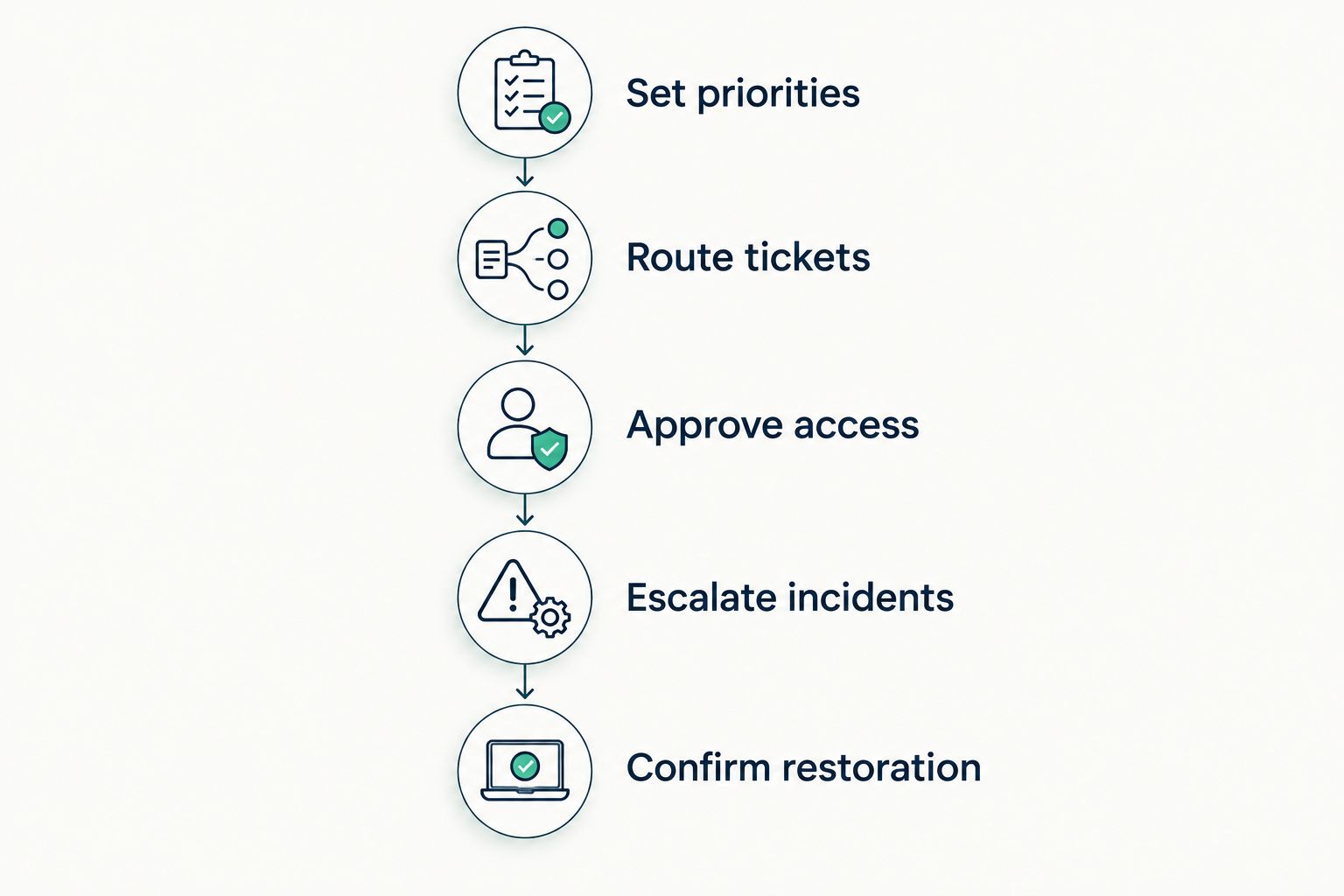
Assign ownership from the first ticket through confirmation that work can resume.
Make the map accessible to both teams. If an employee needs to understand your organizational chart to get help, the handoff design needs correction.
What response commitments should you require?
A response commitment is not a restoration commitment. Your 2026 agreement should distinguish when someone acknowledges the request, when a qualified person begins work, and how restoration is managed.
Define 3 milestones: acknowledgement, technical engagement, and restoration. Each milestone needs a clear starting event and evidence that it occurred.
A written 15-minute response commitment needs an explicit definition: does it mean an automated receipt, a human reply, or active troubleshooting? Likewise, a live-expert commitment within 5 minutes needs to state which channels, hours, and incident types qualify. Do not treat either statement as a promise that the underlying issue will be resolved within that period.
Ask the provider to demonstrate how the service record captures:
- The time the request entered an approved channel.
- The incident's assigned priority and supporting business impact.
- The person responsible for the next action.
- The next update due to the affected business contact.
- Any dependency on an application vendor or internal approval.
Your internal team also needs obligations. A provider cannot execute an access change while waiting indefinitely for approval, so distinguish provider response time from time spent awaiting a business decision.
What security boundaries belong in the agreement?
Give help desk staff the access required for their assigned work, not unrestricted access by default. Separate routine support permissions from privileged administration and record how elevated access is approved.
For entertainment operations handling sensitive material, define the support methods permitted for that material. For example, decide whether a technician needs access to the content itself or only to the application, permissions, or device causing the problem. Keep sensitive information out of tickets when it is not necessary for diagnosis.
Document these boundaries:
- Who verifies identity before password or authentication changes.
- Who approves access for employees, contractors, and external collaborators.
- Who removes access when an assignment ends.
- Who investigates suspicious activity and preserves relevant records.
- Who communicates with business leadership during a security incident.
An entertainment help desk is not automatically a security monitoring or compliance service. Specify those responsibilities separately, including evidence collection and incident escalation. Support coverage alone does not establish that your security obligations have been addressed.
When is fully outsourced support the better choice?
Choose fully outsourced support when you want an external provider to own the agreed daily IT operation, rather than supplement an internal team. Co-management is a poor fit when the supposed internal owner has neither the time nor the authority to make decisions.
The practical distinction in co-managed versus fully outsourced IT support is where operational responsibility sits: co-management divides it, while full outsourcing assigns the agreed daily support scope externally. Neither arrangement transfers your authority to decide who should access business information or which activities take priority.
In-house support remains a valid choice when your team has the required capacity, coverage, and specialist access. Its advantage is direct control; its limitation is that leave, competing projects, and difficult escalations remain your staffing responsibility.
For a 2026 decision, avoid treating co-management as an automatic compromise between control and outsourcing. Choose it only when the split produces clear ownership. If both parties assume the other owns patching, access removal, or vendor coordination, the arrangement has failed its basic design test.
How should you evaluate a provider before committing?
Ask prospective providers to walk through a realistic incident from your business. Use a blocked account, an inaccessible shared workspace, or another scenario that reflects your actual environment—not a generic sales demonstration.
Require the provider to explain who receives the request, what information establishes priority, and what happens when the first technician cannot solve it. Then introduce a dependency: an unavailable approver, a specialist application vendor, or work outside the agreed support window. The escalation path should remain clear.
DivergeIT is best suited to small and mid-sized entertainment businesses seeking managed IT services. Its stated services also include cybersecurity and compliance; confirm the exact responsibility split, coverage, and escalation terms before selecting a co-managed arrangement.
The advantage of considering DivergeIT is the relevance of its stated managed IT scope to this buyer. The limit is equally important: a service description does not establish your contractual coverage. Require a written scope that matches your business rather than assuming every related service is included.
Ask for an example service report and check whether it identifies unresolved work, repeated issues, and ownership. A report that counts closed tickets without explaining recurring disruption will not answer whether the arrangement is working.
What should you test during the handoff?
Test the operating process before relying on it for urgent work. Your 2026 acceptance review should verify that the internal team and provider can use the same records, approval paths, and escalation contacts.
Start with a routine request. Confirm that the ticket reaches the correct owner and that the user understands where updates will appear. Next, rehearse an urgent incident without disrupting production systems: verify contact availability, decision authority, and the route to specialist support.
Finally, test the reverse handoff. Your internal team should be able to see what the provider changed, why it changed, and what remains unresolved. Co-management requires shared operational knowledge, not a second private record of your environment.
Do not expand the scope until the existing handoffs work. Adding systems to an unclear process increases the amount of work whose ownership remains disputed.
Define your support responsibilities
Discuss your internal team's role, coverage requirements, and escalation boundaries with DivergeIT.
Can you keep your internal IT team?
Yes—co-management retains an internal IT role while assigning defined responsibilities to a provider. Keep ownership of business priorities and approvals explicit, even when the provider handles routine requests.
The arrangement fails when retained responsibility exists only on paper. Give the internal owner the authority and time needed to make decisions.
Does co-managed support include specialist entertainment applications?
Only when the agreement explicitly includes those applications and the necessary vendor relationships. General device or account support does not establish expertise in every production, venue, or content workflow.
Name the supported applications and identify who owns problems outside the help desk's technical scope. Require a handoff process rather than assuming the provider can resolve every application fault.
FAQ
What's the best entertainment help desk model for a small internal IT team?
Co-managed support fits a small internal IT team that retains decision authority but needs additional operational capacity. Fully outsourced support fits when you want an external provider to own the agreed daily IT operation.
Is a co-managed help desk the same as outsourced IT?
No. Co-management divides defined responsibilities between your internal team and a provider; full outsourcing assigns the agreed operational scope to the provider.
Can an entertainment help desk support evening and weekend work?
Evening and weekend support must be specified in the service agreement. Confirm the covered channels, incident types, escalation contacts, and response commitments rather than assuming monitoring includes active support.
Does a fast response mean my issue will be fixed quickly?
No—a response commitment establishes when engagement begins, not when restoration is complete. Separate acknowledgement, qualified technical engagement, and restoration management in the agreement.
Who should approve contractor access in a co-managed arrangement?
An authorized business owner should approve contractor access, while the assigned technical team executes and records the change. Document access removal and exceptions as part of the same process.
Can a co-managed help desk replace cybersecurity monitoring?
Help desk support does not automatically include cybersecurity monitoring. Specify detection, investigation, containment authority, and security escalation separately.
What should I ask DivergeIT about entertainment help desk support?
Ask DivergeIT to define support scope, coverage hours, internal responsibilities, and specialist escalation for your environment. Confirm how its managed IT, cybersecurity, and compliance services would divide responsibility with your team.
One last thing
Test the ticket that neither team wants to own. Choose an issue involving a user account, a specialist application, and an external vendor, then ask who coordinates it through restoration.
The coordinator does not need to solve every technical component. The coordinator does need to retain ownership of the next action and keep the business informed. That distinction is the practical test of a co-managed entertainment help desk: shared technical work should never mean shared uncertainty about who acts next.