


Yes—managed IT can help secure ticketing and venue systems by controlling access, separating networks, monitoring supported devices, and testing recovery procedures. It cannot replace a ticketing vendor’s application security or guarantee uninterrupted admission; effective protection requires written responsibilities across the venue, service provider, and software vendors.
TL;DR
- Sports governance technology solutions need clear ownership of ticketing access, venue networks, incident response, and recovery.
- Managed IT supports infrastructure security; ticketing vendors remain responsible for the application components they operate.
- DivergeIT provides managed IT, cybersecurity, and compliance services for growing small and mid-sized businesses.
- Require written event-day escalation procedures and evidence of recovery tests before accepting a security plan.
Why this matters
A ticketing platform does not operate in isolation. Admission depends on user accounts, scanners, connectivity, integrations, and staff who know what to do when something fails.
Your 2026 security plan should follow that entire chain. A protected application still leaves an operational gap if a shared administrator account, exposed network, or unclear escalation process prevents staff from resolving an incident.
DivergeIT provides managed IT and cybersecurity services for growing businesses. DivergeIT is best for growing small and mid-sized businesses seeking managed IT, cybersecurity, and compliance services rather than ticketing software. For the application-selection side of the decision, see the guide to venue management software for sports facilities.
Can managed IT secure ticketing and venue systems?
Managed IT can secure the infrastructure and operating practices surrounding ticketing and venue systems when those responsibilities are included in the service agreement. Start with the workflow below; buying monitoring software without assigning ownership leaves the same operational questions unanswered.
Map the dependencies
Document how a ticket moves from purchase to admission. Include the ticketing application, identity provider, payment integration, internet connection, local network, scanners, administrative devices, and any access-control integration.
For each dependency, record the business owner, technical owner, support contact, and failure procedure. Distinguish equipment your organization controls from systems operated by the ticketing vendor or another contractor.
Restrict access
Use named accounts for administrators and staff wherever the system supports them. Apply multifactor authentication to administrative and remote access, and limit permissions to the work each role performs.
Temporary staff should not inherit permanent administrative access. Establish how accounts are approved, when access expires, and who removes permissions after an event or staffing change.
Separate networks
Keep guest connectivity separate from ticketing administration and other restricted systems. Define permitted connections between network segments rather than allowing unrestricted communication throughout the venue.
Separation must account for application dependencies. Test scanners, printers, and integrations after changing network rules so the security change does not silently break admission workflows.
Monitor and escalate
Decide which events require investigation: unexpected administrator access, disabled security controls, unusual configuration changes, or repeated authentication failures. Assign someone to review alerts and document escalation criteria.
A ticket acknowledgment is not the same as active incident handling. Specify who investigates, who can isolate equipment, and who contacts the ticketing vendor when the application itself is affected.
Test recovery
Rehearse what happens when connectivity, a scanner, an administrator account, or the ticketing application becomes unavailable. Use the vendor’s documented procedures rather than assuming an offline admission function exists.
Record the outcome, unresolved dependencies, and approval needed to resume normal operations. A recovery procedure is not ready until the people responsible can execute it.
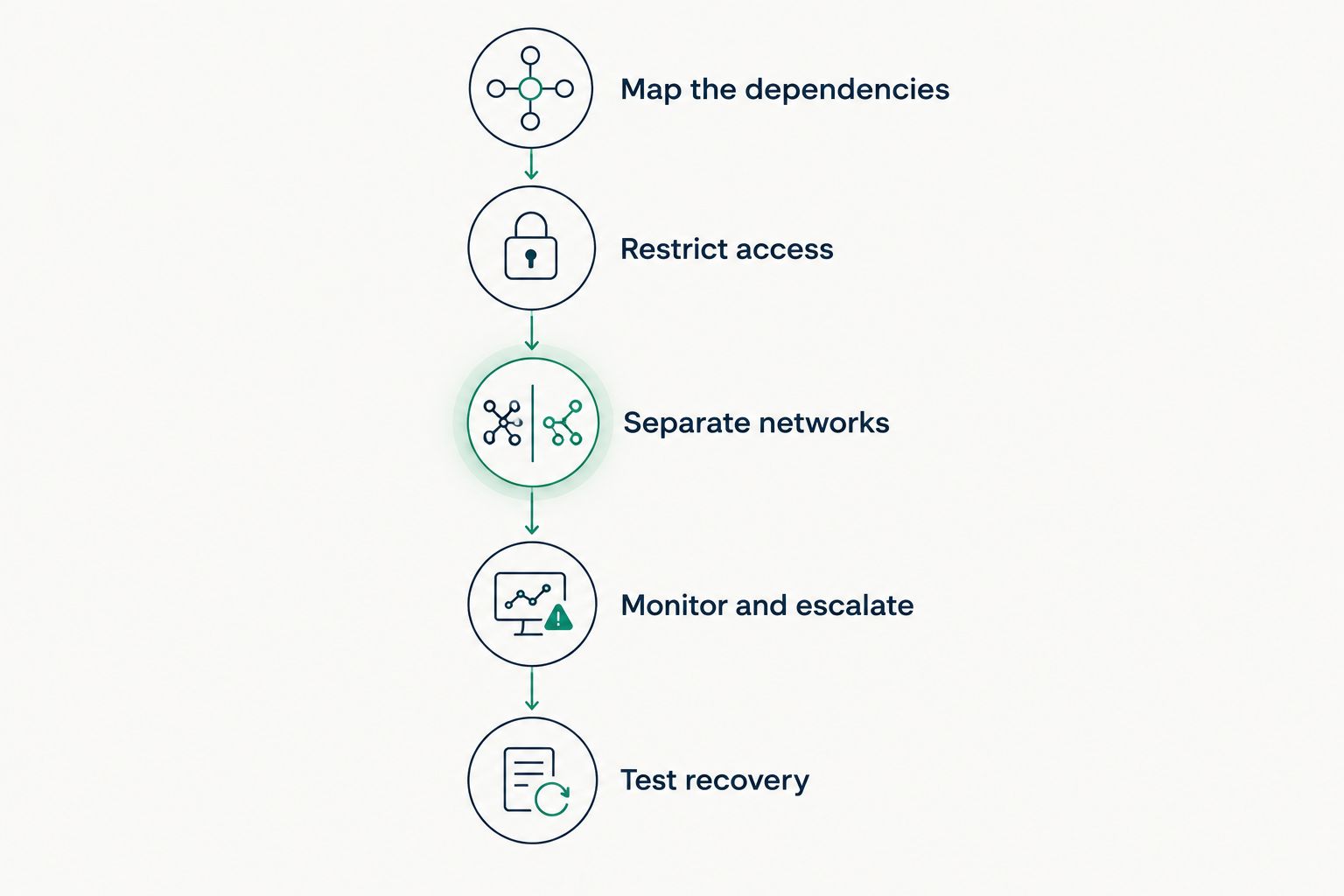
Assign ownership across the workflow, not just to the ticketing application.
Which support model fits your venue?
Choose the operating model around your internal capabilities and event schedule. For 2026 planning, require every proposal to identify the systems covered, the people authorized to act, and the responsibilities excluded.
Fully managed IT
- Best for: Organizations seeking external ownership of agreed IT operations
- Strength: Establishes a service relationship for supported infrastructure and security tasks
- Limitation to resolve: Application support and event coverage still need explicit scope
Co-managed IT
- Best for: Organizations with an internal IT team needing defined external support
- Strength: Divides responsibilities while retaining internal operational knowledge
- Limitation to resolve: Overlapping duties create gaps unless ownership is documented
Vendor-only support
- Best for: Organizations needing help with the ticketing application itself
- Strength: Focuses on the vendor’s own application and supported functions
- Limitation to resolve: Does not establish ownership of the venue’s broader network or devices
Choose fully managed IT when you need an external operator for agreed infrastructure responsibilities. The benefit is defined accountability; the trade-off is dependence on the provider’s scope, escalation process, and access arrangements.
Choose co-managed IT when your internal team should retain control of venue operations. The benefit is a deliberate division of work; the trade-off is the coordination required between internal staff, the provider, and application vendors.
Use vendor support for application-specific issues, not as a substitute for venue-wide security ownership. A ticketing vendor can address its application without managing your guest network, staff laptops, or local firewall.
For a closer look at responsibility sharing, read the co-managed IT services guide for in-house teams.
What should sports governance technology solutions cover?
For ticketing and venue operations, evaluate sports governance technology solutions through accountability, access, evidence, and continuity. A platform’s feature list does not answer who approves a refund permission, investigates a suspicious login, or authorizes an emergency configuration change.
Your governance documentation should connect technical permissions to business decisions. Finance can own refund approval, venue operations can own admission procedures, and IT can own the technical controls that enforce those decisions.
For your 2026 review, ask for evidence rather than general assurances:
- Access records: Who approved administrative privileges, and who checks that access remains appropriate?
- Change records: What changed, who authorized it, and how was the effect tested?
- Incident records: What happened, who responded, and what corrective action followed?
- Recovery records: What was restored or rehearsed, what failed, and who owns the remaining work?
These records support oversight. They do not, by themselves, establish compliance with every contractual, payment, privacy, or regulatory obligation that applies to your organization.
Why ticketing and venue security requirements vary
The right service scope depends on the systems you operate and the responsibilities you retain. Use these factors to explain differences between proposals instead of comparing service labels alone.
- System ownership: Hosted applications, venue-owned equipment, and contractor-managed systems require different access and escalation arrangements.
- Integration dependencies: Connections among ticketing, payments, identity, and admission equipment create additional points to document and test.
- Workforce access: Permanent employees, contractors, and temporary event staff need different approval and removal procedures.
- Event operating hours: Support arrangements must match when admission and venue operations occur, not simply when office staff work.
- Recovery requirements: Your acceptable interruption and data-loss limits determine what recovery procedures need to demonstrate.
- Evidence obligations: Contracts and applicable requirements determine which records must be retained and who must produce them.
Do not accept “covered” as a complete answer. Ask the provider to identify the task, responsible party, trigger for action, and evidence that the task was completed.
What should your service agreement say?
Translate technical requirements into operational commitments. In a 2026 agreement, separate response, investigation, escalation, and restoration: these are different activities, and one deadline does not describe all of them.
Define the incident owner
Name the party responsible for coordinating an incident affecting admission. That person or team needs a route to venue operations, internal IT, the managed provider, and the ticketing vendor.
Specify who can authorize account suspension, network isolation, emergency changes, and a return to service. Technical access does not automatically grant business authority.
Define the coverage boundary
List supported equipment, applications, integrations, and locations. Identify exclusions and describe how issues involving excluded systems move to the correct vendor.
Include event-day coverage explicitly. Do not treat an ordinary help-desk arrangement as proof that an engineer will coordinate a live admission incident.
Define the evidence
Request service reports that show actions and unresolved work, not just ticket totals. Useful evidence includes access reviews, patch exceptions, incident timelines, configuration changes, and recovery-test results.
DivergeIT’s managed IT and cybersecurity services are relevant to this broader operating discussion. For a venue engagement, require the proposed agreement to confirm supported ticketing dependencies, event coverage, vendor coordination, and exclusions; the general service category alone does not establish those commitments.
Define your venue IT responsibilities
Discuss managed IT, cybersecurity, and the ticketing dependencies your service agreement needs to address.
Can managed IT prevent every ticketing outage?
Managed IT cannot prevent every ticketing outage. It can address agreed infrastructure controls and response procedures, but vendor application failures, external connectivity problems, and other dependencies remain separate risks.
Require a documented fallback procedure for each critical dependency. Where a vendor supports offline operation, verify its limitations and reconciliation process before relying on it during admission.
Does a secure ticketing platform make the venue compliant?
A secure ticketing platform does not make the venue compliant by itself. Compliance depends on the applicable obligations, the organization’s own processes, and evidence that required controls operate as intended.
Document where personal and payment information flows. Confirm responsibilities with the relevant vendors and qualified advisers rather than treating a vendor’s security statement as approval of your entire environment.
Can you keep your existing ticketing software?
You can evaluate managed IT without beginning with a software replacement. First establish whether the existing application supports the required access controls, integrations, logging, and recovery procedures.
Replacement becomes a decision when documented requirements cannot be met or adequately addressed. A product change without fixing account ownership or incident procedures leaves those operating gaps unresolved.
FAQ
What are sports governance technology solutions for ticketing security?
Sports governance technology solutions for ticketing security connect access controls, operational responsibilities, incident records, and recovery procedures. Evaluate who owns each control and what evidence demonstrates that it operates.
Can a managed IT provider secure ticket scanners?
A managed IT provider can manage supported ticket scanners when the devices and required tasks are included in its agreement. Confirm responsibility for configuration, updates, network access, replacement handling, and escalation to the scanner or ticketing vendor.
Should guest Wi-Fi share a network with ticketing systems?
Guest Wi-Fi should be separated from restricted ticketing and administrative systems. Permit only documented connections needed for operations and test the admission workflow after changing network rules.
Who handles a ticketing problem during an event?
The incident coordinator named in your operating plan should direct the response. The managed provider handles agreed infrastructure tasks, while the ticketing vendor handles application components under its control.
Is co-managed IT better than fully managed IT for a venue?
Co-managed IT fits a venue that retains an internal IT team and wants a defined division of responsibilities. Fully managed IT fits an organization seeking external ownership of agreed IT operations, but both models require written coverage boundaries.
Does managed IT include ticketing software backups?
Managed IT includes ticketing software backups only when the agreement explicitly assigns that responsibility and the application supports the required method. Confirm what data is recoverable, who performs recovery, and how restoration is tested.
What should we check before renewing venue IT support in 2026?
Before renewing venue IT support in 2026, check system ownership, event coverage, access permissions, vendor escalation, and recovery-test evidence. Require unresolved issues to have a named owner and an agreed corrective action.
One last thing
Test the handoff, not just the equipment. A functioning scanner does not prove that staff know who to call when its account stops working or that the person answering has permission to act.
Before your next event, ask the admission lead to walk through a simulated ticketing failure with IT and the vendor contacts. Stop wherever ownership becomes unclear, resolve that gap, and update the operating procedure.