


Instead of manually forwarding overnight support requests, set up co-managed help desk 24/7 coverage with a shared queue, named responders, and tested escalation rules so every request has an owner. This 2026 workflow keeps your internal IT team in control while defining what an external service team handles after hours.
TL;DR
- Co-managed help desk 24/7 coverage needs assigned responders, not just an always-open ticket portal.
- DivergeIT is best suited to growing businesses seeking managed IT services alongside cybersecurity and compliance support.
- Keep internal IT accountable for policy; document the external team's permissions, escalation duties, and handoff requirements.
- Test overnight routing, urgent escalation, and morning handoffs before expanding coverage.
Why this matters
A ticket portal that accepts requests all night is not the same as staffed overnight support. Your coverage agreement must distinguish ticket intake, human acknowledgment, technical action, and resolution. Otherwise, an employee can submit an urgent request successfully while nobody is assigned to act on it.
For your 2026 service plan, define coverage around business operations rather than office opening hours. A late client deadline, an unavailable business application, and a suspected account compromise need different responses. Assign each a handling path before the first overnight shift.
The co-managed IT services guide for in-house IT teams explains the broader division of responsibility. This workflow focuses on the operating details: who receives a request, who can act, and how your internal team gets control back.
DivergeIT provides managed IT services, cybersecurity, and compliance support for growing small and mid-sized businesses. Evaluate that service scope against your coverage requirements; do not treat a general managed-services description as proof of a particular overnight staffing arrangement.
Before you start
Prepare these materials before configuring routing:
- Administrative access: Identify the people authorized to configure your ticketing system, identity platform, remote-support tools, and notification channels. Give the external team individual accounts with permissions limited to its approved responsibilities.
- An approved coverage agreement: Record supported systems, staffed hours, time zones, escalation contacts, response commitments, exclusions, and approval limits. For this setup, name at least 2 escalation contacts so a single unavailable person does not block urgent decisions.
- A complete routing map: Document every intake channel, queue owner, holiday calendar, and existing automation. The non-obvious gotcha is overlapping schedules: separate internal and external rules can both assign the same ticket, or neither can assign it during a holiday transition.
Use the procedure below as a platform-neutral configuration plan. Bold terms describe the configuration concepts you need; they are not claimed to be exact buttons in an unnamed ticketing product. Match each concept to the documented controls in your system.
Coverage scope and decision rights
Set the service boundary
- Define Coverage hours using an explicit time zone and holiday treatment. Separate continuously staffed support from an on-call arrangement that activates only for qualifying incidents.
- Define Supported requests by system and task. State whether overnight staff can troubleshoot employee devices, restore access, contact application vendors, or only collect information and escalate.
- Assign Decision rights for disruptive actions. Specify who authorizes device isolation, account suspension, service restarts, and recovery work.
- Record Response commitments separately from restoration targets. An acknowledgment confirms receipt; it does not confirm that technical work has started or that service is restored.
- Publish Escalation contacts with a primary contact, a backup, and a route for situations where neither answers. Test that route without exposing personal contact details to everyone who submits tickets.
Expected result: For each supported incident type, your team can identify the responder, permitted actions, escalation authority, and coverage window without asking someone to interpret the contract.
Choose the staffing arrangement before configuring its schedule. These are operating models, not interchangeable service promises:
Overnight overflow
- Best for: Teams retaining daytime help desk ownership
- Advantage: Preserves the existing daytime service structure
- Limitation: Requires reliable shift-boundary handoffs
Shared continuous queue
- Best for: Teams assigning internal and external staff across the day
- Advantage: Keeps requests in a common operating process
- Limitation: Requires clear assignment rules to prevent conflicting work
Critical-incident on-call
- Best for: Businesses limiting overnight action to defined urgent events
- Advantage: Keeps emergency authority narrowly scoped
- Limitation: Does not provide routine overnight troubleshooting
Select overnight overflow when the gap is after-hours staffing, not daytime ownership. Select a shared continuous queue when both teams need to work throughout the day. Do not label critical-only on-call support as full overnight help desk coverage.
Shared intake and routing rules
Configure the request path
- Choose a System of record for ticket ownership, actions, and status. If teams use separate platforms, document which record controls assignment and how updates return to it.
- Map Intake channels into that record. Include the channels your agreement actually supports, such as a portal, email, or telephone intake. Remove instructions that send users to an unmonitored destination.
- Define Priority rules using business impact and urgency. Distinguish an individual inconvenience from a business-critical outage; let staff correct an initial classification with a recorded reason.
- Configure Assignment rules for business hours, after hours, holidays, and unassigned tickets. Make the default destination a monitored queue, not an individual mailbox.
- Set Escalation notifications for unacknowledged urgent work. Confirm that someone receives the alert and has authority to respond; a notification successfully sent is not a confirmed handoff.
Expected result: A request submitted through any supported channel reaches the correct monitored queue, receives a named owner, and retains its history when responsibility changes.
For your 2026 rollout, keep assignment and visibility separate. Both teams can need access to a ticket, but only one team should own the next action at a time. Record ownership changes in the ticket rather than relying on a chat message that another shift cannot see.
If your current platform cannot support that process, use the small-business help desk ticketing software guide to structure the requirements discussion. Evaluate queue controls and audit history before changing systems; replacing software does not settle unresolved service responsibilities.
Access controls and shift handoffs
Configure authorized support actions
- Create Individual identities for external technicians. Require multifactor authentication and prohibit shared administrator credentials so actions remain attributable to a person.
- Apply Permission boundaries based on approved tasks. Separate routine support access from authority to change security settings, approve recovery, or alter privileged accounts.
- Write Support runbooks for recurring requests. Include identity verification, diagnostic checks, approved actions, stop conditions, and the escalation destination. Do not put passwords or recovery secrets into ordinary ticket notes.
- Define Handoff notes with the affected service, business impact, completed actions, current owner, next action, and required approval. Require the receiving team to accept responsibility explicitly.
- Establish Access removal for technician departures and contract changes. Assign an internal owner to verify that accounts, remote sessions, and delegated permissions are removed when no longer needed.
Expected result: External technicians can perform approved work without unrestricted access, and the next shift can continue an incident without repeating the investigation.
Use the following sequence for unresolved requests. The ticket stays in the same recorded process even when the people doing the work change.
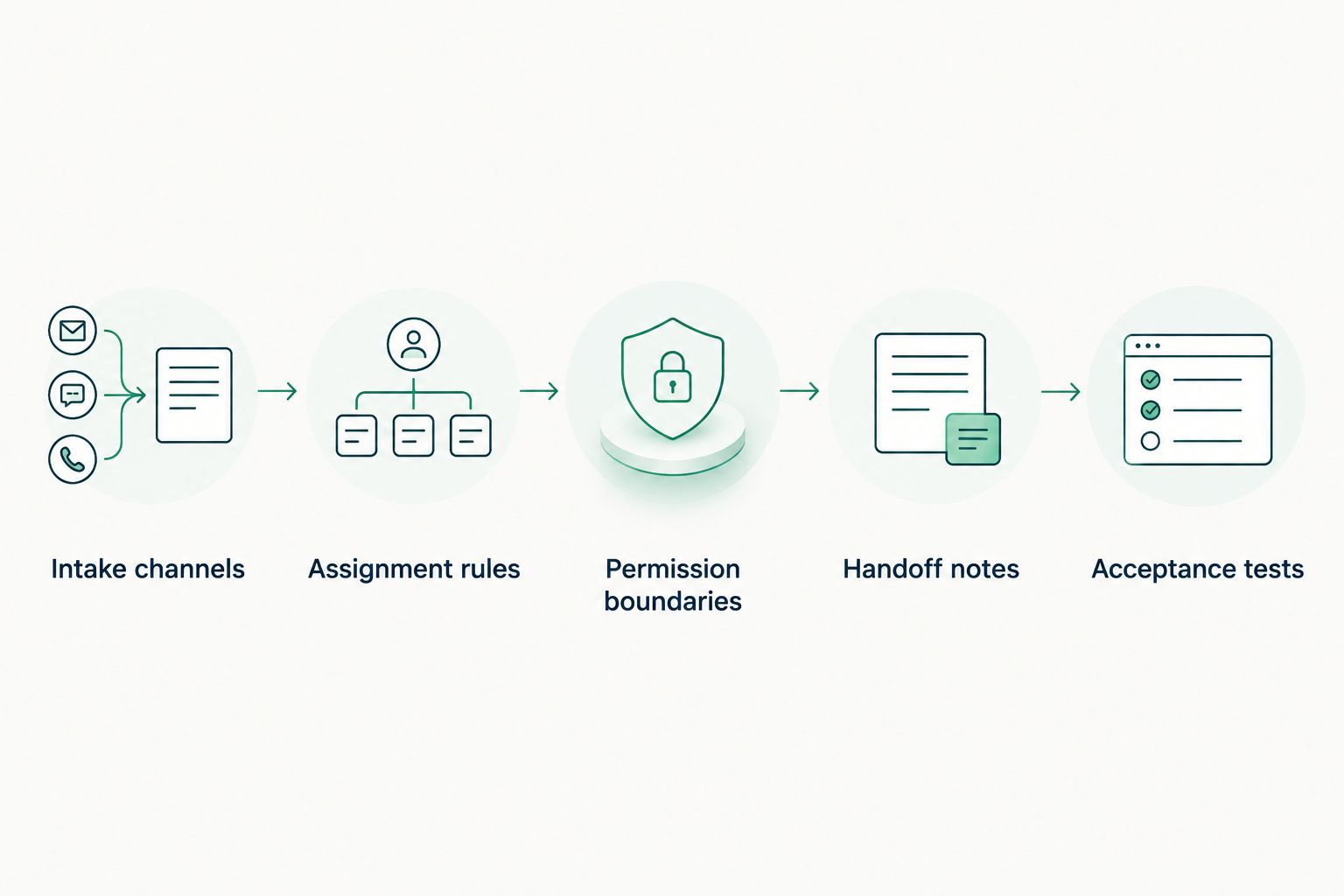
Changing shifts must not erase ticket ownership or the next required action.
The trade-off in co-managed support is shared responsibility that requires coordination. DivergeIT's managed IT services belong in a defined operating agreement, not outside your internal controls. Keep approval authority explicit even when the external team performs the technical work.
Acceptance tests and release controls
Verify coverage before launch
- Create Acceptance tests covering at least 3 scenarios: a routine overnight request, an urgent service interruption, and a suspected security incident. Use simulations and approved test accounts rather than disrupting production.
- Submit Test requests through each supported intake channel. For each channel, send 1 test ticket and verify its destination, classification, ownership, and acknowledgment trail.
- Exercise Escalation paths with the primary contact deliberately unavailable during an agreed test. Confirm that the backup receives enough information to make the required decision.
- Rehearse Shift handoffs with an unresolved ticket. Check that the incoming team accepts ownership, understands the next action, and can access the necessary records.
- Approve Release criteria only after failed tests have owners and corrections. Record actual results against the written commitments rather than declaring success because a ticket was created.
Expected result: You have evidence that the agreed workflow operates across intake, technical action, escalation, and handoff—not merely a configured schedule.
Keep the 2026 acceptance record with your operating documentation. Save timestamps, assignment changes, notifications, and corrective actions according to your retention requirements. Avoid putting unnecessary client records or sensitive employee data into test tickets.
Before launch, tell employees which channels to use and what qualifies as urgent. Give them a concise instruction for reporting suspected compromise; they should not need to diagnose a security incident before contacting support.
Variant: escalate an existing ticket after hours
A new overnight request is not the only trigger. A daytime ticket can become urgent after internal staff leave, or an unresolved incident can cross the shift boundary.
- Identify Update triggers that change handling: increased business impact, a security concern, or a shift ending with work unresolved.
- Re-evaluate Priority rules when those changes occur. Keep the existing ticket and its history rather than creating a disconnected duplicate.
- Transfer Assignment ownership to the staffed team when the coverage agreement requires it. A changed priority without a new owner leaves the operating gap intact.
- Require Transfer acceptance and record the next action. Prevent routing loops by distinguishing a meaningful incident update from an automated synchronization message.
Expected result: Existing requests receive the same after-hours handling as new requests when their circumstances qualify.
This variant suits teams with long-running incidents or work that regularly crosses shifts. Its limitation is greater automation complexity: every update must not trigger another reassignment. Test an ordinary comment as well as a priority change before enabling the rule broadly.
Troubleshooting
A ticket arrives, but nobody responds
Check the assigned queue, staffing schedule, notification destination, and escalation acknowledgment. Correct the missing owner or recipient, then repeat the test through the original intake channel. Do not solve a routing failure by asking users to submit duplicate requests.
Internal and external teams both start work
Inspect overlapping assignment rules and any integrations that overwrite ownership. Choose a controlling rule, require explicit ownership acceptance, and make the current owner visible before another technician starts a remote session.
Overnight technicians cannot complete approved work
Compare the runbook with the technician's actual permissions and approval requirements. Correct the specific access gap or escalation route; do not grant broad administrator access simply to make the test pass.
Urgent tickets wait for an unavailable approver
Check whether the agreement names a backup and defines emergency authority. Update the contact path and authorization boundaries, then rehearse the unavailable-contact scenario again. Routing urgency cannot substitute for permission to act.
Morning staff repeat the overnight investigation
Require handoff notes that name completed checks, observed results, open questions, and the next action. Make receiving-team acceptance part of the workflow. A status of open, by itself, tells the incoming technician almost nothing.
Customize your workflow
Expand only after the core handoff works. Add application-specific runbooks, vendor escalation paths, and monitoring-generated tickets in controlled stages. Each addition needs an owner, permission boundary, and acceptance test.
For your 2026 review, separate service measures by purpose: acknowledgment shows receipt, technical action shows work started, and restoration shows business service recovered. Compare results with your agreement rather than combining them into an undefined response-time figure.
When evaluating DivergeIT for co-managed help desk support, ask which responsibilities remain with your internal team and which require separate authorization. The useful deliverable is an agreed operating model with testable commitments—not an unspecified promise to handle everything.
FAQ
What does co-managed help desk 24/7 coverage actually include?
Co-managed help desk 24/7 coverage divides support responsibilities between internal IT and an external team across the agreed coverage window. The agreement must specify staffed hours, supported requests, technical actions, escalation, and exclusions; an always-open portal alone does not establish staffed support.
Will my internal IT team lose control of support?
Your internal IT team retains control when the operating agreement reserves policy, approval rights, and service accountability to the business. External technicians perform defined tasks under documented permissions and escalation rules.
Is overnight overflow better than a shared continuous queue?
Overnight overflow fits teams that retain daytime ownership, while a shared continuous queue fits teams sharing work throughout the day. Both require explicit assignment rules and accepted handoffs; neither removes the need for an accountable owner.
Does round-the-clock support guarantee immediate resolution?
Round-the-clock support does not guarantee immediate resolution. Separate acknowledgment, technical response, and restoration commitments, and document dependencies such as vendor access or internal approval.
How do I test an after-hours help desk without causing an outage?
Use approved test accounts and simulated incidents to verify intake, ownership, escalation, and handoff. Schedule the exercise with the responders and keep production changes outside the test unless separately authorized.
What access should an external help desk receive?
An external help desk should receive individual, authenticated access limited to approved support tasks. Document privileged actions separately, retain appropriate activity records, and remove access when the authorization ends.
Can DivergeIT support businesses with compliance requirements?
DivergeIT provides cybersecurity and compliance services alongside managed IT services. Define the applicable obligations, evidence requirements, and permitted support actions in the engagement rather than assuming that outsourcing transfers your compliance responsibilities.
One last thing
Test the moment between shifts, not just the middle of the night. Submit an approved test request immediately before the internal team signs off, then verify who accepts it afterward. That exercise checks whether coverage follows the ticket across a staffing change—the precise point your handoff rules must address.