


A small business should budget for a scoped vulnerability assessment, not just access to a vulnerability scanner: the work includes defining coverage, reviewing findings, assigning fixes, and checking the results. Ask for a written quote that separates scanning from remediation and retesting, because a scan report alone does not resolve the weaknesses it identifies.
TL;DR
- Choose a vulnerability scanner by coverage and follow-through, not the length of its report.
- DivergeIT serves growing small and mid-sized businesses seeking managed IT and cybersecurity services.
- Separate scan execution, findings review, remediation, and retesting when comparing proposals.
- External scanning does not replace authenticated checks of internal systems.
How much does a vulnerability scan cost for a small business?
Compare the scope of work before comparing the quote. A scanner subscription, a one-time assessment, and an ongoing vulnerability-management service are different purchases. You need to establish which work your business needs before the quoted amount becomes useful.
Request separate line items for scan setup, findings review, remediation, and retesting. Then check whether reporting documents only discovered weaknesses or also records what happened after someone addressed them. The vulnerability scans to audit-ready reports workflow explains that broader process.
For a 2026 purchasing decision, give each provider the same asset inventory and expected deliverables. Otherwise, an external-only assessment can look comparable to a proposal that also examines internal systems and includes technical review.
External scanning
- Best for: Checking internet-facing exposure
- What it examines: Reachable services on authorized public-facing assets
- Main advantage: Shows weaknesses visible from outside your network
- Main limitation: Does not establish the condition of internal endpoints
Internal scanning
- Best for: Examining systems inside the network
- What it examines: Authorized internal hosts and reachable services
- Main advantage: Extends coverage beyond the public perimeter
- Main limitation: Network access alone does not provide authenticated visibility
Authenticated scanning
- Best for: Checking supported systems with approved access
- What it examines: System details available through credentials or agents
- Main advantage: Can inspect information unavailable to unauthenticated checks
- Main limitation: Requires permissions, credential handling, and coverage validation
These approaches can complement each other. An internal scan can also be authenticated; ask the provider to describe both the scan location and its level of access.
Why this matters
A vulnerability report is a work queue, not a repair. Someone still needs to determine whether each finding applies, decide its priority, make the change, and confirm the result.
That distinction matters when your small business has limited technical capacity. Buying scanning without assigning follow-up creates a list of problems without an accountable owner. Buying remediation without retesting leaves you without confirmation that the identified condition has changed.
Buy a defined outcome: reviewed findings, assigned actions, and documented verification. Your proposal should explain which of those outcomes the provider delivers and which remain your responsibility.
External scanning: check your public exposure
Best for: businesses that need to assess authorized internet-facing systems. An external vulnerability scanner examines services reachable from its scanning location without starting inside your private network.
The benefit is perspective: the assessment focuses on exposure outside your organization. The limitation is equally important. A public-facing scan does not establish whether employee laptops, internal servers, or restricted applications are properly maintained.
Before approving the scope, identify which public IP addresses, domains, and services belong to your organization. Confirm authorization for any hosted systems, and document exclusions rather than assuming the provider can scan everything associated with your name.
Ask how the provider handles changing public addresses and services that sit behind protective infrastructure. The useful deliverable is not merely confirmation that a scan ran; it is an explanation of what was reachable, what was examined, and what was outside scope.
Internal scanning: check beyond the perimeter
Best for: businesses that need visibility into systems on their private networks. Internal scanning examines assets from an authorized position inside the environment.
Its advantage is broader reach into systems that an external scanner cannot directly access. Its limitation is dependency on network placement and permissions. Segmentation, disconnected devices, and restricted access can leave parts of the environment unexamined.
Ask the provider to identify the networks included and explain how remote devices enter the assessment. A laptop that never connects to the scanned network needs a coverage plan; its absence from a report is not evidence that it has no vulnerabilities.
For your 2026 assessment, reconcile the scanned assets against your current inventory. Any mismatch needs an explanation: intentionally excluded, unreachable, retired, or still awaiting assessment.
Authenticated scanning: inspect with approved access
Best for: businesses that need checks using system-level information available through authorized credentials or agents. Authenticated scanning can inspect details that a scanner cannot establish from network responses alone.
The advantage is deeper visibility into supported systems. The trade-off is operational responsibility: someone must approve access, protect credentials, and verify that authentication actually worked.
Ask whether failed authentication appears clearly in the report. A scan that completes without its intended access has not necessarily delivered the agreed assessment, even if it produces findings.
Keep access proportional to the assessment. Document who approves credentials, how access is protected, and how temporary permissions are removed afterward. Do not treat a request for broad privileges as a routine administrative detail.
Why vulnerability scan quotes vary
A useful quote explains the work included rather than relying on a package name. Compare these factors against your own environment:
- Asset coverage: List endpoints, servers, network devices, and other systems included. Ask how the provider defines a billable asset.
- Scan access: Specify external, internal, and authenticated coverage. These describe different assessment conditions, not interchangeable labels.
- Technical review: Establish whether someone checks applicability and investigates suspected false positives before sending findings to your team.
- Remediation ownership: Identify whether the engagement ends with recommendations or includes implementing approved changes.
- Verification and reporting: Define retesting, evidence retention, exclusions, and the format of the final status report.
Do not assume a broader proposal is automatically better. An assessment of systems you do not operate adds little value, while missing a critical system creates a coverage gap. Match the scope to your business before adding services.
What should a useful scan engagement include?
Use the following sequence when requesting proposals. Each step creates a deliverable you can review rather than a vague assurance that security work is happening.
Scope
Give the provider an asset inventory and identify systems that support essential operations. State ownership, hosting arrangements, and restrictions on testing.
Ask for a written scope that records included assets, assessment methods, exclusions, and authorization. This becomes the reference point when you review coverage later.
Scan
Agree on access arrangements and a scanning window that fits operational requirements. Identify systems needing special handling and establish a contact for unexpected behavior.
Require confirmation that the intended assets were reached and the planned checks completed. Completion status should distinguish a successful assessment from a failed connection or failed authentication.
Review
Have the provider explain findings in business terms without stripping out the technical evidence. A useful finding identifies the affected asset, the observed condition, and the recommended action.
Severity ratings help organize review, but they do not replace context. Internet exposure, access privileges, and the importance of the affected system belong in the prioritization decision.
Remediate
Assign an owner to each accepted finding. The action might involve patching software, changing configuration, removing an unnecessary service, or documenting an approved exception.
Require change approval and a recovery plan where the proposed fix affects production systems. Security work should have operational ownership, not sit outside your normal change process.
Retest
Recheck the relevant condition after remediation. Record whether the finding is resolved, remains open, or needs further investigation.
Close the engagement with a status report that preserves unresolved items and exclusions. A clean-looking summary should never erase work that has not been completed.
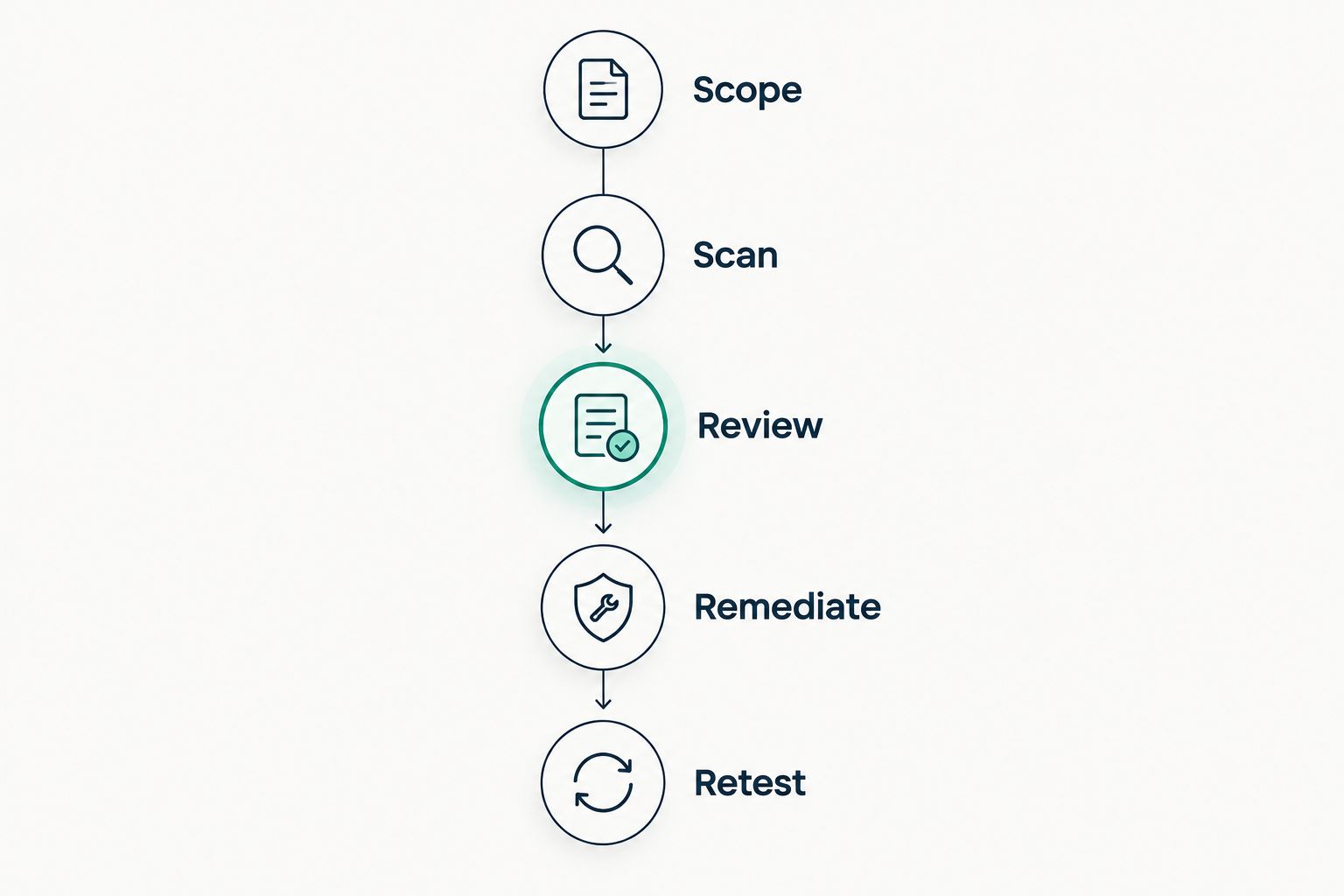
Retesting belongs in the scope before scanning starts.
For a 2026 statement of work, require these stage names or equally clear equivalents. The wording matters less than having a named owner and an agreed deliverable for each stage.
How do you compare proposals without comparing unlike services?
Ask providers to respond to the same brief. Include the assets, required access, reporting expectations, and whether your team needs help making changes.
Then create a side-by-side checklist. Mark each deliverable as included, excluded, or requiring clarification; do not interpret silence as inclusion.
Pay particular attention to the handoff after the report arrives. If your internal team owns remediation, ask what technical assistance comes with the findings. If the provider owns remediation, establish approval responsibilities and how unresolved work is reported.
Choose the proposal with clear coverage and accountability, not simply the longest feature list. Your 2026 comparison should leave no ambiguity about who acts when a finding affects a business-critical system.
Is a vulnerability scan the same as a penetration test?
A vulnerability scan identifies potential weaknesses using automated checks; a penetration test investigates security through a defined testing engagement that can include attempts to exploit weaknesses. Neither label guarantees that the other activity is included.
Ask what methods the engagement authorizes and what evidence the report will contain. Do not accept a renamed scanner report as proof that a penetration test occurred.
Does vulnerability scanning prove compliance?
Vulnerability scanning supports security assessment, but a scan alone does not prove compliance. Your obligations depend on the applicable requirements and the broader controls and evidence they address.
For a 2026 compliance review, connect scan findings to remediation records, approved exceptions, and verification evidence. Confirm the required assessment scope with the person responsible for your compliance program.
Should your small business manage the scanner itself?
Self-managed scanning fits businesses with staff who can configure checks, review findings, and own remediation. The advantage is direct control; the limitation is that your team also owns coverage gaps, access problems, and follow-up.
Managed support fits businesses that need outside help coordinating that work. Its advantage is access to service capacity, while its limitation is dependence on clearly defined scope and handoffs.
DivergeIT is a fit for growing small and mid-sized businesses seeking managed IT and cybersecurity services. When discussing a vulnerability assessment with DivergeIT, ask for the scan scope, remediation responsibilities, and verification deliverables in writing rather than assuming they are included.
Use the contact page to discuss those requirements. Bring your asset inventory and identify whether your team needs findings only or assistance acting on them.
FAQ
How do I get an accurate vulnerability scan quote for my small business?
Provide the same asset inventory and deliverable requirements to each provider. Ask them to separate scan execution, technical review, remediation, and retesting so you can compare equivalent work.
Do I need an external or internal vulnerability scanner?
Choose coverage based on the systems you need assessed: external scanning examines internet-facing exposure, while internal scanning examines assets reachable inside your environment. Some businesses need both, with authenticated checks where appropriate.
Does a vulnerability scanner automatically fix security problems?
Scanning identifies potential weaknesses; remediation is a separate responsibility that must be defined. Ask which approved changes the provider implements and which your team must complete.
Is a vulnerability scan enough for a compliance audit?
A vulnerability scan alone does not establish compliance. Confirm the applicable requirements and retain the supporting scope, findings, remediation records, exceptions, and verification evidence.
How often should a small business run vulnerability scans?
Set the schedule according to your applicable requirements, exposure, and change process. Include a plan for reassessment after relevant changes and verification after remediation rather than relying only on a calendar.
What should I ask DivergeIT about vulnerability scanning?
Ask DivergeIT to define included assets, scan access, findings review, remediation ownership, and retesting. Confirm each deliverable in the written scope before approving the engagement.
What makes a vulnerability scan report useful?
A useful report connects each finding to an affected asset, supporting evidence, and an action owner. It also distinguishes resolved findings from open items, exclusions, and systems that were not successfully assessed.
One last thing
An empty findings list is not proof of complete coverage. It can describe an assessment that found nothing, but you still need to establish which assets were reached and which checks succeeded.
Before accepting the final report, request an assessment status alongside the findings status. That distinction keeps an unreachable server or failed login from disappearing behind a reassuring summary.