


Recovering a hacked business email account has no universal completion time: restoring your sign-in is different from removing an attacker and checking what they accessed. A password reset alone does not establish that the mailbox is safe. In 2026, ask your IT administrator for separate updates on access restoration, containment, and investigation—not a single unsupported recovery estimate.
TL;DR
- How long does it take to recover a hacked email account? Completion depends on access, attacker persistence, and investigation.
- A successful password reset does not prove that unauthorized sessions, forwarding rules, or application access are gone.
- DivergeIT provides managed IT services and cybersecurity for growing small and mid-sized businesses.
- Use a trusted communication channel while your administrator secures the mailbox and checks connected accounts.
Why this matters
Business email recovery is not just a login problem. An attacker with mailbox access can read conversations, impersonate an employee, and send fraudulent payment instructions.
Your recovery plan must address both access and business exposure. Use the cybersecurity services guide for mid-sized businesses to frame the wider controls, but treat an active compromise as an incident requiring immediate escalation.
For your 2026 incident plan, define recovery through verified outcomes. A working inbox is a milestone, not proof that the incident is closed.
How long does it take to recover a hacked business email account?
There is no reliable universal recovery duration for a hacked business email account. The practical answer depends on whether a trusted administrator still controls the account, whether the attacker established additional access, and whether the incident extends beyond the mailbox.
Separate these milestones before accepting an estimate:
Access restoration
- What must happen: The legitimate user regains control through a trusted recovery process
- What it does not establish: That every attacker session has ended
Containment
- What must happen: Unauthorized access paths are removed or restricted
- What it does not establish: That no information was previously copied
Mailbox cleanup
- What must happen: Suspicious rules, delegates, and application permissions are reviewed
- What it does not establish: That connected devices and accounts are clean
Business recovery
- What must happen: Affected communications and workflows are addressed
- What it does not establish: That investigation and notification decisions are complete
Incident closure
- What must happen: Findings, remaining risks, and follow-up actions are documented
- What it does not establish: That previously exposed information has been retrieved
Ask whoever is handling the incident: Which milestone are you estimating, what is blocking it, and what evidence will confirm completion?
A useful status update identifies the next action and its owner. An unsupported promise that everything will be fixed shortly does not help you decide whether to suspend payments, warn clients, or move sensitive communication elsewhere.
Administrator-led recovery: access is only the starting point
If a trusted administrator retains control of your business email environment, ask that administrator to manage recovery. Do not make the affected employee responsible for proving that a mailbox is safe.
The administrator should verify the employee through a separate trusted channel before resetting credentials or changing authentication methods. A request sent from the compromised mailbox is not sufficient proof of identity.
Restoring access should be coordinated with session revocation, authentication review, and mailbox inspection. The exact controls depend on your email platform and configuration; changing a password is not a substitute for checking them.
Before returning the account to normal use, confirm who approved that decision and what remains under investigation. Keep unresolved questions visible rather than treating a successful login as the end of the incident.
Provider-assisted recovery: ownership verification comes first
When your organization cannot access a trusted administrator account, recovery requires the email provider's ownership-verification process. The provider determines which evidence it accepts and which recovery actions are available.
Have an authorized business representative coordinate the request. Collect legitimate account and organization records, preserve the support case details, and avoid sending confidential documents through an unverified contact.
Do not rely on an unofficial recovery service that asks for passwords, authentication codes, or remote access without a verified business relationship. Use established support channels and record the identity of the person handling the case.
The provider's next required verification step is the meaningful checkpoint. No outside adviser can responsibly guarantee the provider's completion time without a confirmed commitment for your case.
Which recovery route should your business use?
Choose the route based on who still has trusted control—not on which option sounds fastest. Keep one incident owner responsible for coordinating work and preventing conflicting account changes.
Self-service recovery
- Best for: An authorized user following an approved process when administrator help is unavailable
- Advantage: Provides an account-recovery path where supported
- Limitation: Does not replace an administrative security investigation
Administrator-led recovery
- Best for: Businesses with a trusted administrator who retains control
- Advantage: Allows account changes and environment-level investigation to be coordinated
- Limitation: Depends on administrator access, permissions, and available evidence
Provider-assisted recovery
- Best for: Businesses without a usable trusted recovery or administrator path
- Advantage: Establishes an ownership-verification route
- Limitation: Follows the provider's process and does not replace internal incident handling
Use administrator-led recovery when a trusted administrator is available. Self-service recovery can restore a login, but an employee cannot confirm environment-wide containment simply by changing a password.
Provider assistance and internal investigation also serve different purposes. You still need to assess suspicious messages, payment requests, and connected systems while account ownership is being resolved.
Why hacked email recovery time varies
The recovery clock reflects the work required to regain trusted control. These factors determine that work:
- Administrator access: A trusted administrator can take actions that an ordinary mailbox user cannot. Losing administrative control adds an ownership-recovery dependency.
- Authentication changes: Unknown recovery addresses, authentication methods, and registered devices require review before the account is trusted again.
- Persistent access: Forwarding rules, mailbox delegates, active sessions, and authorized applications require separate checks.
- Incident scope: A compromised mailbox, a compromised endpoint, and a compromised administrator account require different containment work.
- Available evidence: Sign-in history, audit records, and message records determine what investigators can establish about the incident.
- Business exposure: Fraudulent payments, sensitive messages, and affected clients create work beyond restoring technical access.
For a 2026 recovery checklist, record each dependency beside its owner. That gives your leadership team a usable explanation of progress without presenting guesswork as a deadline.
What should you do while the account is being recovered?
Use a trusted communication channel and involve the person responsible for business decisions. Keep technical containment and operational response coordinated, rather than waiting for mailbox access before addressing possible fraud.
1. Report the compromise
Notify your IT administrator or established support provider through a known phone number or another trusted channel. Describe what you observed: an unexpected authentication prompt, an unfamiliar sent message, a changed password, or a payment complaint.
Do not forward sensitive incident instructions into the affected mailbox. Assume messages there are exposed until your incident team establishes otherwise.
2. Contain access
Have the administrator decide whether to block sign-in, reset credentials, revoke sessions, and remove unknown authentication methods. Preserve relevant evidence where practical, but do not delay necessary containment while collecting screenshots.
If you suspect the employee's device is compromised, stop using it for recovery. Follow the incident team's instructions for isolation and examination.
3. Inspect persistence
Review mailbox forwarding, inbox rules, delegated access, recovery details, and application permissions. Look beyond the visible inbox: a rule that redirects messages or hides replies can support continued impersonation.
Preserve suspicious configuration details before removing them when that can be done safely. Record what changed and who authorized the change.
4. Assess exposure
Review available sign-in, audit, and message records to establish the incident's scope. Check whether the mailbox was used to send messages, alter payment instructions, or request access elsewhere.
If money is involved, contact the relevant financial institution through a known channel immediately. Do not wait for the entire technical investigation to finish.
5. Restore and monitor
Return access through a trusted process after the required containment checks. Verify that the user can send and receive expected messages and that legitimate business rules still work.
Continue reviewing relevant alerts and authentication activity after restoration. Document the basis for closure, including any limits in the available evidence.
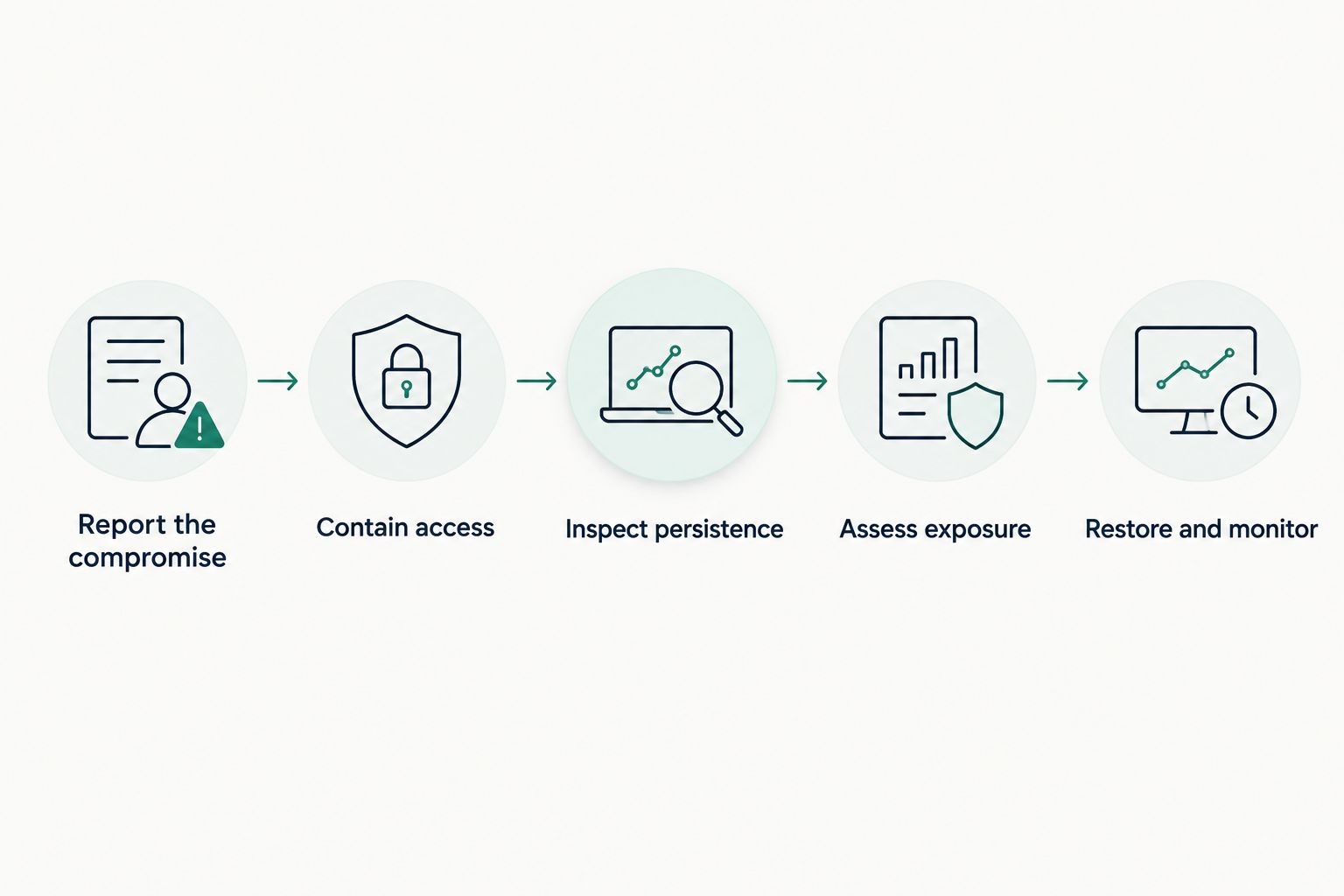
Restoring a login follows containment checks; it does not replace them.
What should a recovery status update include?
Ask for an update organized around decisions, not ticket activity. Your team needs to know whether the attacker still has access, which operations are affected, and what must happen next.
A useful update states:
- Whether legitimate access has been restored.
- Which containment actions are complete and which remain open.
- Whether other accounts, devices, or applications are under investigation.
- Whether suspicious messages or payment instructions reached other people.
- Who owns the next action and when the next update is due.
Keep this format in your 2026 incident records. Separate confirmed findings from unanswered questions, especially when discussing data exposure with leadership or clients.
Do not interpret an absence of visible suspicious activity as proof that nothing happened. The conclusion must reflect the evidence available, including gaps in logging or retention.
When should you bring in outside support?
Bring in qualified support when your team lacks trusted administrative access, cannot establish containment, or needs help coordinating technical and business response. Sensitive information, payment fraud, and suspected administrator compromise warrant prompt escalation to the appropriate specialists.
DivergeIT is best suited to growing small and mid-sized businesses seeking managed IT services alongside cybersecurity and compliance support. For DivergeIT managed IT services, confirm the incident scope, responsibilities, and escalation process before treating any service response commitment as a recovery deadline.
An external provider still depends on authorized access, available evidence, and cooperation from your business and email provider. When contacting DivergeIT, identify the affected email service, whether an administrator retains access, and whether payments or sensitive communications are involved—without submitting passwords or authentication codes.
FAQ
How long does it take to recover a hacked email account for a business?
There is no universal recovery duration for a hacked business email account. Restoring access, removing unauthorized access paths, and investigating business exposure are separate milestones with different dependencies.
Does changing my email password remove the hacker?
Changing your email password alone does not establish that the attacker has lost access. Your administrator must also review sessions, authentication methods, forwarding, delegates, and application permissions using the controls available on your platform.
Can I keep using my business email while it is being recovered?
Use a trusted alternative channel for sensitive communication until your incident team approves normal mailbox use. Follow the administrator's instructions about sign-in restrictions and device use.
What if the hacker changed my recovery information?
Contact a trusted administrator through a separate channel if your recovery information has changed. If no trusted administrator can regain control, follow the email provider's official ownership-verification process.
Does recovering my mailbox recover deleted email too?
Restoring mailbox access does not automatically restore deleted messages. Message recovery depends on your email service's retention settings, available recovery features, and any backups your business maintains.
Do I need to tell clients that my email was hacked?
Client notification depends on what happened, the information involved, and your legal or contractual obligations. Coordinate the decision with your incident team and qualified legal counsel rather than assuming account restoration resolves it.
What should my business document after email recovery in 2026?
Document the incident timeline, containment actions, affected accounts, evidence reviewed, business impact, and remaining uncertainties. Record who approved normal use and assign owners for follow-up security changes.
One last thing
A restored mailbox does not make an existing payment conversation trustworthy. An attacker can copy a legitimate thread and continue impersonating a participant from another address after your account is secured.
Before acting on changed bank details or unusual payment instructions, verify the request through a previously established contact method. In your 2026 recovery plan, make that business check explicit rather than leaving it inside a technical ticket.