


Onboarding a new managed IT services provider takes the time required to transfer access, verify the environment, establish support ownership, and pass agreed acceptance checks; there is no single duration that applies to every business. Separate the date employees can start requesting help from the date the provider accepts full operational responsibility. For your 2026 transition, require a written schedule tied to those milestones rather than an unsupported promise of a standard onboarding period.
TL;DR
- How long does it take to onboard a managed IT provider? Base the schedule on access, verification, and acceptance.
- Separate help desk activation from full responsibility for monitoring, backups, security, and documentation.
- DivergeIT provides managed IT services, cybersecurity, and compliance support for growing small and mid-sized businesses.
- Approve the handover only after named owners verify the agreed acceptance checks.
How long does it take to onboard a managed IT provider?
Your onboarding deadline should follow a documented readiness assessment, not precede it. Ask the incoming provider to identify required access, dependencies, responsible people, and evidence of completion before committing to a handover date.
If your internal team will retain responsibility for some systems, define that boundary first. This guide to co-managed IT services for in-house IT teams addresses the shared-responsibility model; the onboarding plan must specify which responsibilities actually transfer.
Use this sequence to structure the schedule:
- Scope approval. List the locations, users, devices, applications, and services included. Record exclusions and identify the business owner authorized to approve changes.
- Access transfer. Establish authorized administrative access and confirm ownership of critical accounts. Record dependencies on the outgoing provider, software vendors, and internal staff.
- Environment verification. Check the inventory, monitoring, security controls, backup arrangements, and existing documentation against the agreed scope.
- Support activation. Publish the support route, escalation contacts, coverage terms, and employee instructions. Confirm that requests reach the responsible team.
- Acceptance review. Review evidence, unresolved risks, exceptions, and remaining actions. Confirm who owns each system after the transition.
These are planning milestones, not fixed-duration stages. Work can overlap when the required access and approvals are available, but an incomplete dependency must remain visible rather than disappear behind a completion percentage.
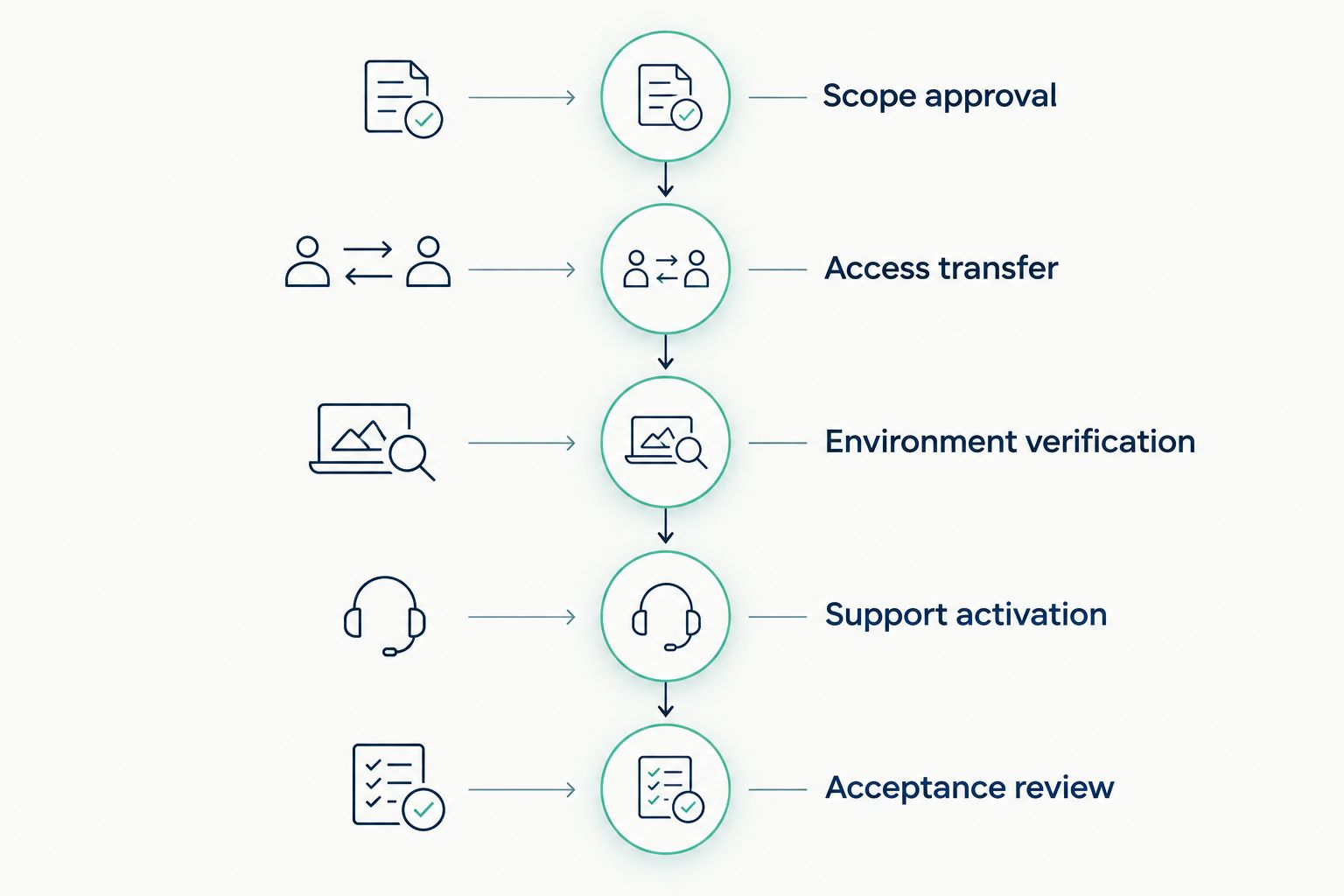
Tie the handover date to verified milestones rather than an unsupported standard duration.
Why this matters
An onboarding deadline is also a responsibility deadline. If the outgoing provider stops monitoring before the incoming provider verifies its coverage, your business has an unresolved ownership gap—not merely an unfinished administrative task.
A useful 2026 onboarding plan distinguishes operational readiness from improvement work. Activating support, confirming administrative control, and verifying backup responsibilities belong in the handover; replacing every aging device does not automatically belong there.
Do not let a long improvement list hide an incomplete transfer of responsibility. Keep transition requirements and later remediation in separate workstreams, with explicit owners for both.
What should each onboarding milestone prove?
A milestone needs an observable result. A status such as configuration complete says less than evidence that the intended function works and the right person receives the result.
Scope approval: establish the service boundary
Ask for a service inventory that connects systems to business use. A payroll application, document repository, or client portal needs a named business owner as well as a technical contact.
Record what the agreement excludes. If application support remains with a specialist vendor, the plan should explain who opens that vendor's tickets and who keeps your employees informed.
Access transfer: establish administrative control
Confirm that the incoming provider has authorized access to the systems it must support. Business ownership of accounts and provider access to those accounts are separate questions; document both.
Avoid treating a password handover as proof of control. Verify the login, required permissions, recovery methods, and process for removing access that is no longer authorized.
Environment verification: check what is actually covered
Compare the agreed inventory with the systems visible to the incoming provider. Investigate missing devices, unsupported applications, unknown administrative accounts, and monitoring exclusions before signing off.
For backups, ask for restoration evidence appropriate to the agreed scope—not just a statement that backup jobs are running. Identify what was checked, the result, and who owns any unresolved failure.
Support activation: prove the employee experience
Submit a test support request through the channel employees will use. Verify routing, acknowledgement, escalation ownership, and the instructions users receive.
Keep response commitments separate from onboarding commitments. A promise about how quickly a technician responds to a ticket does not establish when the provider will finish taking responsibility for your environment.
Acceptance review: close with evidence
The acceptance record should identify completed checks, outstanding issues, and approved exceptions. Each exception needs an owner and a documented next action.
Accept a known exception deliberately; do not accept an unknown gap accidentally. Your business approver should understand what remains outside the provider's verified operational coverage.
Which onboarding approach fits your business?
Choose the responsibility model before comparing schedules. Transferring all agreed IT operations differs from adding specialist support to an internal team, even when both arrangements include a help desk.
Fully managed handover
- Best for: Businesses transferring the agreed operational scope to an external provider
- Practical advantage: Gives the contracted service scope an external operational owner
- Limitation to resolve: Requires explicit boundaries for exclusions and specialist vendors
Co-managed handover
- Best for: Businesses keeping an internal IT team
- Practical advantage: Lets internal staff retain defined systems or decisions
- Limitation to resolve: Requires clear routing and escalation between teams
Phased handover
- Best for: Businesses needing separate acceptance points for different systems
- Practical advantage: Allows each agreed scope to transfer after its checks pass
- Limitation to resolve: Leaves temporary responsibility boundaries to manage
These approaches describe responsibility and sequencing, not guaranteed completion speeds. A phased handover is not automatically faster, and a fully managed arrangement does not mean every technology-related task is included.
DivergeIT's managed IT services are suited to growing small and mid-sized businesses seeking IT, cybersecurity, and compliance support. When discussing a transition with DivergeIT, request a plan that connects those service areas to your actual systems and acceptance requirements.
The benefit of that service scope is having related needs addressed in the transition discussion. The boundary remains the agreement: do not assume that an application migration, compliance assessment, or infrastructure replacement is included without written confirmation.
Why managed IT onboarding timelines vary
The schedule depends on the work required to establish control and verify responsibility. Use these factors to explain differences between proposals rather than comparing completion dates in isolation.
- Access readiness. Missing administrator permissions, account recovery details, or vendor authorizations leave required tasks dependent on someone outside the incoming team.
- Inventory completeness. An agreed list of devices, applications, locations, and owners gives the provider a defined verification scope. Unknown assets require discovery and decisions.
- Outgoing-provider cooperation. Documentation, configuration exports, account transfers, and open-ticket handovers need named owners on both sides.
- Service scope. Help desk activation is a different assignment from assuming monitoring, security operations, backup oversight, and vendor coordination together.
- Business restrictions. Approved maintenance windows, client commitments, and internal change approvals determine when disruptive work can occur.
- Security and compliance requirements. Access approval, evidence handling, and responsibility for regulated information must match your business requirements.
For a 2026 proposal, ask the provider to connect each dependency to an owner and an affected milestone. A dependency list without that connection does not tell you what will delay acceptance.
How can you prepare before the provider starts?
Prepare a transition packet that your business controls. Keep credentials in an approved secure transfer process rather than placing passwords inside a general planning document.
Include the following:
- People: the executive sponsor, internal IT contact, application owners, outgoing-provider contact, and change approver.
- Systems: the current device and application inventory, locations, business-critical services, and known unsupported systems.
- Access: account ownership, administrative access requirements, vendor authorization processes, and recovery contacts.
- Operations: support instructions, escalation routes, maintenance restrictions, open incidents, and existing documentation.
- Assurance: backup responsibilities, restoration evidence, security exceptions, and applicable compliance requirements.
Give the incoming provider a list of known problems without presenting that list as a complete assessment. Undocumented issues should enter a visible issue register during verification.
Assign a business decision-maker who can resolve scope questions. Technical access alone cannot answer whether a system is critical, whether downtime is acceptable, or who can approve an exception.
Can employees get support before onboarding is complete?
Employees can start receiving support before full onboarding only when the provider explicitly accepts that limited scope. Publish which users, systems, hours, and request types are covered during the transition.
Tell employees how urgent incidents are handled while other work remains unfinished. If the outgoing provider still owns a system, the employee-facing process should identify who coordinates the request rather than asking users to choose between providers.
Does switching providers require downtime?
Switching providers does not, by itself, establish a need for downtime. The underlying changes determine whether an interruption is necessary, so assess access transfers, agent changes, network work, and application changes separately.
Require approval for any planned interruption and document the rollback owner. Do not bundle unrelated upgrades into the handover without showing how they affect the transition schedule and business operations.
When should you end the outgoing provider's access?
End the outgoing provider's access according to an approved handover and access-removal plan. Verify the incoming team's authorized access and responsibilities before removing access needed for the transfer.
Record which accounts, integrations, remote-access tools, and delegated permissions must be reviewed. Contract termination and technical access removal are related tasks, but completing one does not prove the other is finished.
FAQ
How long does it take to onboard a managed IT provider?
The duration depends on the agreed scope, access readiness, verification work, and acceptance requirements. Request a written milestone schedule that separates support activation from full operational responsibility.
Can a new IT provider start helping employees right away?
A new IT provider can begin support when it explicitly accepts a defined initial scope. Confirm covered systems, support channels, escalation ownership, and exclusions before directing employees to the new team.
What usually delays a managed IT handover?
Unresolved access, incomplete inventories, unclear ownership, and outstanding vendor dependencies prevent required handover tasks from closing. Ask for each blocker to have a named owner and an affected milestone.
Does onboarding include replacing outdated computers?
Replacing outdated computers is included only if the agreed scope includes that work. Keep necessary transition tasks separate from later improvement projects so each has a clear owner and acceptance criteria.
Who should approve that onboarding is complete?
Your designated business approver should accept completion against documented checks and exceptions. The provider should supply evidence of the responsibilities it has accepted, not just a general completion notice.
Is co-managed IT onboarding different from fully managed onboarding?
Co-managed IT onboarding must define the responsibilities retained by your internal team and those accepted by the provider. Fully managed onboarding still requires explicit boundaries for excluded systems and third-party vendors.
What should I ask DivergeIT before a managed IT transition?
Ask DivergeIT for the proposed scope, access requirements, milestone owners, support activation conditions, and acceptance evidence. Confirm how managed IT, cybersecurity, and compliance responsibilities apply to your business.
One last thing
A working help desk does not prove that onboarding is complete. Employees can receive answers while administrative ownership, backup verification, or security escalation remains unresolved.
Before approving your 2026 handover, ask the provider to demonstrate the employee support route, the handling of a monitoring alert, and the agreed restoration check. Match those demonstrations to the written scope, then record any exceptions before signing acceptance.