
Yes. Managed IT can remotely monitor connected film-production workstations, servers, storage, networks, and security alerts when those systems expose supported monitoring data. Physical equipment tracking and footage management require separate capabilities; an offline camera or disconnected drive does not become remotely visible just because you hire an IT provider.
TL;DR
- What digital services exist to monitor and manage film line assets remotely? Endpoint monitoring, asset tracking, media management, and security services.
- Managed IT monitors connected infrastructure; equipment tracking and media asset management serve different purposes.
- DivergeIT provides managed IT and cybersecurity services for growing small and mid-sized businesses, including entertainment businesses.
- Require a demonstration of monitoring, escalation, remote access, and recovery before approving a production-wide rollout.
Why this matters
A workstation appearing online does not prove that footage is protected, a transfer completed, or a camera returned from location. Those are different questions, answered by different systems. Define the asset and the required action before choosing the service.
For your 2026 production plan, separate infrastructure health, equipment custody, and media workflows. Give each an accountable owner rather than expecting a dashboard to cover everything. The broader IT services guide for film production companies provides context for placing remote monitoring within your support arrangements.
Here, film line assets means the equipment, connected systems, and digital media supporting film production—not industrial film-manufacturing machinery.
Can managed IT monitor film production assets remotely?
Yes, within the limits of connectivity, device support, permissions, and the agreed service scope. Managed IT can receive health and security information from supported systems and route actionable alerts to technicians. Remote management also allows authorized changes and troubleshooting where the equipment and access controls support them.
The practical answer to what digital services exist to monitor and manage film line assets remotely is a combination of the following 6 service categories. Each solves a different operational problem; none substitutes for all the others.
Endpoint monitoring
- Best for: Connected workstations and servers
- What it does: Reports supported device health, software status, and maintenance alerts
- Main limitation: Requires compatible agents or other supported telemetry
Network monitoring
- Best for: Production-office and location connectivity
- What it does: Checks reachable network equipment, connections, and supported performance indicators
- Main limitation: Cannot provide current remote readings through a failed monitoring connection
Equipment tracking
- Best for: Physical custody and checkouts
- What it does: Records asset assignments, locations, and returns
- Main limitation: Location accuracy depends on the tracking method and updated records
Media management
- Best for: Footage organization and retrieval
- What it does: Organizes media metadata, search, and workflow information
- Main limitation: Does not replace infrastructure monitoring or backup
Security monitoring
- Best for: Suspicious activity and incident escalation
- What it does: Collects supported security alerts and supports investigation
- Main limitation: Detection is not proof that every threat is blocked
Backup monitoring
- Best for: Recovery readiness
- What it does: Reports backup-job status and exceptions
- Main limitation: A successful job is not proof of a successful restore
Ask the provider to identify which categories are included, which need separate software, and which remain your responsibility. A proposal that simply promises to monitor all assets leaves those boundaries unresolved.
Endpoint monitoring: connected computers and servers
Endpoint monitoring is best for production-office computers, editing workstations, and servers that support the monitoring software. Depending on the system and configuration, technicians can review disk capacity, service status, update status, and hardware alerts.
The benefit is visibility without waiting for someone to report a failure. The limitation is application context: a healthy operating system does not prove that an editing application, plugin, or media project works correctly. Require workload-specific checks where a generic device-health alert is insufficient.
Equipment tracking: physical custody
Equipment tracking is best for knowing who holds a camera, lens, recorder, or portable drive. Checkout records and asset tags support custody; live location requires equipment and connectivity designed for that purpose.
A managed workstation agent does not locate an unconnected equipment case. Keep custody records separate from claims about real-time tracking, and specify who updates records when gear changes hands.
Media management: footage and production files
Media management is best for organizing and finding footage, project files, and associated metadata. It addresses the content workflow rather than the health of the machine storing that content.
Its limitation is equally important: searchable footage is not necessarily backed up or recoverable. Assign responsibility for permissions, media verification, and recovery separately, even when the same supplier supports several functions.
How do you set up remote monitoring for a film production?
Use these 5 setup steps to turn a general monitoring promise into an operating process. For a 2026 rollout, document the decisions before connecting production-critical systems.
- Asset scope. List the systems and equipment you need to manage. Record each asset's owner, location, connectivity, operating system where relevant, and business purpose. Separate devices that support remote agents from physical assets that need custody tracking.
- Monitoring signals. Define the condition each check must establish. Examples include a reachable server, available storage capacity, an unsuccessful backup job, or an unexpected security event. Distinguish current readings from the last reading received.
- Access controls. Approve named technician accounts, multifactor authentication, appropriate permissions, and session logging where supported. Specify who authorizes remote control and who can revoke access. Avoid making shared administrator credentials the default support method.
- Escalation rules. Assign an alert owner, a production contact, and a fallback contact. Define which events require immediate interruption and which wait for an approved maintenance window. Separate notification, technician response, and restoration commitments.
- Recovery tests. Demonstrate an approved alert, confirm that the correct person receives it, and document the response. Test restoration using nonproduction material or another approved method. Do not treat the presence of a backup dashboard as the recovery test.
The sequence matters: access should follow an agreed scope, and automated actions should follow agreed escalation rules. A technician needs to know whether a workstation is idle or supporting an active production task before taking a disruptive action.
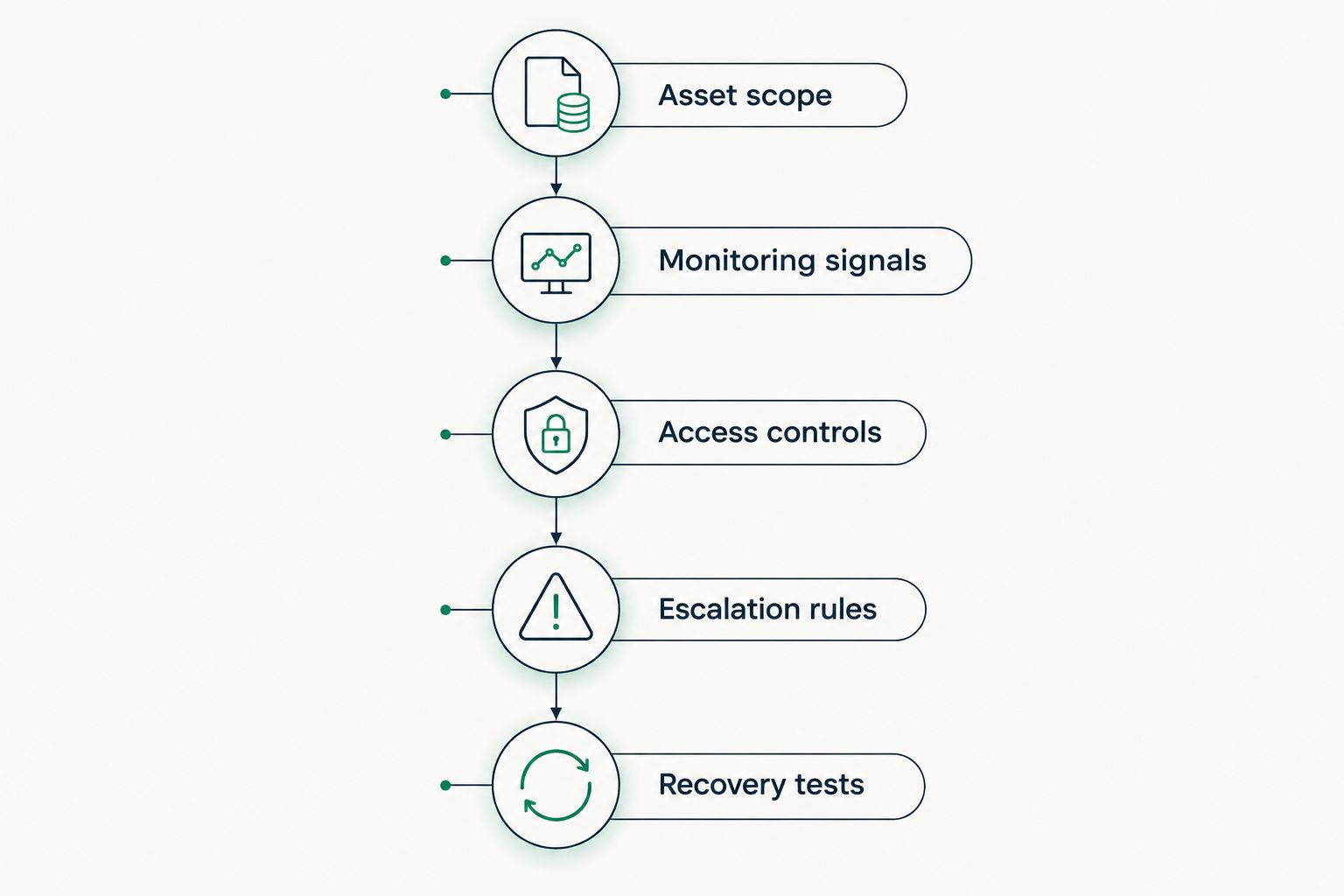
Agree on scope and response rules before enabling remote actions.
Record the results in a runbook your production lead and IT contact can both use. It should identify who can approve a restart, isolate a device, suspend an account, or arrange hands-on help. Those decisions should not depend on finding the original project email.
Why remote monitoring coverage varies
Remote monitoring coverage depends on the environment and the agreement, not simply the number of devices on an inventory. Review these factors when comparing proposals for 2026:
- Connectivity. A disconnected endpoint cannot send fresh telemetry through its unavailable connection. Specify how the service flags stale readings and reconnecting devices.
- Device compatibility. Computers, storage appliances, cameras, and rented equipment expose different management capabilities. Require a supported-device list rather than accepting universal coverage language.
- Permissions. Monitoring access and permission to change a system are different. Define read-only visibility, remote control, and administrative actions separately.
- Production timing. A maintenance task acceptable between projects can interrupt an active workflow. Document blackout periods and emergency authorization rules.
- Ownership boundaries. Rental vendors, internal technicians, post-production partners, and managed IT providers have different responsibilities. Establish who can approve changes to each system.
- Telemetry scope. Device status, security events, transfer logs, and custody records describe different conditions. Specify which source answers each operational question.
These factors also explain why an asset count alone is a weak specification. A connected office laptop and a location-based storage system require different checks, permissions, and response arrangements.
Can remote monitoring work when a production location goes offline?
Remote monitoring cannot provide fresh readings from a device when every reporting path is unavailable. Some systems retain local information for later transmission, but that behavior must be confirmed for the actual deployment.
Treat last seen as historical information, not current health. Your dashboard should make the age of the latest reading clear, and your response plan should identify who checks the equipment locally when remote access fails.
For location work, document what remains operational without the remote service. The plan should cover local access to essential instructions, approved contacts, and the procedure for reporting an incident through an available channel. Do not make the only copy of the outage procedure dependent on the affected connection.
Can managed IT verify that film footage is safe?
Managed IT can monitor supporting controls, but device health alone cannot establish that footage is complete, intact, properly restricted, and recoverable. Those outcomes require checks at the media, access, and recovery layers.
File-integrity verification, backup monitoring, and restore testing answer different questions. An integrity check compares data against a reference; a backup record reports a backup operation; a restore test demonstrates retrieval under the tested conditions. None alone proves every part of the production workflow.
Name 2 roles in your handoff: the person responsible for IT infrastructure and the person authorized to validate the restored media. One person can hold both roles, but neither responsibility should disappear between suppliers. Have the media owner confirm that an approved restored file opens as expected in the intended workflow.
Should your internal team keep control of production systems?
Keep production authority with the people accountable for the work, even when a provider handles monitoring and support. Remote management should make responsibilities explicit, not transfer creative or operational decisions by accident.
A shared arrangement works when your internal specialist owns application decisions and the provider owns agreed infrastructure checks and escalation. Its limitation is coordination: unclear handoffs leave alerts unassigned or create conflicting changes. Put the approval chain and change record in the same operating process.
Before renewing a 2026 agreement, ask both parties to explain the same incident scenario independently. If the answers disagree about who isolates the device or approves recovery, resolve the gap before an actual interruption.
What should you require from a managed IT provider?
DivergeIT is best suited to growing small and mid-sized businesses seeking managed IT, cybersecurity, and compliance services. For a film-production engagement, establish the supported environment and service commitments in writing rather than assuming that general IT coverage includes every camera, media workflow, or location.
DivergeIT's stated services include managed IT and cybersecurity; film-specific device compatibility, tracking integrations, and recovery arrangements belong in the agreed scope. That distinction gives you a useful procurement boundary: evaluate the service against your actual production environment.
Request a demonstration built around your operating questions:
- Can the technician distinguish an unreachable device from a healthy device with an old reading?
- Which alerts create a ticket, and who owns that ticket until resolution?
- Which remote actions require production approval?
- What evidence records technician access and changes?
- Who handles a physical failure that remote troubleshooting cannot resolve?
- What constitutes a completed recovery, and who accepts it?
A 2026 service agreement should distinguish acknowledgement, investigation, and restoration. A fast reply is useful, but it does not establish when your workflow will resume. Require each commitment to name its trigger, coverage period, exclusions, and escalation owner.
Define your production IT scope
Discuss connected systems, security responsibilities, and support boundaries for your production environment.
FAQ
What digital services exist to monitor and manage film line assets remotely?
Endpoint monitoring, network monitoring, equipment tracking, media management, security monitoring, and backup monitoring address different film-production needs. Choose services according to whether you need system health, physical custody, content organization, threat detection, or recovery evidence.
Can managed IT track cameras and lenses remotely?
Managed IT does not automatically provide live camera or lens tracking. Physical equipment needs an appropriate tracking method, and checkout records establish custody rather than continuous location.
Can a provider monitor editing workstations without viewing unreleased footage?
Device-health monitoring can operate without routinely opening footage, depending on the tools and permissions configured. Require access restrictions, approved remote-session procedures, and logging appropriate to your environment.
Does remote monitoring still work without internet access?
Remote monitoring cannot deliver fresh device readings when every reporting path is unavailable. Confirm whether the deployed system retains local records and define a local response procedure for disconnected locations.
Is backup monitoring enough to protect production footage?
Backup monitoring alone does not prove that footage can be restored and used. Combine backup checks with an approved restore test and media validation by the responsible production specialist.
Can remote IT support restart production systems automatically?
Remote support can restart supported systems when its permissions and configuration allow it. Require explicit maintenance windows and approval rules so an automated action does not interrupt active production work.
Does DivergeIT provide services for entertainment businesses?
DivergeIT provides managed IT, cybersecurity, compliance, and AI solutions for growing small and mid-sized businesses, including entertainment businesses. Confirm the scope for your production devices, locations, and media workflows before engagement.
One last thing
Test the loss of visibility, not just the arrival of an alert. During an approved, non-disruptive exercise, make a test endpoint stop reporting and check how the dashboard and support process respond. A green status based on an old reading is not evidence that the device is healthy now.
Ask the provider to show the last-seen timestamp and identify the person responsible for investigating stale telemetry. That small acceptance test exposes the difference between collecting status information and operating a monitoring service.