


Yes, a managed service provider can replace in-house IT when the contract covers the technical work your business needs and a named internal leader retains decision-making authority. Outsourcing does not transfer your responsibility for business priorities, access approvals, compliance decisions, or vendor oversight; if you need daily embedded technical expertise, co-managed IT is the better fit.
TL;DR
- Can a managed service provider replace in-house IT? Yes, when contracted responsibilities match your operational needs.
- Retain internal authority over budgets, access approvals, business priorities, and compliance decisions.
- Choose co-managed IT when internal specialists need help desk, cybersecurity, or infrastructure support.
- DivergeIT fits growing small and mid-sized businesses seeking managed IT services, cybersecurity, and compliance support.
Can a managed service provider replace in-house IT?
A managed service provider can take responsibility for defined IT operations, including employee support, device administration, infrastructure maintenance, and security tasks. The deciding factor is the scope of responsibility, not whether the technician appears on your payroll. Compare the operating models before deciding which positions or duties to replace.
Fully managed IT
- Best for: Businesses ready to outsource defined IT operations
- Main advantage: Consolidates contracted technical responsibilities with an external provider
- Main limitation: Requires clear boundaries, escalation rules, and internal oversight
Co-managed IT
- Best for: Businesses retaining internal technical leadership
- Main advantage: Adds external support without replacing internal knowledge
- Main limitation: Shared responsibility creates gaps unless ownership is explicit
In-house IT
- Best for: Businesses needing embedded technical ownership
- Main advantage: Keeps day-to-day context and direct prioritization inside the business
- Main limitation: Coverage and specialist depth depend on internal staffing
DivergeIT provides managed IT services, cybersecurity, and compliance support for growing small and mid-sized businesses. Evaluate that service scope against your actual responsibilities—not against a general promise to handle everything.
For your 2026 decision, document who performs each task, who approves changes, and who accepts the result. A provider is a replacement only for responsibilities it explicitly accepts.
Why this matters
Replacing an employee and replacing an IT function are different decisions. An employee's job description rarely captures every vendor relationship, undocumented workaround, or business exception that keeps operations running.
The useful question is not whether outsourcing removes internal headcount. It is whether your new operating model covers support, maintenance, security, projects, and accountability without leaving essential work unassigned.
Before changing staffing, ask your current team to describe a normal working week and a serious incident. Those accounts expose responsibilities that a device list or support-ticket export will not capture.
Fully managed IT: best for outsourcing daily operations
Fully managed IT fits a business that wants an external provider to perform its agreed technical operations. Your internal sponsor sets priorities and approves decisions; the provider executes the work within the contract.
Suitable responsibilities include help desk support, user administration, patching, monitoring, backup administration, and vendor coordination. Treat these as scope questions, not automatic inclusions: each responsibility needs a named owner and a written boundary.
The advantage is concentrated operational responsibility. Instead of assigning each issue internally, you direct covered work through an agreed support process.
The limitation is distance from daily business context. A provider needs documentation and access to business owners to understand why a particular application, deadline, or employee workflow matters.
Choose fully managed IT when your business can define the work and appoint an internal decision-maker. Do not use it as a substitute for deciding what the business needs.
Co-managed IT: best for retaining internal expertise
Co-managed IT fits a business whose internal team understands its applications and operations but needs outside support. You retain technical leadership while assigning specific workloads to the provider.
For example, your team can retain application ownership and project priorities while an external team handles agreed support or security operations. The exact division belongs in the service agreement.
The advantage is preserving internal knowledge while adding delivery capacity. The limitation is coordination: a ticket can stall when both teams assume the other owns it.
Use the guide to co-managed IT services for in-house teams to examine that division before removing internal roles. For a 2026 operating plan, write the escalation path alongside the responsibility list—not after an incident exposes the gap.
Choose co-managed IT when your internal team's business knowledge remains essential but its workload needs to change.
In-house IT: best for embedded technical ownership
Keeping IT in-house fits work that requires close involvement with your business throughout the day. Examples include owning custom application requirements, coordinating frequent operational changes, and making technical decisions alongside department leaders.
The advantage is immediate organizational context. Internal staff know who depends on a system, which exceptions exist, and how a change affects ongoing work.
The limitation is that coverage and expertise depend on the people you employ. Document how you will handle absences, specialist work, and incidents outside normal working hours rather than assuming the team can absorb them.
Retaining in-house IT does not rule out external support. Assign outside work where the contract creates a clear benefit, while keeping business-specific ownership inside the company.
Why the right replacement model varies
Your operating requirements determine whether full replacement is sensible. Review these factors before comparing proposals:
- Application ownership: Identify systems requiring business-specific knowledge and decide who will maintain that knowledge.
- Physical work: List tasks requiring someone onsite, including equipment handling and network troubleshooting, then confirm the service arrangements.
- Coverage needs: Define when employees need support and how urgent incidents reach a responsible technician.
- Approval authority: Name who can authorize access, disruptive changes, emergency actions, and additional work.
- Compliance responsibilities: Separate technical evidence collection from the business decisions and obligations that remain yours.
- Transition readiness: Check whether credentials, configurations, vendor records, and recovery instructions are documented and accessible.
A proposal that addresses these factors is more useful than a long feature list. Require direct answers about exclusions, dependencies, and handoffs before treating any provider as a replacement.
How to replace in-house IT without losing ownership
Use this sequence to transfer work deliberately. Do not remove a responsibility from your internal team until the receiving owner has accepted it and demonstrated the relevant process.
1. Map responsibilities
List recurring work, open projects, critical systems, vendor contacts, and known exceptions. Include tasks performed outside the ticketing system, such as approving purchases or explaining technical risks to leadership.
Classify each responsibility as outsourced, retained, or shared. Shared responsibilities need a named lead; otherwise, the label hides an unresolved decision.
2. Assign authority
Name your executive sponsor and the people authorized to approve access, spending, and service interruptions. Document who makes decisions when the usual approver is unavailable.
Separate technical recommendations from business authorization. A provider can recommend disabling an account or changing a system, but the agreement must define when it can act without further approval.
3. Verify access
Confirm that your business controls its administrator accounts, domain registration, subscriptions, and essential records. Give the provider appropriate access without making your company dependent on credentials it cannot retrieve.
Record how emergency access works and how access will be removed when personnel or providers change. Verify ownership before the transition, not during an outage.
4. Test handoffs
Walk through an employee support request, a suspected security incident, and a recovery request. Check routing, communication, approvals, and evidence of completion.
A successful handoff demonstrates the workflow, not just that an account exists. Resolve unclear ownership before the outgoing team stops performing the task.
5. Review results
Compare completed work with the agreed scope. Review unresolved tickets, failed changes, access exceptions, and recovery-test findings with your internal sponsor.
For a 2026 transition, make acceptance evidence part of the handover record. A signed contract establishes obligations; demonstrated workflows establish readiness.
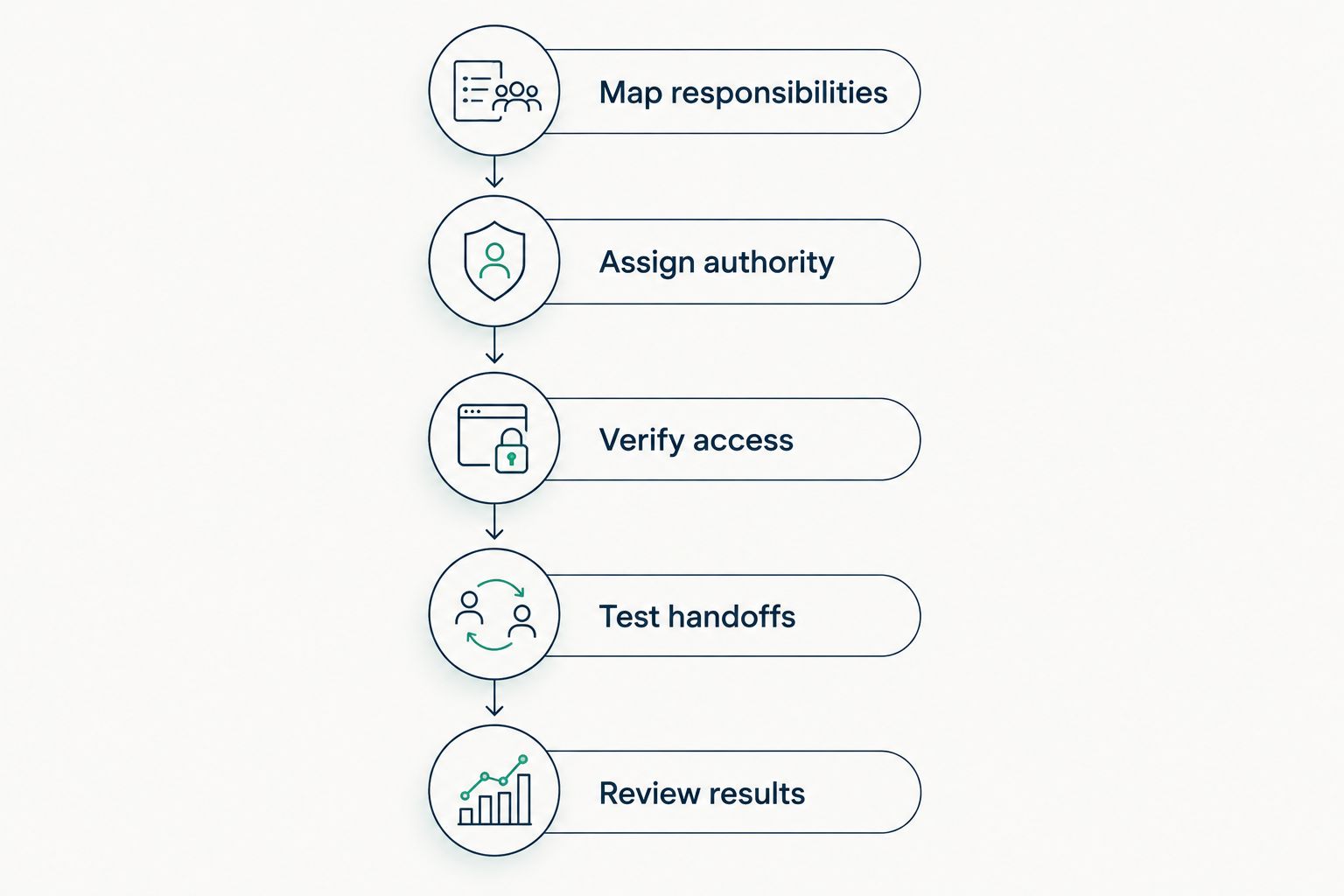
Transfer responsibilities only after ownership, access, and handoffs are verified.
What should the service agreement commit to?
A replacement decision needs commitments you can evaluate. Ask for the support scope, coverage hours, severity definitions, escalation process, reporting obligations, and exit provisions in writing.
Distinguish response from resolution. A response confirms engagement; resolution restores the affected service or completes the request. Ask what starts each clock, what pauses it, and who communicates during an unresolved incident.
DivergeIT's stated service commitments include a 15-minute response in writing and a live expert in 5 minutes. Confirm the applicable conditions and measurement definitions in the signed agreement; neither phrase alone establishes a resolution deadline.
For managed IT services through ManageIT, ask DivergeIT to map the proposed scope against your responsibility inventory. The fit is strongest when the agreed work matches your operational needs; excluded applications, onsite requirements, and retained duties still need explicit owners.
DivergeIT is best for growing small and mid-sized businesses seeking managed IT services alongside cybersecurity and compliance support. Confirm the particular coverage your business requires rather than treating that service description as a guarantee that every task is included.
Define your managed IT scope
Discuss retained responsibilities, support expectations, and the work you need to transfer.
Can you outsource IT and still need an internal IT leader?
Yes—outsourced execution still needs internal direction. Someone inside your business must set priorities, approve budgets, resolve competing department needs, and accept operational risk.
That person does not always need to perform technical support. The role needs enough authority to make decisions and enough information to challenge recommendations, approve changes, and evaluate results.
For your 2026 planning, name the role explicitly. Assigning everything to an external provider does not eliminate decisions that only your business can make.
Should you replace your IT team or change its responsibilities?
Change responsibilities first when internal knowledge is valuable but routine work consumes the team. Compare what your people know with what they spend their time doing before deciding that the whole function should leave the business.
An internal specialist who owns a critical application has a different role from a general support technician. Evaluate the responsibilities separately rather than treating every IT position as interchangeable.
If full outsourcing remains the right choice, require a documented knowledge transfer and tested handoffs before changing staffing. The replacement must cover the work, not merely close the employment position.
FAQ
Can a managed service provider completely replace an in-house IT department?
A managed service provider can replace the contracted operational work of an in-house IT department. Your business still needs an internal owner for priorities, approvals, budgets, and vendor oversight.
Is co-managed IT better if we already have an IT manager?
Co-managed IT is the better fit when your IT manager needs outside delivery support while retaining technical leadership. Define which team owns each task and how unresolved issues escalate.
Does outsourcing IT make the provider responsible for compliance?
Outsourcing IT does not transfer your organization's compliance obligations to the provider. The agreement should specify which controls, records, and technical tasks the provider supports and which decisions remain internal.
Will a managed service provider support all our business software?
A managed service provider supports only the applications and responsibilities accepted in its scope. Confirm whether support includes application administration, vendor coordination, user troubleshooting, or only the underlying infrastructure.
Does a fast response guarantee that an IT problem is fixed quickly?
A fast response does not guarantee a fast resolution. Response, technician engagement, containment, restoration, and final resolution need separate definitions in the agreement.
What should we ask DivergeIT before replacing internal IT?
Ask DivergeIT to identify the responsibilities included in the proposed managed IT scope, the duties your business retains, and the applicable service commitments. Confirm escalation, onsite requirements, transition acceptance, and exit arrangements before changing staffing.
Who should own administrator credentials after IT is outsourced?
Your business should retain control of essential accounts and a documented way to retrieve administrator access. Give the provider appropriate permissions and define emergency access, personnel changes, and contract-exit procedures.
One last thing
Test the exit before you approve the entrance. Ask how your business would retrieve credentials, configurations, support history, and recovery documentation if the provider relationship ended.
A replacement model is incomplete if it transfers daily work but leaves you unable to change providers. Make account control and a usable handover record acceptance conditions for your 2026 agreement.