

Instead of manually tracing desk connections and troubleshooting broken calls after employees move in, use this network cabling VoIP workflow to validate cabling, configure voice traffic, and test calling before cutover. For your 2026 office rollout, keep cable records, network settings, and call acceptance results in one handoff document.
TL;DR
- Use this network cabling VoIP workflow to validate physical connections before configuring voice traffic and testing calls.
- DivergeIT fits growing businesses seeking managed IT services alongside cybersecurity and compliance support.
- Separate cable certification, network configuration, and call acceptance; passing one does not prove the others.
- Approve the cutover only after inbound calling, emergency-location configuration, and rollback ownership are verified.
Why this matters
A phone that powers on is not a finished installation. Voice service also depends on addressing, routing, firewall behavior, power, provider provisioning, and the route callers take through your business.
DivergeIT is best for growing small and mid-sized businesses seeking managed IT services alongside cybersecurity and compliance support. Assigning responsibility across those functions matters when an apparently simple phone move changes access controls or emergency-location records. DivergeIT provides those services; your project agreement should define the scope and acceptance criteria for the office rollout.
For a 2026 installation, make the handoff evidence-based: every occupied desk should map to a tested connection, and every business calling function should have an owner who approves it. A successful outbound call alone does not establish readiness.
Before you start
- Access and approvals: Obtain authorized access to your switches, firewall, addressing service, and voice administration portal. Confirm who controls telephone numbers, provider changes, emergency-location records, and the cutover decision.
- Materials and records: Gather floor plans, jack and patch-panel identifiers, cable-test reports, endpoint requirements, switch power specifications, and the voice provider’s current network requirements. Back up existing configurations before changing them.
- The gotcha: A voice network needs a working addressing and provisioning path. Creating a separate voice VLAN without the required DHCP service, routing, and endpoint discovery configuration can leave a powered phone unable to register.
Choose an installation window with someone available from both the network and voice sides. Do not schedule number transfer and first-time network testing as the same activity; establish network readiness before a provider-controlled transfer begins.
Site map and endpoint configuration
Establish the deployment record
- Map the workspaces. Record each occupied desk, reception position, meeting room, and shared calling location. Match the wall jack to its patch-panel position and switch port; do not rely on an old floor plan without checking it.
- Choose the endpoint type. Decide where you need desk phones and where approved softphones fit the job. Confirm the provider supports the intended endpoint before changing network settings.
- Record dependencies. For each location, document the user or role, extension, telephone number, power source, and required calling functions. Identify shared devices that remain in place when employees change roles.
- Assign approval. Name the person who will verify each calling function and the administrator responsible for resolving failed tests. Keep number-transfer authorization with the designated account owner.
Expected result: Your deployment record connects each calling location to its physical connection, intended endpoint, and acceptance owner. Unassigned desks and shared phones are visible before installation starts.
Select the right endpoint workflow
Both endpoint approaches require network testing. Neither removes the need to verify call routing, authentication, or emergency-location handling.
Wired desk phone
- Best for: Fixed reception and shared calling positions
- Advantage: Gives the location a dedicated calling device
- Limitation: Requires compatible power and physical connectivity
- Acceptance focus: Port configuration, registration, call handling, and location records
Softphone
- Best for: Employees who make calls from approved computers
- Advantage: Places calling on the employee’s existing workstation
- Limitation: Depends on computer health, audio devices, and the active network connection
- Acceptance focus: Authentication, microphone permissions, headset behavior, and location handling
Use wired desk phones where a calling position must remain independent of an employee’s computer. Use softphones where workstation-based calling fits the role, with explicit checks for audio permissions and remote-use policies.
Cabling and power validation
Establish a verified physical path
- Inspect and label. Check accessible terminations, patch cords, and rack connections. Replace damaged components and label both ends consistently with the deployment record.
- Certify permanent links. Have a qualified cabling technician test installed links to the specified cabling standard. A basic continuity check does not establish the same performance evidence as a certification report.
- Check channel length. Standard balanced-copper Ethernet channels have a 100-meter limit, typically comprising a 90-meter permanent link and 10 meters of patch cords. Include the patching at both ends rather than measuring only the in-wall run.
- Verify power requirements. Compare each endpoint’s required power standard with the switch’s supported standard, per-port capacity, and total available power budget. Include other powered devices sharing the switch.
- Check negotiated connections. Inspect link state, negotiated speed, and interface errors after connecting the endpoint. Investigate a connection that repeatedly drops rather than accepting a successful registration as proof of cable health.
Expected result: Each intended calling location has a labeled, tested physical path and a supported power source. Certification records identify the tested link, not merely the room where a technician worked.
For your 2026 handoff, retain the actual test reports alongside the port map. A spreadsheet marked complete cannot explain a later cable fault if it contains no matching test record.
Power continuity needs its own decision. If phones depend on a powered switch, include that switch and the upstream network equipment in the backup-power plan; protecting the phone alone does not preserve connectivity.
Voice network configuration
Establish addressing and traffic controls
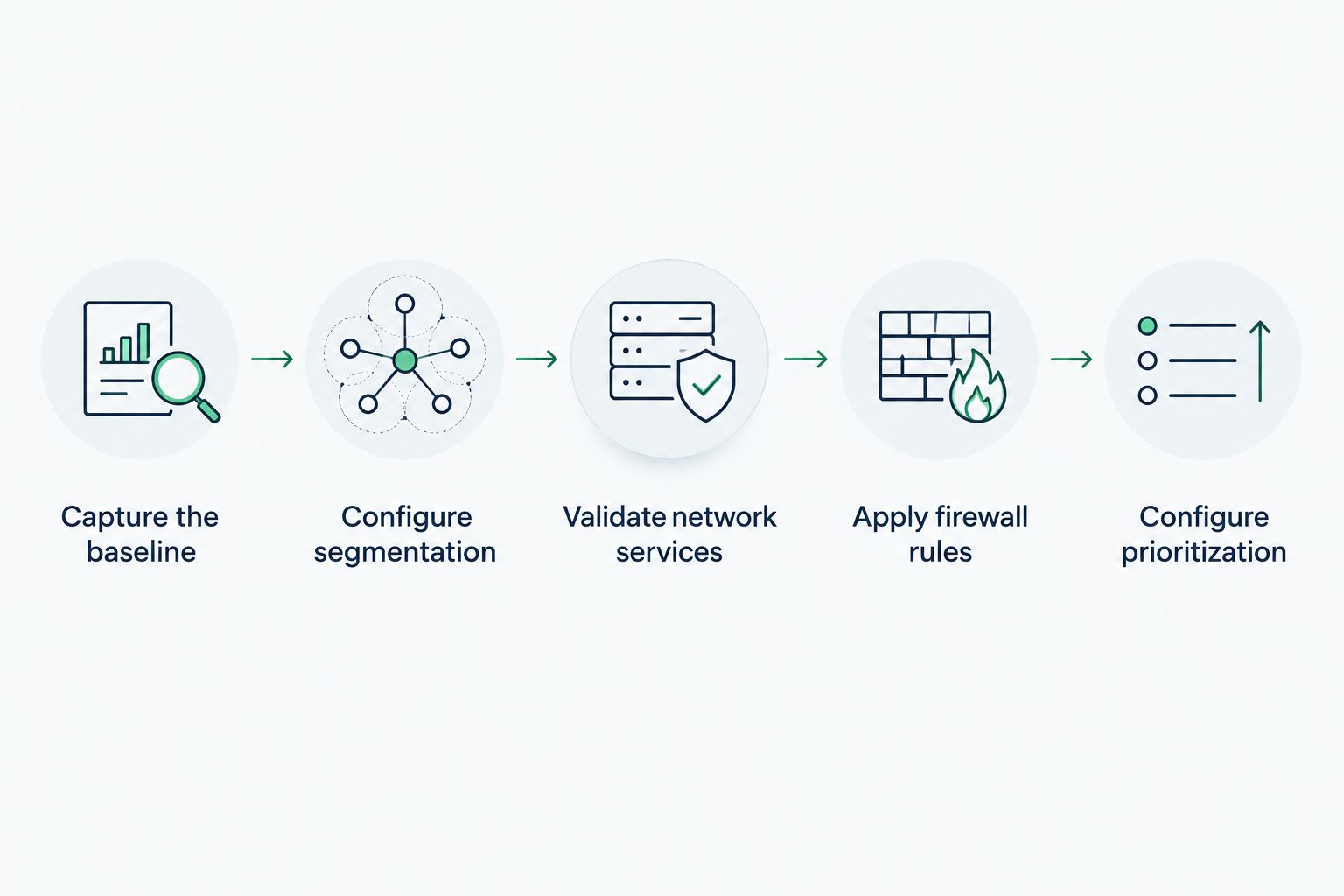
- Capture the baseline. Export or back up the existing switch and firewall configurations. Record the working addressing, routing, and name-resolution settings before introducing a voice network.
- Configure segmentation. If your design uses a voice VLAN, configure the endpoint-facing port and upstream links consistently. Set endpoint discovery according to the switch and phone documentation; a computer connected through a phone also needs the intended data-network behavior.
- Validate network services. Confirm the endpoint receives an address from the intended subnet, reaches its gateway, resolves required names, and reaches the provider’s provisioning services. Apply provider-specific DHCP options only when documented for that deployment.
- Apply firewall rules. Use the voice provider’s current requirements for destinations, protocols, and session handling. Do not open broad inbound access simply because registration fails, and do not assume a SIP inspection setting is correct for every provider.
- Configure prioritization. Establish where voice markings are accepted, applied, or rewritten. DSCP 46 is the standardized Expedited Forwarding codepoint commonly used for voice media, but marking packets alone does not reserve bandwidth or control an internet provider’s network.
- Verify restrictions. Check that the voice network reaches required services without gaining unnecessary access to business systems. Keep management access restricted to authorized administrators.
Expected result: The endpoint obtains the intended network configuration, registers successfully, and communicates through documented rules. Voice segmentation and prioritization work without unintentionally expanding access.
Validate addressing and service access before treating traffic prioritization as the solution to poor calls.
Establish a monitoring baseline before the office becomes busy. The network monitoring tools for small business IT guide provides a next step for choosing how to observe interfaces and network behavior.
Compare call-quality measurements with the selected provider’s published requirements. Keep the measurement method and test conditions with the results; a quiet-office test and a busy-office test answer different questions.
Calling acceptance and cutover
Establish operational readiness
- Provision identities. Assign the correct extension, telephone number, device, and permissions. Replace default credentials where applicable and protect administrative access with multifactor authentication when supported.
- Test actual call paths. Verify inbound and outbound calling, two-way audio, transfers, hold, voicemail, reception routing, and after-hours handling. Include keypad interactions with any automated systems your employees use.
- Test under representative load. Repeat calls while normal business traffic is active. Check for audio gaps, delayed speech, disconnects, and interface errors rather than relying only on a bandwidth test.
- Verify emergency handling. Confirm the provider’s emergency-calling configuration and location records for each relevant endpoint or user. Follow the provider’s approved verification procedure; do not place an uncoordinated live emergency call as an installation test.
- Approve the cutover. Obtain sign-off from the business owner of each critical call path. Define rollback triggers, the person authorized to act, and the fallback communication method before changing production routing.
- Deliver the handoff. Provide configuration backups, cable reports, the endpoint register, acceptance results, escalation contacts, and instructions for reporting failed calls. Store credentials in an approved credential system, not the handoff spreadsheet.
Expected result: Business owners have approved real calling functions, and support staff have enough evidence to diagnose faults without rebuilding the installation history.
For a 2026 cutover, confirm number-transfer status directly with the responsible provider. A saved configuration backup does not reverse a telephone-number transfer; document what fallback routing the provider actually supports.
When an employee changes desks
Reuse the workflow for a desk move rather than treating the move as a patch-cord task. The physical location, network assignment, and emergency-location record can change even when the extension stays the same.
- Before the move: Confirm the destination jack, switch port, endpoint power, and intended network assignment.
- During the move: Reconnect the approved endpoint and verify addressing, registration, and user assignment.
- After the move: Test inbound and outbound calling, review location-dependent settings, and update the deployment record.
Keep calling permissions tied to the approved role, not inherited from the previous desk occupant. For shared phones, verify the location and business function separately from any individual employee account.
This repeatable move process gives your 2026 operations team the same acceptance standard as the original installation. It also makes later troubleshooting depend on current records instead of memory.
Troubleshooting
The phone has power but never registers
Check its address, subnet, gateway, and name resolution first. Compare the endpoint-facing VLAN configuration with upstream links, then inspect provider provisioning requirements and firewall logs. Power confirms only that the device receives electricity.
Calls connect, but audio works in one direction
Inspect the media path and the provider’s documented firewall and NAT requirements. Registration and call signaling can succeed while media traffic fails; check packet flow before changing SIP inspection or exposing additional ports.
Audio breaks up during busy periods
Compare affected calls with interface errors, uplink utilization, and provider call-quality records. Verify prioritization at the actual congestion point; a voice VLAN separates traffic but does not, by itself, guarantee call quality.
Several phones restart together
Check switch events, power interruptions, and the total PoE allocation. Compare the combined endpoint requirements against the switch’s power budget, especially after adding other powered devices or replacing phones.
Internal calls work, but outside callers reach the wrong destination
Review number assignment, provider routing, reception rules, and after-hours schedules. Test from an external telephone and record the destination reached; internal extension dialing does not validate public-number routing.
Customize your workflow
Extend the deployment record into your normal change process. Require the same checks when adding a conference phone, replacing a switch, changing an internet connection, or opening another office.
DivergeIT’s managed IT services, cybersecurity, and compliance offerings fit businesses that want those responsibilities addressed together. The benefit is a shared operational scope; the limitation is that a service engagement does not replace carrier authorization, cabling certification, or business acceptance. Assign each responsibility explicitly.
Make evidence part of every change ticket: the affected location, configuration change, test result, and rollback decision. Close the ticket only after the relevant business function works.
FAQ
What is a network cabling VoIP workflow?
A network cabling VoIP workflow connects physical cable validation, network configuration, endpoint provisioning, and call acceptance. It establishes readiness before employees depend on the new calling setup.
Do VoIP phones need a separate voice VLAN?
A separate voice VLAN is a network design choice, not a universal requirement. When used, it needs consistent switch configuration, addressing, routing, and access controls; separation alone does not guarantee call quality.
How long can an Ethernet cable run be for a desk phone?
Standard balanced-copper Ethernet channels have a 100-meter limit, typically including a 90-meter permanent link and 10 meters of patch cords. Validate the installed channel and the endpoint’s supported Ethernet and power requirements.
Why does my VoIP phone turn on but not connect?
Power does not prove that a phone has working addressing, name resolution, or access to its provisioning service. Check those dependencies and the intended network assignment before replacing the phone.
Can I use softphones instead of desk phones?
Yes, when your voice service supports the intended softphone and workstation. Test authentication, audio permissions, headset behavior, and emergency-location handling before approving it for business use.
What should I test before switching office phone service?
Test inbound and outbound calls, two-way audio, transfers, voicemail, reception routing, and after-hours handling. Verify emergency-location configuration through the provider’s approved process and document the supported fallback arrangements.
Can DivergeIT support the IT side of an office voice rollout?
DivergeIT provides managed IT services, cybersecurity, and compliance support for growing small and mid-sized businesses. Define the rollout’s network responsibilities, carrier coordination, and acceptance deliverables in the project scope.
One last thing
A cable certification pass and a successful phone registration prove different things. Neither proves that an outside caller can reach reception after hours. Keep physical acceptance, network acceptance, and business calling acceptance separate so nobody mistakes a green status indicator for a finished office.