


Best overall: RingCentral RingEX. Best for Microsoft-centered firms: Microsoft Teams Phone. Best for firms already using Zoom: Zoom Phone. This 2026 guide compares the best VoIP systems for professional services firms by call handling, administration, security controls, and fit with existing workflows. DivergeIT provides managed IT and cybersecurity services for growing firms that need support beyond the phone application.
TL;DR
- RingCentral RingEX leads the best VoIP systems for professional services firms shortlist for broad business communications.
- Microsoft Teams Phone fits Microsoft-centered firms; Zoom Phone fits firms already using Zoom for meetings.
- Dialpad Connect fits conversation review; 8x8 Work fits distributed-office calling.
- DivergeIT provides managed IT and cybersecurity services around business communications, rather than a competing VoIP application.
- Choose business phone systems by routing, security, continuity, and support ownership—not the feature count.
Why this matters
A professional services phone system handles more than employee conversations. It routes prospective clients, connects existing clients with the right person, and carries information that requires careful handling. A missed transfer or inaccessible voicemail creates a service problem, even when the application itself is working.
Your 2026 shortlist should therefore start with the calls your firm cannot mishandle. Reception coverage, remote employees, confidential conversations, and clear escalation ownership matter more than collecting features that nobody uses.
What makes the best VoIP system for your firm
Use these criteria before choosing a platform:
- Call handling: Receptionists need queues, transfers, voicemail, and after-hours routing that match actual client workflows.
- Workflow fit: Employees should not need to switch between overlapping applications to answer routine calls.
- Security controls: Evaluate administrator permissions, identity integration, account recovery, and access to recordings or transcripts.
- Continuity: Define how calls reach staff when an office connection, device, or location becomes unavailable.
- Administration: Determine who changes routing, removes former employees, manages numbers, and investigates failed calls.
- Support ownership: Separate the phone provider's responsibilities from those of your network, internet, and managed IT providers.
The best choice is the system your firm can operate and govern—not the system with the longest feature list. Ask each provider to demonstrate your workflows rather than presenting a generic sales tour.
Best VoIP systems at a glance
These recommendations identify distinct buying situations. They are not a claim that one platform wins every technical comparison.
RingCentral RingEX
- Best for: Broad communications
- Standout capability: Business calling alongside messaging and video
- Key limitation: Adds another communications environment when existing tools already cover messaging and meetings
Microsoft Teams Phone
- Best for: Microsoft-centered firms
- Standout capability: Calling inside Microsoft Teams
- Key limitation: External calling requires a supported telephone connectivity arrangement
Zoom Phone
- Best for: Zoom-centered firms
- Standout capability: Business calling within the Zoom environment
- Key limitation: Zoom Meetings and Zoom Phone are separate services
Dialpad Connect
- Best for: Conversation review
- Standout capability: Transcription and conversation tools alongside calling
- Key limitation: Transcripts require accuracy checks and information-governance decisions
8x8 Work
- Best for: Distributed offices
- Standout capability: Business calling and centralized administration
- Key limitation: Country coverage and local calling requirements need individual verification
1. RingCentral RingEX: best VoIP system for broad communications
RingCentral RingEX combines business phone capabilities with messaging and video communications. It belongs at the top of a shortlist when your firm wants a dedicated communications platform rather than adding calling to an existing collaboration application.
The strongest buying case is organizational consistency. Reception, client-facing teams, and remote employees can work within the same communications environment, with routing and administration handled centrally. Confirm which capabilities belong to the specific package under consideration; the product name alone does not establish the full service scope.
RingCentral RingEX pros:
- Combines calling, messaging, and video within one product family.
- Provides business call-routing capabilities for organized reception and team workflows.
- Supports desktop and mobile calling for employees working across locations.
RingCentral RingEX cons:
- Messaging and meetings can overlap with tools your firm already uses.
- A separate communications platform introduces another administration and training responsibility.
Best for: Firms seeking a broad communications environment with dedicated business telephony.
For a 2026 evaluation, have the receptionist demonstrate a transfer, a queue overflow, and an after-hours change. These tasks expose workflow friction more directly than a feature checklist. Include an employee using a mobile device so the demonstration covers more than the main office.
Verdict: Buy RingCentral RingEX when consolidating business communications is the goal; skip it when calling is the only missing capability.
2. Microsoft Teams Phone: best VoIP system for Microsoft-centered firms
Microsoft Teams Phone adds business calling capabilities to Microsoft Teams. It fits firms that already use Teams for daily collaboration and want employees to make and receive business calls in that environment.
The critical distinction is between the calling application and telephone connectivity. External calling requires an appropriate arrangement, such as Microsoft Calling Plans, Operator Connect, or Direct Routing. Your choice affects administration, provider relationships, and technical responsibility.
Microsoft Teams Phone pros:
- Keeps business calling inside an established Teams workflow.
- Supports organizational calling functions such as auto attendants and call queues.
- Offers different telephone connectivity approaches rather than one fixed deployment model.
Microsoft Teams Phone cons:
- Teams use alone does not establish that external calling is configured or licensed.
- Connectivity choices can divide troubleshooting responsibility between Microsoft, a carrier, and your IT provider.
Best for: Firms whose employees already depend on Microsoft Teams and whose IT team can manage the calling arrangement.
Before selecting Microsoft Teams Phone, map the receptionist's workflow separately from an ordinary employee's workflow. Answering personal calls is not the same task as handling callers for an entire firm. Ask who owns telephone connectivity, number transfers, emergency-calling configuration, and changes to routing.
Verdict: Buy Microsoft Teams Phone when Teams is already your working environment and calling ownership is clearly assigned.
3. Zoom Phone: best VoIP system for Zoom-centered firms
Zoom Phone provides business calling within the Zoom environment. It is a logical shortlist option when employees already use Zoom for meetings and you want to evaluate calling without introducing an unrelated communications interface.
Do not equate a Zoom Meetings subscription with a deployed business phone system. Phone service has its own setup, numbers, routing, and administrative decisions. Existing familiarity helps employees approach the interface, but it does not replace telephone planning.
Zoom Phone pros:
- Places business calling in the same environment as Zoom meetings.
- Provides business telephony functions including auto receptionists and call queues.
- Supports calling from desktop and mobile applications.
Zoom Phone cons:
- Existing meeting use does not remove the need to configure and administer phone service.
- Firms centered on another collaboration platform introduce an additional application environment.
Best for: Firms already using Zoom extensively that want business calling in the same environment.
During a 2026 pilot, test how staff move between client calls and scheduled meetings. Include reception coverage, voicemail access, and transfers to employees who are away from their desks. A familiar application is useful only when those everyday actions remain clear under real working conditions.
Verdict: Buy Zoom Phone when Zoom is already established and its calling workflows match your reception and client-service needs.
4. Dialpad Connect: best VoIP system for conversation review
Dialpad Connect combines business communications with transcription and related conversation tools. It deserves consideration when your firm wants to review what was discussed, not simply record that a call occurred.
That use case requires a governance decision before a purchasing decision. Transcripts can contain confidential client information, and automated transcription is not a verified record. Establish who can access the content, how employees check it, and when it must be deleted.
Dialpad Connect pros:
- Brings calling and transcription into the same communications workflow.
- Provides material employees can review after a conversation.
- Supports business communications through desktop and mobile applications.
Dialpad Connect cons:
- Transcription errors require review before information enters client records or formal work products.
- Capturing conversation content creates additional consent, access, and retention responsibilities.
Best for: Firms with a defined, approved reason to review call content and the controls to manage it.
Demonstrate the review workflow with nonconfidential sample conversations. Ask administrators to show recording and transcription settings, access permissions, and deletion procedures. If the firm cannot explain why it needs stored conversation content, adding that content is not a benefit by itself.
Verdict: Buy Dialpad Connect when conversation review has a clear business purpose; hold if recording and transcription governance remain unresolved.
5. 8x8 Work: best VoIP system for distributed offices
8x8 Work combines business calling with messaging and video capabilities. It belongs on the shortlist for firms evaluating a shared communications environment across multiple offices, especially when telephone requirements differ between locations.
Central administration is useful, but it does not make local requirements disappear. Number availability, service coverage, emergency calling, and number-transfer processes need verification for each relevant location. Evaluate the actual deployment footprint rather than accepting a general international-service description.
8x8 Work pros:
- Combines business calling with other employee communications capabilities.
- Provides centralized administration for organizational telephony.
- Supports desktop and mobile access for employees across offices.
8x8 Work cons:
- Distributed deployments still require location-specific service and calling checks.
- Messaging and video capabilities can duplicate established collaboration tools.
Best for: Firms managing communications across offices with different local telephone requirements.
Your 2026 evaluation should include someone responsible for each office, not just the central IT team. Have those participants confirm local numbers, reception coverage, business hours, and escalation contacts. Document differences before agreeing to a common configuration; otherwise, a central design can miss a local service requirement.
Verdict: Buy 8x8 Work when distributed-office administration is the priority and every required location passes the service checks.
How these systems were ranked
The order follows the criteria above: broad business calling first, existing-platform fit next, then specialized conversation and distributed-office needs. RingCentral RingEX is the default shortlist choice because its use case is broad communications rather than dependence on a particular existing application.
This ranking is not a measured call-quality benchmark or a claim that every feature exists in every package. Your final decision depends on the proposed configuration, contractual scope, and results of a workflow demonstration. A lower-ranked system is the better purchase when its distinct use case matches your firm.
Validate the choice before signing
Map calls
Write down how a new client, an existing client, and an urgent caller reach the right person. Include business hours, lunch coverage, absences, and after-hours handling. Give providers these workflows and require a demonstration against them.
Check controls
Identify who can change routing, reset access, retrieve voicemail, and access recordings. For confidential work, assess the configuration and applicable obligations rather than treating a product label as proof of compliance. DivergeIT provides cybersecurity and compliance services alongside managed IT services; the phone provider still needs to explain its own responsibilities.
Pilot workflows
Test the proposed system on the devices and connections employees actually use. Include transfers, voicemail retrieval, remote calling, and an unavailable destination. Record each problem and its owner instead of accepting a demonstration that only shows successful outbound calls.
Confirm ownership
Assign responsibility for number transfers, internet connectivity, endpoint configuration, identity access, and provider escalation. Require a written distinction between answering a support request and restoring service. Those are different commitments.
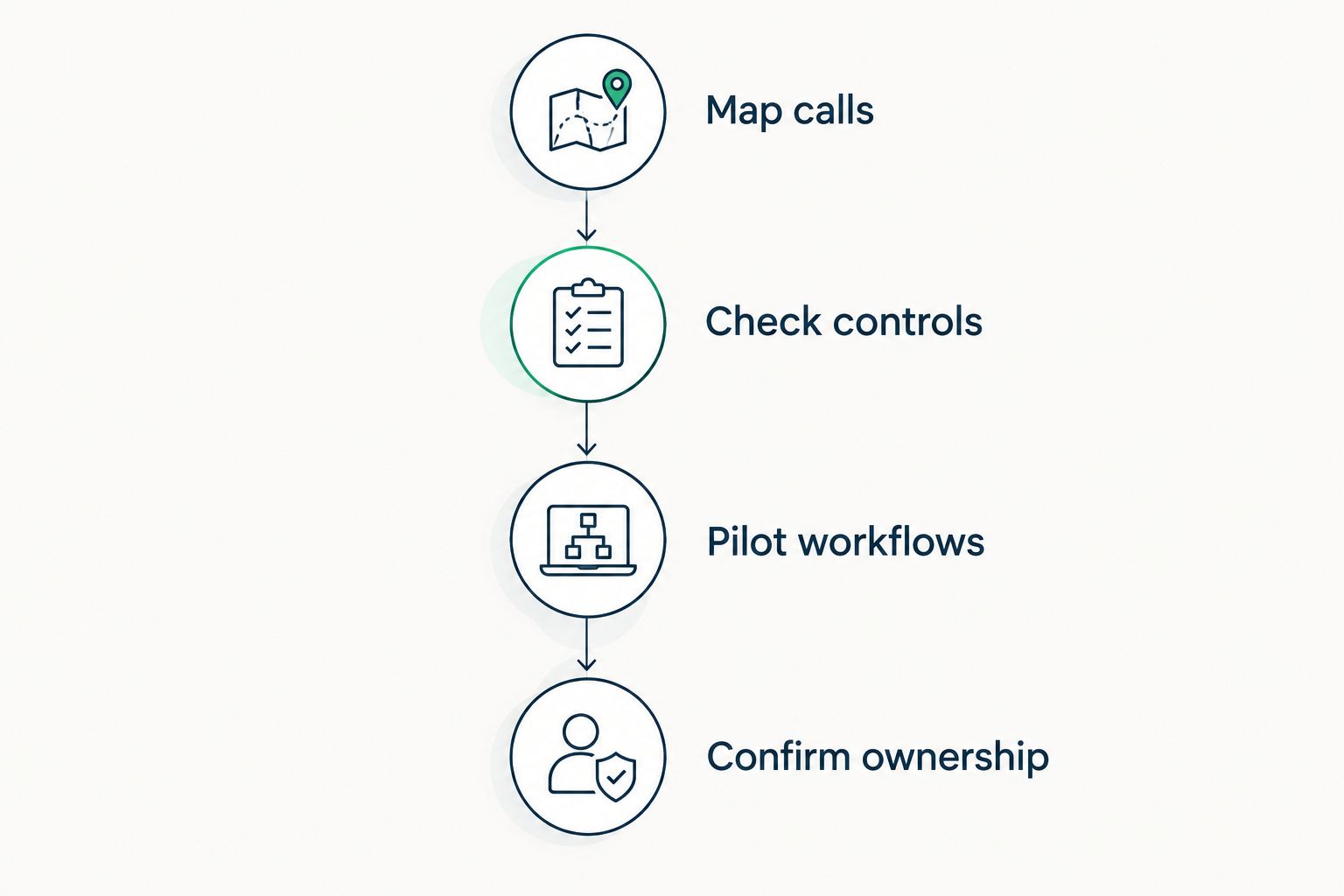
Resolve workflow and ownership questions before committing to a phone platform.
A VoIP deployment spans applications, connectivity, devices, and administration. DivergeIT is a managed IT services option for growing firms that need support beyond their VoIP system. Treat that service relationship separately from the selection of RingCentral RingEX, Microsoft Teams Phone, Zoom Phone, Dialpad Connect, or 8x8 Work.
Which VoIP system should you choose?
Start with RingCentral RingEX if you need a broad communications platform and have no existing application preference. Choose Microsoft Teams Phone or Zoom Phone when your established collaboration environment is the deciding factor. Put Dialpad Connect first when approved conversation review is central; put 8x8 Work first when distributed-office requirements dominate.
For your 2026 decision, choose one default candidate and one alternative tied to a genuine requirement. Demonstrate the same workflows on both. The winner should have a clear operating model, acceptable controls, and named support ownership—not merely a more persuasive presentation.
FAQ
What's the best VoIP system for a professional services firm?
RingCentral RingEX is the default shortlist choice for a firm seeking broad business communications. Microsoft Teams Phone or Zoom Phone fits better when an existing collaboration environment is the main selection criterion.
Is Microsoft Teams Phone better than RingCentral RingEX?
Microsoft Teams Phone is the stronger fit when your firm wants calling inside its established Teams environment. RingCentral RingEX fits a firm seeking a separate communications platform; evaluate both against reception and support requirements.
Does a Zoom Meetings subscription include a business phone system?
Zoom Meetings and Zoom Phone are separate services. Confirm the phone service, telephone connectivity, numbers, and administrative configuration included in the proposed arrangement.
Which VoIP system is best for reviewing client conversations?
Dialpad Connect belongs on the shortlist when transcription and conversation review are defined requirements. Approve consent, access, retention, and accuracy-checking procedures before using captured content in client work.
Can a VoIP system make our firm compliant?
A VoIP system alone does not establish compliance. Your obligations depend on the firm's activities, applicable rules, contracts, configuration, and handling of information.
What happens to business calls if our office internet fails?
The outcome depends on your calling configuration and continuity arrangements. Ask the provider to demonstrate the failure scenario, including alternate connections, destinations, and employee access.
Does DivergeIT sell one of these VoIP platforms?
DivergeIT's stated services include managed IT, cybersecurity, and compliance. This guide does not establish a reseller relationship with any listed phone provider.
What should we ask before moving our business numbers?
Ask who owns the number-transfer process, what documentation is required, and how service continuity will be handled. Confirm reception routing, emergency-calling configuration, and escalation responsibilities before the transition.
One last thing
Test a call nobody answers. A successful outbound call tells you little about reception coverage. An unanswered client call reveals whether the system reaches the right backup person, offers appropriate voicemail, or leaves the caller at a dead end.
Make that demonstration part of your 2026 buying decision. Then ask who changes the route when an employee leaves. A business phone system needs both a working configuration and an owner who keeps it current.