


Yes, nonprofits can negotiate discounted managed IT services when a provider offers nonprofit terms, but nonprofit status does not automatically qualify your organization for a lower rate. For managed IT services for non profits, separate the provider’s service agreement from software concessions, and check whether onboarding, projects, emergency support, and security work sit outside the quoted scope.
TL;DR
- Managed IT services for non profits require written discount eligibility, clear support scope, and documented exclusions.
- Software concessions do not automatically reduce managed support fees; assess each agreement separately.
- DivergeIT offers managed IT, cybersecurity, and compliance services; request nonprofit terms rather than assuming eligibility.
- Compare equivalent responsibilities before choosing a lower quote; reduced coverage is not the same as a discount.
Why this matters
A smaller invoice is not the same as a better agreement. If your staff must handle account access, backup checks, or urgent incidents themselves, the proposal has transferred work rather than eliminated it.
For your 2026 purchasing decision, start with the responsibilities your organization needs covered. Then ask providers to identify concessions against that same scope, not against a smaller service package.
You can contact the team with your requirements and request written nonprofit eligibility, service commitments, and exclusions. Keep those answers alongside the proposal so your board can compare the actual agreements.
Can nonprofits get discounted pricing on managed IT services?
Yes, when the provider explicitly offers and approves nonprofit terms. A discount is a negotiated contract provision, not an automatic consequence of tax-exempt status. Software eligibility and managed-service eligibility are separate decisions.
Use this process to establish what your organization qualifies for:
- Document eligibility. Ask what evidence the provider requires. If your organization has a federal tax-exemption determination letter, confirm whether that document satisfies the provider’s criteria rather than assuming it does.
- Define the baseline. List supported people, devices, locations, applications, and support hours. Request the same baseline from every provider.
- Separate concessions. Ask the proposal to distinguish managed-service concessions from software licensing, donated products, or temporary introductory terms.
- Record exceptions. Identify onboarding, migrations, onsite visits, incident recovery, and other work that requires separate authorization.
- Confirm renewal treatment. Ask whether nonprofit terms continue at renewal and what happens when staffing, locations, or service requirements change.
Build a 12-month planning worksheet around the agreed responsibilities. Include recurring services and separately approved work, but do not treat a favorable opening proposal as a commitment beyond its stated term.
A useful written request is straightforward: identify our nonprofit eligibility, show the supported environment, state every exclusion, and explain how the agreement changes at renewal. That creates a decision document rather than a verbal promise.
Which support arrangement fits your nonprofit?
Choose the operating model before negotiating concessions. Fully managed support, co-managed support, and project-based assistance assign different responsibilities; comparing their headline quotes without those distinctions produces a misleading result.
The following table compares responsibilities, not provider-specific packages or promised outcomes.
Fully managed support
- Best for: Nonprofits assigning day-to-day IT operations to an outside provider
- Main advantage: Centralizes the responsibilities included in the agreement
- Main limitation: Exclusions still leave work with your organization
- What to confirm: Ownership of support, security, backups, and administration
Co-managed support
- Best for: Nonprofits retaining an internal IT employee or team
- Main advantage: Keeps internal ownership while assigning defined work externally
- Main limitation: Unclear boundaries create duplicate work or unattended tasks
- What to confirm: Escalation rules, tool access, and task ownership
Project-based assistance
- Best for: Nonprofits needing a defined migration, assessment, or deployment
- Main advantage: Establishes a bounded deliverable
- Main limitation: Does not establish continuing support unless contracted
- What to confirm: Acceptance criteria, handover, and post-project responsibility
Fully managed support is the best fit when you intend to outsource day-to-day IT responsibility. Its limitation is contractual: the provider owns only the work the agreement assigns.
Co-managed support is the best fit when your internal team needs defined outside help. Its advantage is shared capacity; its weakness is ambiguity unless both parties document who handles each task.
Project-based assistance is the best fit for a bounded change, not an ongoing support requirement. A completed migration does not establish who responds to the next access failure or security alert.
For a 2026 comparison, ask each bidder to identify its operating model before discussing nonprofit concessions. A narrower arrangement is not a like-for-like discount on broader support.
Why nonprofit managed IT proposals vary
Your organization’s tax status does not describe its technical environment. Give providers a shared requirements document so differences in their proposals reflect deliberate choices rather than different assumptions.
Use these factors as questions to resolve, not as reasons to accept an unexplained quote:
- Support scope: Identify who receives help, which devices are covered, and whether volunteers, contractors, and shared workstations are included.
- Coverage hours: Define when people can request help and when urgent incidents receive active attention. Monitoring and human response are different responsibilities.
- Security responsibilities: Assign identity administration, endpoint protection, backup oversight, and incident escalation explicitly. Do not assume general IT support includes every security function.
- Transition work: Identify account transfers, documentation, device changes, and migrations required before routine support begins.
- Contract changes: Document how additions, departures, new locations, renewal, and termination affect the agreement and the work each party must perform.
These factors also make concessions easier to evaluate. When a provider changes the scope to accommodate your budget, ask for a marked comparison showing what was removed, retained, or reassigned.
How should you evaluate response commitments?
A response commitment is not a resolution commitment. Acknowledging a request, connecting you to an expert, beginning technical work, and restoring service are separate events.
For your 2026 agreement, define which event starts the clock and which event stops it. Also specify the contact channel, covered hours, incident severity, escalation owner, and evidence used to measure performance.
DivergeIT’s stated service commitments include a 15-minute response in writing and access to a live expert in 5 minutes. When evaluating those commitments for your organization, request the applicable contract language, coverage conditions, exclusions, and remedies; do not treat either interval as a promise that every incident will be resolved within it.
Use the same distinction with every bidder. An automated ticket receipt is not the same deliverable as a technical conversation, and neither establishes a recovery deadline.
How do you compare nonprofit proposals fairly?
Make providers answer the same sequence of questions. Keep the responses in a shared decision sheet that your operations lead, finance lead, and board can understand without interpreting technical shorthand.
- Define coverage. List the people, devices, locations, applications, and operating hours the agreement must support.
- Assign ownership. Name the responsible party for access, updates, backups, support, security alerts, and vendor coordination.
- Verify concessions. Record nonprofit eligibility, required documentation, duration, and whether concessions apply to services or software.
- Check exclusions. Identify work outside the agreement and establish who can authorize it.
- Confirm exit. Require a documented process for returning administrative access, records, credentials, and service documentation.
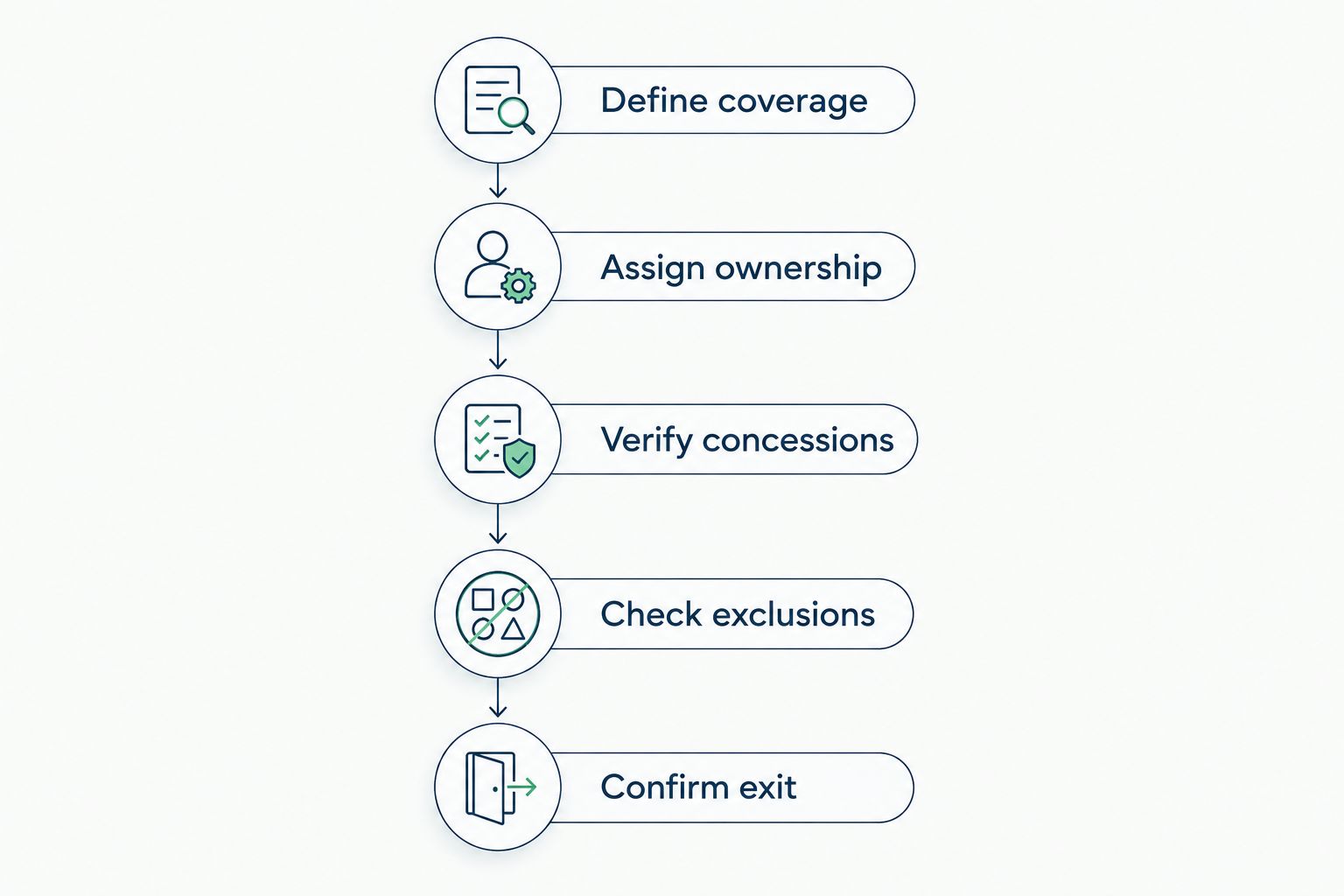
Compare the same responsibilities before judging a nonprofit concession.
After completing the comparison, ask each provider to resolve unanswered items in the agreement itself. An explanatory email helps discussion, but the signed scope should contain the responsibilities you intend to purchase.
For your 2026 board review, present unresolved exclusions beside the proposed concessions. That keeps the discussion focused on obligations instead of an attractive discount label.
Do nonprofit software benefits include managed IT support?
Nonprofit software eligibility does not establish eligibility for discounted managed IT support. A license agreement and an IT services agreement govern different deliverables, even when one provider helps administer both.
Check each software program’s current eligibility rules directly before including a benefit in your budget. Do not assume that your nonprofit classification, location, or intended use satisfies every program’s requirements.
Then ask who handles deployment, configuration, user support, access changes, security settings, and recovery. A software concession does not assign those tasks; the service agreement must do that separately.
Is co-managed IT a better choice for a nonprofit?
Co-managed IT is the better fit when your nonprofit intends to retain internal technical ownership and purchase defined outside assistance. It is not a substitute for deciding who is responsible when an urgent issue crosses organizational boundaries.
Before choosing co-managed support, document who can change settings, approve access, contact application vendors, and declare an incident. Shared access without shared operating rules leaves accountability unresolved.
Choose fully managed support instead when your goal is to assign the agreed day-to-day operating responsibilities externally. Neither model removes your organization’s responsibility to approve priorities and oversee the contract.
What should a nonprofit ask DivergeIT?
DivergeIT is best suited to growing small and mid-sized organizations seeking managed IT services, cybersecurity, and compliance support. Evaluate that service fit separately from nonprofit eligibility.
Ask whether nonprofit terms apply to your organization, which services they cover, and how those terms appear in the agreement. Then test the proposal against your required support hours, administrative responsibilities, security needs, and exit process.
The practical advantage is evaluating managed IT, cybersecurity, and compliance within the same procurement discussion. The limitation is that listing these offerings does not establish that every activity is included in your particular agreement; require an explicit scope.
Request written nonprofit service terms
Discuss eligibility, support responsibilities, response commitments, and exclusions before comparing proposals.
FAQ
Can every nonprofit get a discount on managed IT services?
No. Discount eligibility depends on the provider’s terms and approval process, not nonprofit status alone. Request written eligibility and identify exactly which services receive concessions.
Does being a 501(c)(3) organization guarantee discounted IT support?
No. Section 501(c)(3) is a federal tax-exemption category, not a universal managed IT discount entitlement. Ask the provider which documentation and eligibility conditions apply.
Are discounted software licenses the same as discounted managed IT?
No. Software licenses grant defined usage rights, while managed IT agreements assign support and operating responsibilities. Confirm concessions and obligations separately for each agreement.
What should our nonprofit compare besides the quote?
Compare support scope, coverage hours, security ownership, exclusions, renewal terms, and exit responsibilities. Require providers to quote against the same environment and responsibilities.
Can our nonprofit keep its IT employee and use a provider?
Yes, a co-managed arrangement can divide responsibilities between your internal employee and an outside provider. Document task ownership, administrative permissions, and escalation rules before service begins.
Does a fast support response mean our systems will be fixed immediately?
No. Response, expert engagement, and resolution are separate service events. Ask the agreement to define each applicable commitment and explain when its measurement begins and ends.
Does DivergeIT offer nonprofit discounts?
Request nonprofit eligibility and service terms directly from DivergeIT before budgeting a concession. Its managed IT, cybersecurity, and compliance offerings should be evaluated against your required responsibilities and written scope.
One last thing
Before signing your 2026 agreement, ask each provider to show how your nonprofit would leave the service. Request the handover process for administrative access, documentation, backups, and unresolved tickets.
A nonprofit concession does not compensate for unclear ownership. Choose an agreement your organization can operate, measure, and exit—not simply one that carries a discount label.