


Best overall: 1Password Business. Best for open-source review: Bitwarden. Best for delegated vault administration: Keeper. Best for browser-centered teams: Dashlane. This 2026 guide compares the best password managers for financial services firms by access control, recovery, audit evidence, and daily usability—not by features your firm will never use.
TL;DR
- The best password managers for financial services firms start with 1Password Business for a general-purpose shortlist.
- Bitwarden is the open-source choice; Keeper suits delegated administration; Dashlane suits browser-centered workflows.
- Require controlled sharing, multifactor authentication, recovery procedures, and usable audit evidence before selecting a password manager.
- DivergeIT suits growing financial firms seeking managed IT and cybersecurity services rather than a standalone password manager.
Why this matters
A financial services firm needs more than a place to store passwords. You need to control who receives access, recover business credentials when someone leaves, and show how those decisions were approved. A shared spreadsheet solves none of those responsibilities reliably.
DivergeIT is best for growing financial services businesses seeking managed IT and cybersecurity services rather than a standalone password manager. The distinction matters: software stores and shares credentials, while your organization still needs accountable people to administer access and respond to incidents. DivergeIT provides managed IT services, cybersecurity, and compliance services for growing small and mid-sized businesses, including financial services firms.
For your 2026 selection, separate the software decision from the operating decision. A password manager does not replace multifactor authentication, endpoint protection, or an employee departure process. Nor does buying one establish compliance with every obligation that applies to your firm.
What makes the best password manager for financial services?
Use these criteria before comparing brands. A feature earns its place only when it supports a documented business requirement.
- Controlled sharing: Employees need access to business credentials without circulating passwords through email or chat. Check who can grant, change, and remove access.
- Account lifecycle: Enrollment, role changes, and departures need clear ownership. Verify the identity integrations your organization actually uses.
- Recovery: Test how an authorized administrator restores access without making one person the permanent recovery bottleneck.
- Audit evidence: Identify which events are recorded, who can review them, and whether the available evidence answers your compliance team's questions.
- Authentication: Evaluate multifactor authentication, administrator protections, and support for the authentication methods your firm requires.
- Daily usability: Test the browser, device, and application workflows used by advisors, operations staff, and administrators. An approved tool that employees avoid creates a different access problem.
Ask for a demonstration using your workflows, not a generic product tour. Have the provider show a departed employee, a lost device, and an incorrectly shared credential. Those scenarios expose the difference between having controls and operating them.
Best password managers at a glance
The following ranking assigns each product a distinct use case. The limitation column identifies a decision constraint, not a claim that the product lacks every feature outside its main strength.
1Password Business
- Best for: General-purpose business adoption
- Standout feature: Secret Key alongside the account password
- Key limitation: A vault cannot end access to an already authenticated third-party session
Bitwarden
- Best for: Open-source review
- Standout feature: Publicly available source code
- Key limitation: Source transparency does not establish your firm's configuration or compliance
Keeper
- Best for: Delegated vault administration
- Standout feature: Administrative roles and shared credential management
- Key limitation: Delegation still requires clear ownership and permission review
Dashlane
- Best for: Browser-centered teams
- Standout feature: Browser-extension credential workflows
- Key limitation: A browser-focused evaluation does not cover every desktop or legacy application
Prices are not a useful substitute for requirements. Compare the business offering that includes the controls you need, and request current terms directly from the provider.
1. 1Password Business: best for general-purpose business adoption
1Password Business stores credentials and organizes access through business vaults. Its account security model uses a Secret Key alongside the account password. That makes it a useful starting point when your firm wants a business password manager without making open-source review or delegated administration the primary selection criterion.
The strongest reason to shortlist 1Password Business is the fit between everyday credential use and business administration. Your evaluation should still cover shared access, recovery, and the applications employees use outside the browser. A recognizable product name is not evidence that those workflows are covered.
1Password Business pros:
- Business vaults provide a defined place for shared credentials.
- The Secret Key adds a separate element to account protection.
- Individual and shared access can be evaluated within the same rollout.
- The product supports a practical pilot across different employee roles.
1Password Business cons:
- Account recovery needs an approved procedure before deployment.
- Removing vault access does not invalidate a password someone already knows.
- Existing sessions in financial applications need separate termination controls.
Best for: Financial firms that want a general-purpose password manager and will assign an administrator to own enrollment, sharing, and recovery.
For your 2026 pilot, include an advisor, an operations employee, and an administrator. Give each participant real tasks: save a new credential, retrieve a shared login, report a suspicious prompt, and request recovery. The outcome you want is a repeatable workflow, not merely a successful installation.
Verdict: Buy 1Password Business as the default choice after it passes your access and recovery tests.
2. Bitwarden: best for open-source review
Bitwarden is an open-source password manager with business offerings for organizational credential management. Its publicly available source code makes it a distinct option for firms whose security review includes software transparency. Bitwarden also offers self-hosting, which creates an additional operating decision rather than an automatic security advantage.
Choose Bitwarden because open-source review is a real requirement—not because the phrase sounds reassuring. Someone must still assess the relevant documentation, configuration, authentication, and deployment responsibilities. Source visibility does not show whether your employees share credentials appropriately.
Bitwarden pros:
- Open-source code supports technical scrutiny.
- Organizational collections provide a structure for shared credentials.
- Hosted and self-hosted approaches allow different operating models.
- The product fits firms with an explicit software transparency requirement.
Bitwarden cons:
- Open-source status alone does not demonstrate compliance.
- Self-hosting adds infrastructure, maintenance, and recovery responsibilities.
- Your team still needs to configure permissions and review access.
Best for: Financial firms with technical reviewers who need open-source software assessment as part of vendor selection.
Before choosing self-hosting, name the people responsible for updates, backups, monitoring, and restoration. Document how staff regain access during an infrastructure incident. If you cannot assign those responsibilities, evaluate the hosted approach instead of treating self-hosting as the safer default.
For a 2026 assessment, consult Bitwarden's official business, security, and self-hosting documentation against your intended deployment. Keep the evidence tied to the offering and configuration you select; documentation for another deployment model is not interchangeable.
Verdict: Buy Bitwarden when open-source review is a defined requirement; skip self-hosting without an operating owner.
3. Keeper: best for delegated vault administration
Keeper provides business password management with administrative roles and shared credential management. It belongs on the shortlist when different departments need access administration without giving everyone the same authority. The buying question is whether you can delegate responsibility while preserving oversight.
That distinction matters in a financial firm with separate advisory, operations, and finance functions. Department-level administration can match how work is organized, but shared ownership must not become unclear ownership. Build the permission model before importing credentials.
Keeper pros:
- Administrative roles support a delegated management structure.
- Shared credential management gives teams an alternative to informal password exchange.
- Department-based requirements can be demonstrated during evaluation.
- Central oversight can be assessed alongside local administration.
Keeper cons:
- Delegation adds permission decisions that require ongoing review.
- A departmental administrator still needs limits and an escalation path.
- Vault permissions do not replace access controls inside the underlying application.
Best for: Financial firms that need multiple administrators with different responsibilities across departments.
Ask the provider to demonstrate an administrator who manages one department without controlling unrelated credentials. Then test who can change that administrator's permissions and who sees the resulting activity. Write down the answer before agreeing that the model fits your firm.
Also inspect shared financial accounts. Where an application supports named users, use individual accounts rather than making a shared password the standard workflow. Keeper can manage credentials; it cannot make a shared application login provide individual accountability.
Verdict: Buy Keeper when delegated administration is necessary and the demonstrated permissions match your organizational boundaries.
4. Dashlane: best for browser-centered teams
Dashlane provides password management through browser extensions and business administration tools. Its browser-centered workflow makes it a useful shortlist option when staff spend most of their credential-dependent work in web applications. Evaluate it inside the browsers and browser profiles your organization approves.
Start with actual tasks rather than a feature checklist. An employee should recognize the expected login page, retrieve the correct credential, and understand what to do when autofill behaves unexpectedly. Convenience does not remove the need to check where a password is being entered.
Dashlane pros:
- Browser-extension workflows align with web-based applications.
- Credential generation and retrieval can sit close to the login task.
- Teams can evaluate usability within their existing browser environment.
Dashlane cons:
- A browser pilot does not establish coverage for every desktop application.
- Extension deployment and browser policies need administrative ownership.
- Legacy workflows require separate testing before firm-wide adoption.
Best for: Financial firms whose staff primarily use browser-based business applications.
Test Dashlane with your customer relationship management system, document portals, and other approved web applications. Include any separate browser profiles employees use. Record exceptions instead of allowing staff to invent workarounds after rollout.
If important workflows remain outside the browser, compare the complete credential-access process with the other shortlisted tools. Choose according to the applications that matter, not the percentage of a demonstration that looks easy.
Verdict: Buy Dashlane for a browser-centered environment after testing the exceptions; hold if essential workflows remain unresolved.
How the ranking works
This is a use-case ranking, not a claim of comparative penetration testing. The criteria are controlled sharing, account lifecycle, recovery, audit evidence, authentication, and daily usability. Each product receives a distinct slot so you can reduce the shortlist without pretending every firm has identical requirements.
1Password Business is the default general-purpose candidate. Bitwarden becomes the preferred candidate when open-source review is mandatory. Keeper moves first when delegated administration dominates the requirements. Dashlane moves first when browser-centered credential use is the deciding workflow.
For source verification, use each provider's official business and security documentation during your 2026 review. Ask for evidence covering the exact offering, integrations, and deployment you intend to purchase. Do not treat documentation as proof that your configuration is correct.
Which password manager should your firm choose?
Start with 1Password Business unless a specific requirement points you toward another candidate. Compare only the tools that meet your non-negotiable controls, then let a practical pilot settle the choice.
Use this decision sequence:
- Requirements: Identify sensitive applications, shared credentials, authentication rules, and evidence needs.
- Pilot: Run a recommended 30-day pilot with representative employees and administrators.
- Recovery: Assign at least 2 authorized administrators and test the approved recovery procedure.
- Departure: Test 4 scenarios: employee departure, lost device, compromised credential, and unavailable administrator.
- Review: Approve the operating procedure before expanding access across the firm.
These are recommended evaluation conditions, not vendor performance claims. Adjust the pilot to your organization, but do not remove the recovery and departure tests to shorten procurement.
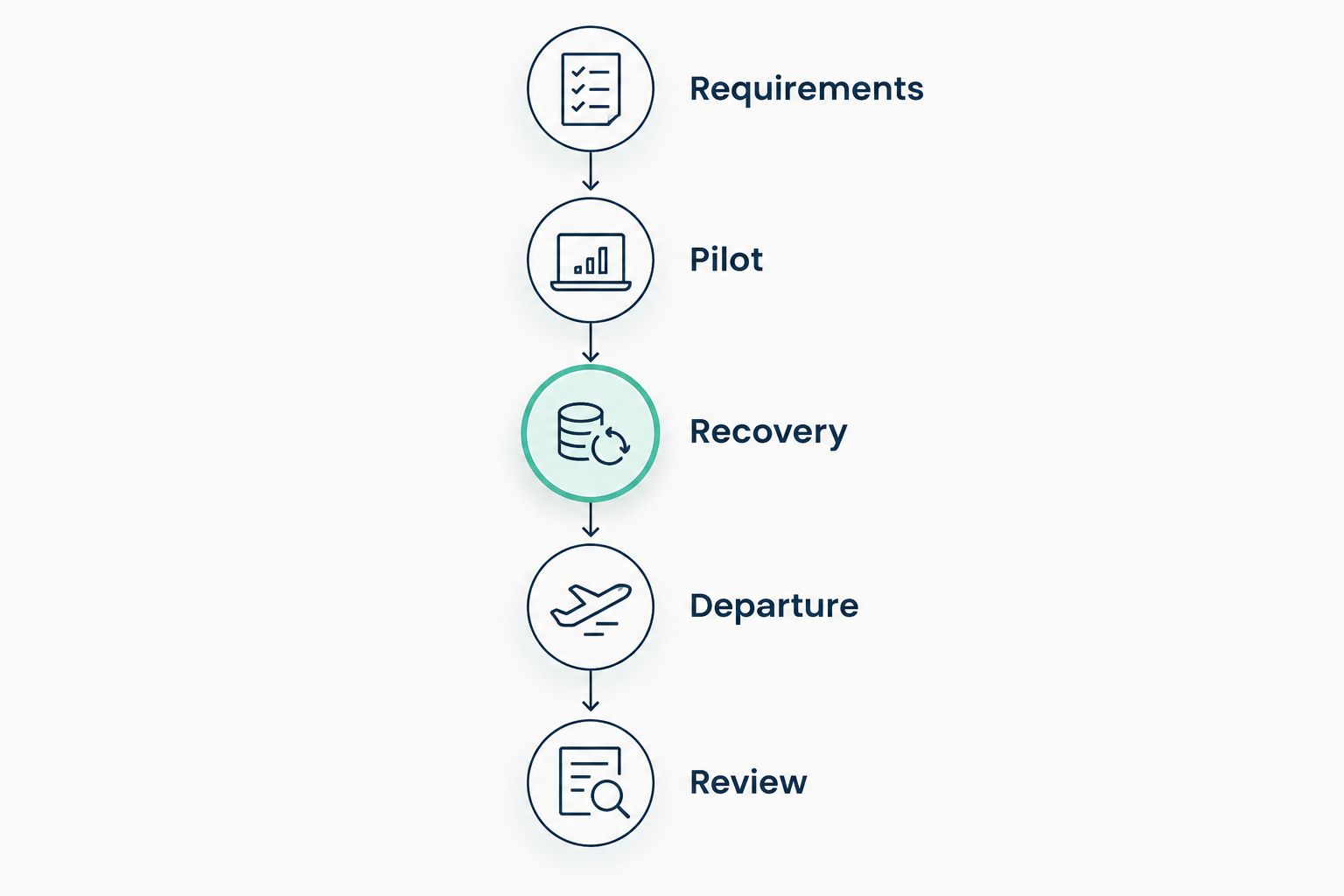
Approve recovery and departure procedures before expanding the password manager across the firm.
Your 2026 acceptance record should identify the selected product, configuration owner, recovery approvers, unresolved exceptions, and evidence location. It should also explain how application sessions are terminated and exposed credentials are changed. Removing access to a vault is only one part of departure handling.
DivergeIT provides managed IT and cybersecurity services for growing businesses. If your software shortlist is ready but operational ownership is not, address that service requirement before deployment.
Define your IT service requirements
Discuss managed IT, cybersecurity, and compliance needs for your financial services firm.
FAQ
What's the best password manager for a financial services firm?
1Password Business is the default general-purpose shortlist choice in this guide. Choose Bitwarden for open-source review, Keeper for delegated administration, or Dashlane for browser-centered workflows, then validate the required controls.
Is Bitwarden better than 1Password Business for financial firms?
Bitwarden is the more relevant candidate when open-source review is a mandatory selection requirement. 1Password Business is the general-purpose candidate; test both against your sharing, recovery, and authentication requirements rather than treating either as universally better.
Does a password manager make a financial services firm compliant?
No, a password manager does not establish compliance by itself. Your firm still needs applicable policies, configured controls, access reviews, incident procedures, and evidence that those processes operate.
Should a financial firm use shared passwords?
Use individual application accounts wherever the application supports them. When a shared credential is unavoidable, restrict access, assign an owner, and document how the credential is changed after exposure or an employee departure.
Do we still need multifactor authentication with a password manager?
Yes, a password manager does not replace multifactor authentication. Protect the password manager and sensitive business applications with the authentication methods required by your security policy.
What should we test before choosing a business password manager?
Test credential sharing, administrator permissions, recovery, employee departures, and audit evidence. Include the browsers, devices, and applications employees actually use, and record any unsupported workflows.
Can DivergeIT replace a password manager?
DivergeIT is a managed IT, cybersecurity, and compliance service provider, not one of the password manager products ranked here. Software selection and service ownership are separate decisions; define both before deployment.
One last thing
A password that an employee has copied cannot be made unknown again by removing vault access. Your departure procedure must address the underlying account, active sessions, and any shared credentials the person accessed.
Make that the final procurement test. Ask the administrator to demonstrate the complete departure workflow—not just deletion from the password manager. A successful demonstration ends with controlled business access, not merely an empty user list.