


Best overall for Microsoft-centered small businesses: Microsoft Azure. Best for custom application infrastructure: Amazon Web Services. Best for analytics-led projects: Google Cloud. Best for straightforward application hosting: DigitalOcean. This 2026 guide compares the best cloud computing platforms for small business by workload fit, security responsibilities, and the work required to operate them.
TL;DR
- The best cloud computing platforms for small business fit existing applications, security requirements, and operating capacity.
- Microsoft Azure is the default shortlist choice for Microsoft-centered business infrastructure.
- Amazon Web Services suits custom applications; Google Cloud suits analytics-led workloads.
- DigitalOcean suits straightforward hosting, not a replacement for every business IT system.
- DivergeIT provides managed IT services; cloud platforms provide infrastructure. Choose each for its distinct role.
Why this matters
A cloud platform does not replace IT management. Your business still needs someone accountable for access, configuration, monitoring, recovery, and support when an application stops working.
DivergeIT recommends Microsoft Azure as the first cloud platform to assess for small businesses centered on Microsoft infrastructure. That is a starting point, not a reason to move every application. DivergeIT provides managed IT, cybersecurity, and compliance services; the platforms below supply the underlying technology.
For your 2026 decision, start with the business application and its dependencies. A platform with more services is not automatically a better home for the software your employees need every morning.
What makes the best small-business cloud platform?
Judge each platform against these criteria before comparing product catalogs:
- Application fit: Your software vendor supports the proposed deployment, including its database, operating system, and licensing requirements.
- Identity control: Administrators can enforce appropriate authentication, restrict privileges, and remove access when employees leave.
- Operational ownership: A named team handles configuration, alerts, updates, and escalation. Provider support does not replace that responsibility.
- Recovery design: Backups, retention, and restore procedures match the business consequences of losing the workload.
- Spending visibility: Your team can identify resources, assign ownership, and review usage without guessing which application created the charge.
- Exit practicality: Your team understands how to export data, rebuild the application, and leave services that create dependencies.
Treat unsupported software or unclear data-handling requirements as reasons to pause. Do not let a strong feature list compensate for an application that cannot run in the proposed environment.
Cloud computing platforms at a glance
These recommendations compare infrastructure platforms, not office productivity suites. Microsoft 365 and Google Workspace serve a different purpose from virtual machines, application runtimes, and cloud databases.
Microsoft Azure
- Best for: Microsoft-centered business infrastructure
- Standout capability: Connections across Microsoft identity, Windows workloads, and cloud infrastructure
- Key limitation: Existing Microsoft use does not eliminate cloud configuration work
Amazon Web Services
- Best for: Custom applications with varied infrastructure requirements
- Standout capability: Broad infrastructure and managed application services
- Key limitation: Service selection and permissions require deliberate design
Google Cloud
- Best for: Analytics-led applications and data projects
- Standout capability: BigQuery and managed data services
- Key limitation: Data preparation and access governance remain your responsibility
DigitalOcean
- Best for: Straightforward web and application hosting
- Standout capability: Focused hosting services, including Droplets and managed databases
- Key limitation: Check specialized enterprise requirements before committing
The order reflects the use cases above, not a universal performance ranking. Your application requirements determine the winner.
1. Microsoft Azure: best for Microsoft-centered business IT
Microsoft Azure supplies virtual machines, storage, networking, databases, and application services. For a business already operating Windows-based applications and Microsoft identity systems, Azure belongs at the front of the infrastructure shortlist.
Azure and Microsoft 365 are separate offerings with different responsibilities. Moving a server application into Azure does not automatically configure secure access, backups, or application maintenance.
Microsoft Azure pros:
- Supports Windows and Linux virtual machine workloads.
- Offers connections with Microsoft Entra ID for identity-related requirements.
- Supports hybrid designs that connect on-premises systems with cloud resources.
- Provides managed services when an application supports moving beyond a traditional server.
Microsoft Azure cons:
- Identity, network, and resource permissions still require careful configuration.
- Existing Microsoft subscriptions do not establish entitlement to every Azure service.
- Moving an unchanged server preserves many of its existing maintenance requirements.
Best for: Small businesses assessing cloud infrastructure for Microsoft-dependent applications, Windows servers, or hybrid environments.
For a 2026 Azure assessment, ask the application vendor to confirm the supported deployment architecture in writing. Then assign responsibility for patching, backups, privileged access, and after-hours incidents. Familiar terminology does not remove those obligations.
Verdict: Buy for Microsoft-centered workloads after confirming application support and operational ownership.
2. Amazon Web Services: best for custom application infrastructure
Amazon Web Services, commonly called AWS, supplies computing, storage, databases, networking, and managed application services. Amazon EC2 supports virtual machines, while Amazon S3 provides object storage.
AWS fits businesses whose developers or technical partners need to assemble infrastructure around a custom application. The useful question is not how many AWS services exist, but which services your application needs and who can maintain them.
Amazon Web Services pros:
- Offers infrastructure components for varied application architectures.
- Supports managed databases and application services alongside virtual machines.
- Provides identity and access controls for separating administrative responsibilities.
- Supports approaches ranging from server-based hosting to event-driven applications.
Amazon Web Services cons:
- More architecture choices create more configuration decisions.
- Application teams still own code, access design, and workload-specific recovery.
- Using several services requires clear dependency documentation and spending ownership.
Best for: Small businesses with custom software and an accountable development or infrastructure team.
Before selecting AWS, require an architecture diagram that identifies the application, database, storage, identity controls, and recovery dependencies. If the proposed design cannot be explained clearly, simplify it before deployment.
Do not buy architectural complexity for hypothetical future growth. Choose the services your application requires now, with a documented path for changes that the business actually expects.
Verdict: Buy for custom applications when a technical owner can operate the architecture; skip an unnecessarily complex design.
3. Google Cloud: best for analytics-led workloads
Google Cloud supplies computing, storage, networking, databases, and application services. BigQuery, its managed analytics data warehouse, makes Google Cloud a relevant shortlist option when your main requirement is querying and analyzing business data.
Google Workspace usage alone does not establish a need for Google Cloud infrastructure. Start with the reporting or application problem, then identify the data sources and processing requirements.
Google Cloud pros:
- Offers BigQuery for analytical queries across business datasets.
- Provides managed services for data processing and application development.
- Supports virtual machines as well as container-based application environments.
- Provides access controls for organizing project and resource permissions.
Google Cloud cons:
- A data platform does not fix inconsistent source records or unclear reporting definitions.
- Data pipelines require ownership, monitoring, and handling procedures.
- Moving information between systems adds integration work that must be planned.
Best for: Small businesses building reporting, analytics, or data-driven applications with an identified technical owner.
For your 2026 shortlist, define the business decision the data project must support. Specify the source systems, authorized users, refresh requirements, and acceptable handling of sensitive information before selecting services.
Keep ordinary file sharing separate from an analytics infrastructure decision. A business that needs shared documents does not automatically need a data warehouse.
Verdict: Buy for a defined analytics workload; hold if the project lacks reliable data or a responsible owner.
4. DigitalOcean: best for straightforward application hosting
DigitalOcean supplies cloud hosting services, including Droplets virtual machines, managed databases, and application hosting through App Platform. It belongs on the shortlist when your requirements center on a website, web application, or a relatively direct hosting architecture.
A narrower deployment is easier to describe, but it still needs security and maintenance ownership. A virtual machine does not become a fully managed business application simply because it runs in the cloud.
DigitalOcean pros:
- Provides virtual machines for conventional hosting requirements.
- Offers managed database options for supported application designs.
- Includes application deployment services beyond self-managed servers.
DigitalOcean cons:
- Specialized identity, integration, or governance requirements need individual verification.
- Self-managed servers still require operating-system and application maintenance.
- A hosting account does not replace employee help desk or endpoint support.
Best for: Small businesses and development teams hosting a defined web application without extensive enterprise integration requirements.
List the application's dependencies before selecting DigitalOcean. Confirm database compatibility, backup arrangements, logging needs, and the person responsible for responding when the service fails.
Avoid choosing it solely because the initial deployment looks simple. Evaluate the routine tasks after launch: access changes, certificate management, software updates, restores, and incident escalation.
Verdict: Buy for straightforward hosting with a clear maintenance plan; skip when essential enterprise requirements remain unverified.
How the platforms rank
This ranking prioritizes application fit, identity control, operational ownership, recovery, spending visibility, and exit practicality. It does not treat the longest service catalog as the best small-business choice.
Microsoft Azure leads the Microsoft-centered use case. AWS leads the custom-infrastructure use case, Google Cloud leads the analytics-led use case, and DigitalOcean leads the straightforward-hosting use case.
DivergeIT's managed IT and cybersecurity services address a separate decision: who operates and protects the environment. Keep platform selection and service-provider selection distinct so each has clear requirements.
Turn the shortlist into a deployment decision
Use this sequence before approving a 2026 migration. Each step should produce something your business can review, rather than another feature presentation.
Workload fit
Choose 1 production workload for the initial assessment. Record its users, dependencies, supported deployment options, and business owner. Starting with a defined workload keeps the decision tied to an actual business requirement.
Access ownership
Identify who approves access and who administers the platform. Establish 2 named emergency administrators with individually assigned credentials and protected authentication; avoid making a shared password the recovery plan.
Recovery proof
Restore a backup into an isolated environment and have the application owner verify that the restored system works. A completed backup job proves that a job ran, not that employees can resume work.
Operating review
Use a 30-day pilot as a recommended planning window, not a promised migration duration. Review alerts, administrative work, usage, application behavior, and escalation procedures before expanding the deployment.
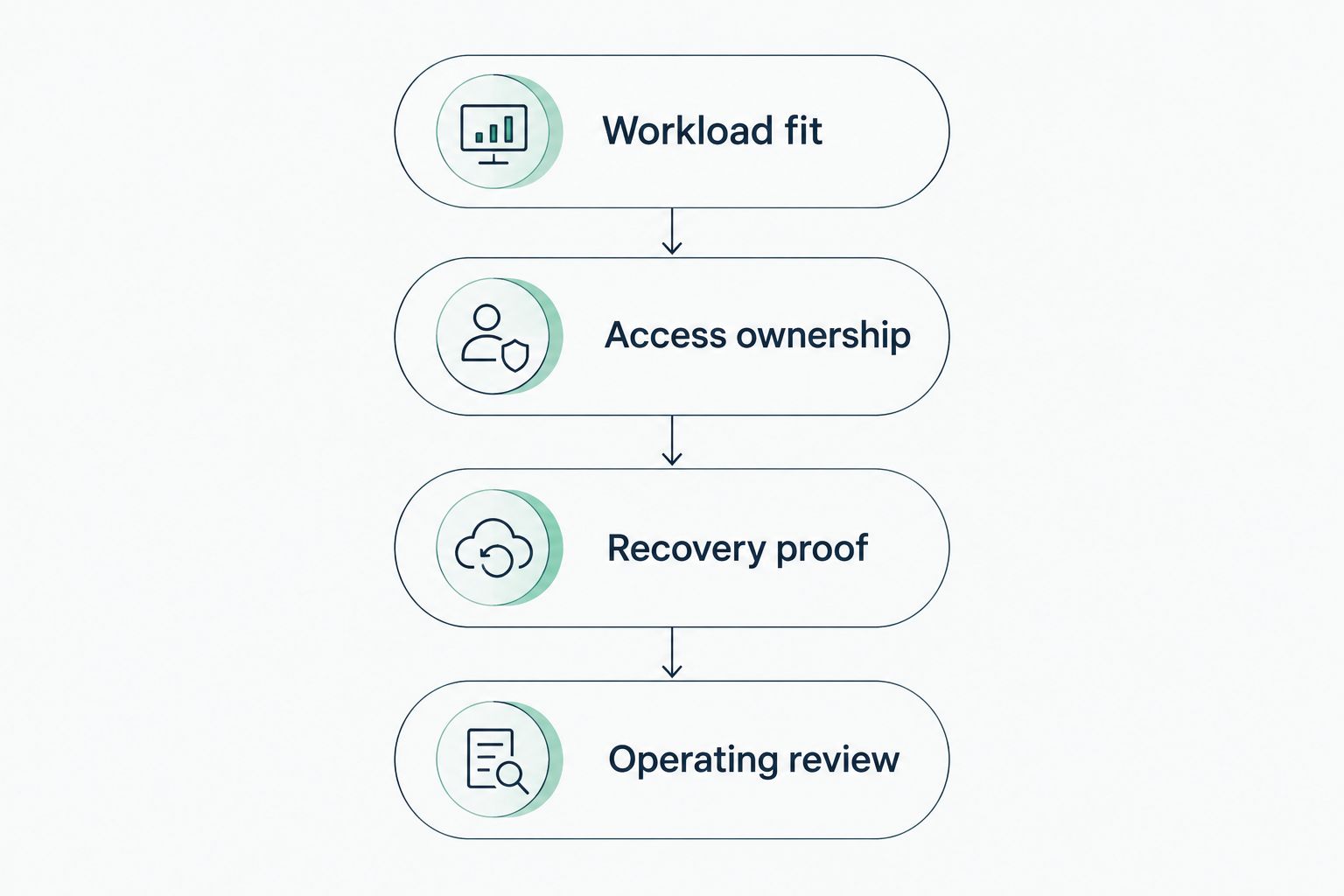
Approve the workload only after ownership and recovery are demonstrated.
The pilot should end with an explicit decision: proceed, revise the architecture, or stop. Do not expand an environment while its support responsibilities remain unresolved.
Discuss your cloud operating requirements
Review managed IT, cybersecurity, and compliance responsibilities before expanding your cloud environment.
Which cloud platform should you choose?
Choose Microsoft Azure as your default starting point if your business applications depend on Microsoft infrastructure. Choose AWS for a custom application whose architecture needs its services, Google Cloud for a defined analytics project, or DigitalOcean for straightforward application hosting.
For your 2026 decision, require application-vendor support, named operational ownership, and a demonstrated restore before migration approval. If those conditions are unresolved, hold the migration rather than selecting a platform on reputation alone.
FAQ
What's the best cloud computing platform for a small business?
Microsoft Azure is the first platform to assess for a small business centered on Microsoft infrastructure. AWS suits custom application infrastructure, Google Cloud suits analytics-led workloads, and DigitalOcean suits straightforward hosting.
Is Microsoft Azure better than AWS for small businesses?
Microsoft Azure is the stronger starting point for Microsoft-centered workloads, while AWS fits custom applications requiring its infrastructure services. Application support and operating responsibilities should determine the final choice.
Does using Google Workspace mean I need Google Cloud?
No. Google Workspace is a productivity suite, while Google Cloud supplies infrastructure and application services. Choose Google Cloud only when a defined workload requires those services.
Can a small business use more than one cloud platform?
Yes, a small business can use multiple cloud platforms. Each additional platform needs clear access ownership, monitoring, recovery procedures, and administrative responsibility.
Does moving to the cloud make my business compliant?
No. Compliance depends on your obligations, agreements, configurations, access controls, and operating procedures. A provider's certifications do not establish compliance for your particular deployment.
Do I still need backups if my application runs in the cloud?
Yes, your cloud application needs a defined recovery plan, including appropriate backups and restore testing. Replication and service redundancy do not replace recovery from accidental deletion or corrupted data.
Should I choose a cloud platform or a managed IT provider first?
Define the workload and operating responsibilities before committing to either. A managed IT provider such as DivergeIT addresses management and security responsibilities; a cloud platform supplies the underlying infrastructure.
One last thing
Ask the proposed administrator to demonstrate how your business would regain control if the current administrator became unavailable. Require documented account ownership, emergency access, billing authority, and recovery instructions.
Your business should retain control of its cloud accounts even when a service provider manages them. Resolve that requirement before migration, not during an outage.