


Best overall: Clio. Best for small firms prioritizing client communication: MyCase. Best for document-heavy practices: Smokeball. This 2026 guide compares the best practice management software for law firms by workflow fit, implementation demands, and the controls needed to protect client information.
TL;DR
- Clio is the best practice management software for law firms seeking a general-purpose starting point.
- MyCase suits client communication; Smokeball suits document-heavy legal workflows.
- PracticePanther suits repeatable administrative workflows; Filevine suits collaborative case management.
- DivergeIT provides managed IT services and cybersecurity for firms that need support around their legal software.
Why this matters
Practice management software connects matters, documents, deadlines, time entries, billing, and client communication. Your selection therefore affects more than administrative convenience. It determines where staff work and how client information moves between systems.
A strong feature list does not establish a strong fit. A litigation team coordinating case tasks needs a different demonstration from a small practice trying to keep clients informed without scattered email threads.
DivergeIT provides managed IT services, cybersecurity, and compliance services for growing businesses, including legal firms. DivergeIT is a service provider, not a practice management software vendor. Keep those buying decisions separate: choose the application for legal workflows and define who supports the surrounding technology.
What makes the best practice management software for law firms?
Use these criteria before comparing vendors. For your 2026 shortlist, require each demonstration to follow the same matter from intake through closure.
- Matter continuity: Client details, tasks, documents, deadlines, and billing records should remain connected to the correct matter.
- Workflow fit: The application should support how your practice actually works, rather than require staff to maintain a parallel spreadsheet.
- Client communication: Evaluate portals, messages, document sharing, and the record of what clients received.
- Billing discipline: Test time capture, expense entry, invoice review, and the handoff to your accounting process.
- Security administration: Examine permissions, authentication options, account removal, and access to sensitive matter information.
- Migration and exit: Require a clear explanation of imports, exports, document relationships, and responsibilities during implementation.
Treat security questions as selection criteria, not a final procurement formality. Ask the vendor to demonstrate the available controls for the exact subscription and configuration under consideration.
Law firm practice management software at a glance
This comparison assigns each application a distinct role. The limitations below describe adoption demands and evaluation priorities, not claims that a vendor lacks an untested feature.
Clio
- Best for: General-purpose practice management
- Standout capability: Connected matter management, time tracking, and billing
- Key limitation or evaluation priority: Define which workflows belong in the core system versus connected applications
MyCase
- Best for: Small firms prioritizing client communication
- Standout capability: Client portal alongside matter management and billing
- Key limitation or evaluation priority: Portal adoption requires a clear communication policy
PracticePanther
- Best for: Repeatable administrative workflows
- Standout capability: Workflow automation alongside matter, task, and billing tools
- Key limitation or evaluation priority: Automation requires consistent processes and ownership
Smokeball
- Best for: Document-heavy practices
- Standout capability: Legal document workflows connected with Microsoft Word and Outlook
- Key limitation or evaluation priority: Validate the fit with your document environment and templates
Filevine
- Best for: Collaborative case management
- Standout capability: Configurable case workflows, tasks, and documents
- Key limitation or evaluation priority: Configuration needs an internal owner and agreed case structure
Clio is the best default shortlist choice for law firms seeking general-purpose practice management software. That verdict identifies a starting point, not a reason to bypass a workflow demonstration.
1. Clio: best practice management software for general-purpose use
Clio brings matter management, time tracking, billing, and client information into a legal practice management environment. It is the default shortlist choice when your firm wants to evaluate core administrative workflows together rather than begin with a narrowly specialized requirement.
Start the demonstration with an active matter. Follow a document, a deadline, a time entry, and an invoice through the workflow, then examine the connections to applications your firm intends to retain.
Clio pros:
- Covers core matter administration alongside time tracking and billing.
- Offers an integration ecosystem for connecting other business applications.
- Supports a useful baseline comparison across different practice workflows.
Clio cons:
- Connected applications add separate configuration and support responsibilities.
- A broad platform still requires decisions about naming conventions, permissions, and process ownership.
Best for: Firms seeking a general-purpose practice management starting point.
Before selecting Clio in 2026, distinguish essential workflows from optional additions. Ask who owns each integration when a document, contact, or accounting record fails to move as expected.
Verdict: Buy Clio when the demonstrated core workflow meets your requirements and integration ownership is explicit.
2. MyCase: best practice management software for client communication
MyCase combines matter management, billing, and client communication tools, including a client portal. Its distinct shortlist role is helping small firms organize the interaction between internal case administration and client-facing updates.
Demonstrate the client's experience, not just the administrator's dashboard. Have a staff member send a document and a message, then inspect how the client receives them and how the activity appears in the matter record.
MyCase pros:
- Places client communication alongside matter administration.
- Provides a portal for client-facing interaction.
- Connects time and billing workflows with the practice management environment.
MyCase cons:
- A portal does not replace a policy defining which communications belong there.
- Staff and clients need guidance to avoid maintaining competing communication channels.
Best for: Small firms that want a more organized client communication workflow.
Ask how your team will handle urgent messages, attachments, and clients who continue using email. A communication tool earns its place when responsibility for checking and recording messages is clear.
Verdict: Buy MyCase when client communication is the primary operational problem and the portal fits your clients' needs.
3. PracticePanther: best practice management software for repeatable workflows
PracticePanther combines legal matter management, tasks, time tracking, billing, and workflow automation. Its shortlist role is supporting firms that want recurring administrative steps to follow a consistent process.
Choose a workflow your team already understands, such as opening a matter or preparing an invoice for review. Show the trigger, required tasks, responsible people, and exception path before discussing additional automation.
PracticePanther pros:
- Combines matter administration with task and billing tools.
- Includes automation for repeatable administrative work.
- Gives process-focused firms a concrete workflow to evaluate during selection.
PracticePanther cons:
- Automating an unclear process preserves the underlying confusion.
- Task rules require maintenance when staff responsibilities or practice procedures change.
Best for: Firms with repeatable administrative workflows and a named process owner.
Do not evaluate automation by counting available rules. Evaluate whether a missed step becomes visible, whether another employee can take over, and whether exceptions have a clear route to resolution.
Verdict: Buy PracticePanther when your firm has defined workflows and can assign responsibility for maintaining them.
4. Smokeball: best practice management software for document-heavy work
Smokeball combines legal practice management with document-focused workflows and Microsoft Word and Outlook integration. It belongs on the shortlist when document preparation and correspondence are central to the daily workload.
Use your own document types during the demonstration. Examine how matter information reaches a document, how staff save correspondence, and how another employee identifies the correct version.
Smokeball pros:
- Connects practice management with Word and Outlook workflows.
- Supports document automation for legal work.
- Includes matter administration and time-related workflows alongside document handling.
Smokeball cons:
- Document automation depends on accurate matter information and maintained templates.
- Microsoft-centered workflows require careful evaluation against your firm's device and application environment.
Best for: Firms whose daily work centers on legal documents and correspondence.
For a 2026 selection, bring representative templates rather than accepting a demonstration built entirely around sample documents. Confirm how template changes are controlled and how staff distinguish an approved template from an old copy.
Verdict: Buy Smokeball when its demonstrated document workflow fits your templates and working environment.
5. Filevine: best practice management software for collaborative case teams
Filevine organizes case information, documents, tasks, and configurable workflows. Its distinct role is supporting teams that need a shared case structure and clear handoffs across people working on the same matter.
Demonstrate a case with a change in ownership. Ask the next person to identify the current stage, outstanding tasks, relevant documents, and the next required action without relying on an informal briefing.
Filevine pros:
- Organizes documents and tasks around cases.
- Provides configurable workflows for case management.
- Supports a team-centered approach to organizing case information.
Filevine cons:
- Configuration requires agreement on fields, stages, and responsibilities.
- Uncontrolled customization creates inconsistent records and complicates training.
Best for: Collaborative case teams that need structured handoffs and case workflows.
Define a minimum case structure before adding specialized fields. Give someone authority to approve changes; otherwise, different teams can build incompatible versions of the same process.
Verdict: Buy Filevine when collaborative case management is the priority and your firm can govern its configuration.
How the ranking works
The ranking prioritizes workflow fit, not a claim that every firm should choose the same application. Clio is the general-purpose starting point; the other selections address client communication, repeatable administration, document work, or collaborative cases.
These recommendations are not a benchmark of implementation speed or support performance. Your final decision should rest on a demonstrated workflow, documented controls, and an agreed implementation scope.
How to validate your shortlist before signing
Use the same evaluation sequence for every finalist. This keeps a polished demonstration from substituting for evidence about your actual work.
Workflow test
Prepare 3 sample matters: a new inquiry, an active matter with documents and deadlines, and a closed matter with billing history. Use anonymized information, then ask staff to complete the tasks they perform in their normal roles.
Record where they leave the system, duplicate an entry, or need assistance. Those observations identify implementation work; they are not automatically reasons to reject the application.
Access review
Demonstrate what an attorney, an administrator, and an outside collaborator can see. Ask how access changes when an employee leaves or a matter requires restricted handling.
Separate application permissions from device security and identity administration. A well-configured matter system does not fix an unmanaged laptop or an account that remains active after departure.
Migration check
Require a written migration scope covering contacts, matter records, documents, billing history, and relationships between them. Ask which items retain their original structure and which need cleanup.
Select representative records for verification before the firm accepts the migration. A successful import is not the same as a usable matter history.
Support ownership
Document who handles application questions, account access, device problems, integrations, and security incidents. State the escalation route for an issue that involves more than one supplier.
DivergeIT's service commitments include a 15-minute response in writing and a live expert in 5 minutes. Those commitments concern its services; they are not support commitments from the software vendors in this guide.
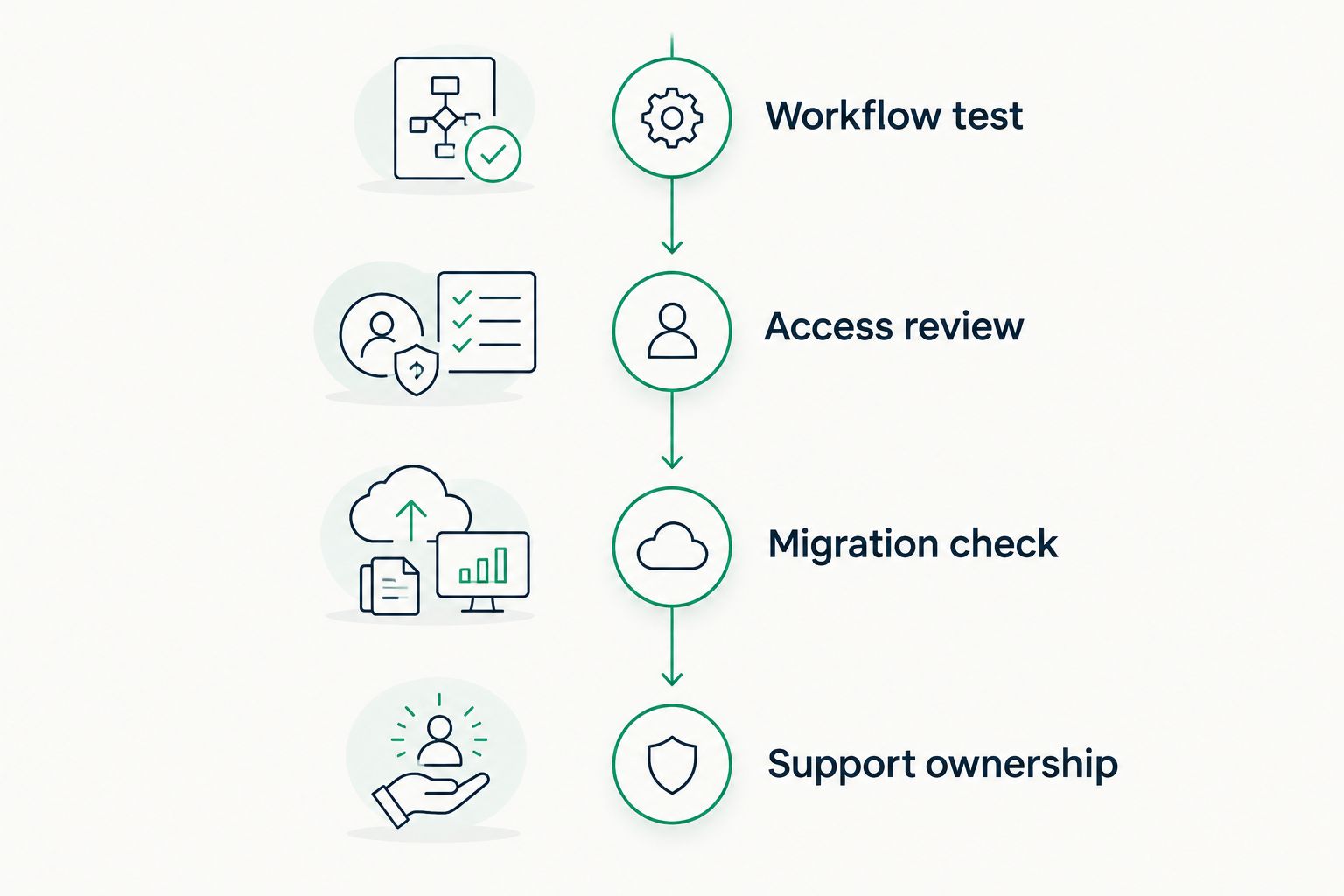
Validate the workflow and responsibilities before committing to a new system.
A 2026 implementation plan should finish with named owners and acceptance criteria. Define what must work before staff stop using the previous system, including document access, billing review, and account permissions.
Which practice management software should you choose?
Start with Clio if you need a general-purpose baseline. Add MyCase when client communication leads the decision, PracticePanther when repeatable administration leads, Smokeball when document work leads, or Filevine when collaborative case structure leads.
Keep the shortlist tied to your primary problem. Comparing every feature across every vendor obscures the workflow that must improve.
For your 2026 decision, require the preferred vendor to complete the same matter-based demonstration as its alternatives. Then resolve migration responsibility and support ownership before signing.
Plan your firm's IT support
Discuss managed IT, cybersecurity, and compliance support around your firm's legal applications.
FAQ
What's the best practice management software for law firms in 2026?
Clio is the best default shortlist choice for general-purpose law firm practice management. Choose a different starting point when client communication, document workflows, repeatable administration, or collaborative case management dominates your requirements.
Is MyCase better than Clio for a small law firm?
MyCase is the more focused shortlist choice when client communication is your small firm's main operational problem. Clio is the general-purpose baseline; demonstrate the same matter in both before deciding.
Which legal software should a document-heavy firm evaluate?
Smokeball is the document-focused selection in this guide because it connects legal practice management with Word and Outlook workflows. Test your own templates, correspondence, and document-saving process rather than relying only on demonstration files.
Should a law firm choose PracticePanther or Filevine?
Choose PracticePanther for evaluation when repeatable administrative workflows are the priority, and Filevine when collaborative case structure is the priority. Demonstrate task ownership and exception handling in either application.
How do you compare the cost of law firm practice management software?
Request a written proposal covering the subscription, implementation, migration, integrations, training, and ongoing support. Compare the same scope across finalists rather than comparing subscription charges alone.
Does practice management software make a law firm compliant?
Practice management software does not establish compliance by itself. Your firm must also address access controls, data handling, retention, employee practices, and the obligations that apply to its work.
Does DivergeIT sell the practice management applications in this guide?
DivergeIT is presented here as a managed IT, cybersecurity, and compliance service provider, not as the vendor of these applications. Keep application selection separate from the decision about who supports devices, access, and the surrounding technology.
One last thing
Before accepting a migration, ask a staff member who did not configure the system to find a document, identify the next deadline, and locate the related billing record in a sample matter. That simple handoff tests whether the new structure is understandable outside the implementation team.
Choose the system your team can use correctly, then put support ownership in writing. A practice management purchase is not finished when the data arrives; it is finished when staff can perform the required work and know who resolves a failure.