


Best overall foundation: endpoint detection and response. Best for account protection: identity security with multifactor authentication. Best for recovery: backup and recovery software. The best cybersecurity software for small businesses in 2026 is a coordinated set of tools with a named owner for alerts, access decisions, and recovery—not an isolated antivirus purchase.
TL;DR
- The best cybersecurity software for small businesses combines endpoint protection, identity security, email filtering, and tested recovery.
- Endpoint detection and response is the default starting point for protecting business computers.
- Identity security controls account access; backup software addresses recovery rather than attack prevention.
- DivergeIT is best suited to growing businesses needing cybersecurity services alongside managed IT and compliance support.
Why this matters
Security tools address different problems. Endpoint protection monitors computers, identity security controls access, and backup software restores data. Buying one does not replace the others.
For a small business, the operational question is just as important as the feature list: who acts when the software finds a problem? An alert without an assigned responder leaves a decision sitting in a queue. A backup without a restore test leaves recovery unproven.
DivergeIT provides managed IT services, cybersecurity, and compliance support for growing small and mid-sized businesses. Its role is service delivery, not selling a single cybersecurity application. Use this guide to choose the capabilities your business needs and decide which responsibilities to keep internally.
What makes the best cybersecurity software for small businesses?
Evaluate your 2026 shortlist against these criteria before comparing features:
- Coverage: Identify whether the software protects devices, accounts, email, business data, or exposed systems. A clear scope prevents overlapping purchases and uncovered risks.
- Response ownership: Establish who reviews alerts, isolates affected devices, disables compromised accounts, and informs business leaders.
- Administrative fit: Check whether your team can deploy, configure, update, and review the software without leaving important settings unattended.
- Recovery evidence: Require evidence that protected data can be restored into a usable business environment. A successful backup job is not a restore test.
- Reporting quality: Look for usable records of access changes, security events, remediation, and recovery tests. Match those records to your contractual and compliance obligations.
- Integration: Check how the software works with your existing computers, identity system, email environment, and business applications. Confirm compatibility before committing.
Choose the tool your business can operate correctly, not the tool with the longest feature list. Advanced controls introduce work as well as protection. Your purchasing decision should include that work explicitly.
Cybersecurity software categories at a glance
These are ranked capabilities, not interchangeable products. Each earns a different place in your security plan.
1. Endpoint detection and response
- Best for: Protecting business computers
- Standout capability: Device-level detection and investigation
- Key limitation: Alerts need an accountable responder
2. Identity security
- Best for: Protecting business accounts
- Standout capability: Authentication and access controls
- Key limitation: Does not replace device protection
3. Email security
- Best for: Reducing email-based threats
- Standout capability: Filtering and suspicious-message handling
- Key limitation: Cannot eliminate every deceptive message
4. Backup and recovery
- Best for: Restoring business data
- Standout capability: Recovery from deletion, corruption, or disruption
- Key limitation: Does not prevent the original incident
5. Business password management
- Best for: Managing employee credentials
- Standout capability: Controlled storage and sharing of passwords
- Key limitation: Does not govern every application permission
6. Vulnerability management
- Best for: Finding technical weaknesses
- Standout capability: Discovery and prioritization of remediation work
- Key limitation: Findings remain open until someone fixes them
1. Endpoint detection and response: best for business computers
Endpoint detection and response, or EDR, detects suspicious activity on protected devices and gives responders information for investigation. Depending on the product and configuration, response functions include isolating a device or stopping suspicious activity. Verify those functions during evaluation rather than assuming every package includes them.
For a business choosing its 2026 security foundation, EDR belongs near the top of the shortlist. Employees use computers to access accounts, documents, and business systems. Device protection therefore needs both coverage and an operating process.
Endpoint detection and response pros:
- Gives responders visibility into activity on covered devices.
- Supports investigation beyond a simple malware warning.
- Offers device-level response controls where included and configured.
Endpoint detection and response cons:
- Requires deployment, maintenance, and alert review.
- Does not replace identity security or backup recovery.
Best for: Businesses that need a defined process for detecting and responding to suspicious activity on employee computers.
Ask the provider to demonstrate an alert from detection through closure. Identify who investigates, who authorizes isolation, and what happens outside normal working hours. A dashboard demonstration alone does not answer those questions.
Verdict: Buy endpoint detection and response with explicit response ownership. Hold if nobody is responsible for its alerts.
2. Identity security: best for business account protection
Identity security controls how people authenticate and what they can access. Multifactor authentication adds another verification factor beyond a password; access policies and account administration address different parts of the same problem.
Start with the accounts that control your business environment. Email administration, financial systems, remote access, and other privileged accounts deserve deliberate access decisions. Separate routine employee access from administrative permissions.
Identity security pros:
- Adds authentication controls beyond passwords alone.
- Supports consistent access decisions across connected applications.
- Helps make account creation and removal a managed process.
Identity security cons:
- Coverage depends on application integration and configuration.
- Poorly planned recovery procedures create access problems for legitimate users.
Best for: Businesses whose employees depend on cloud applications, remote access, or sensitive business accounts.
Check the full account lifecycle, not just the login screen. A new employee needs appropriate access; a departing employee needs access removed. Temporary exceptions need an owner and an expiry decision.
Verdict: Buy identity security that fits your applications. Skip a deployment that leaves privileged accounts outside its controls.
3. Email security: best for reducing email-based threats
Email security filters messages and supports handling of suspicious attachments, links, and impersonation attempts. Product capabilities differ, so verify what is included and how employees report a suspicious message.
The strongest purchasing discussion connects filtering to business procedures. A message requesting changed bank details still needs independent verification. Software should support that process, not become the reason employees stop checking unusual requests.
Email security pros:
- Screens incoming messages before employees act on them.
- Provides a place to investigate reported messages.
- Supports controls for email-specific threats.
Email security cons:
- Legitimate messages can require review or release.
- Filtering does not replace verification of sensitive business requests.
Best for: Businesses that exchange invoices, client documents, payment instructions, or other consequential information by email.
During a 2026 evaluation, ask how the system handles employee reports, false positives, and messages delivered before a threat is recognized. Assign responsibility for investigating those reports. A reporting button without follow-through is an incomplete process.
Verdict: Buy email security with a clear reporting workflow. Skip the assumption that filtering makes every delivered message trustworthy.
4. Backup and recovery: best for restoring business data
Backup and recovery software preserves recoverable copies of business data and supports restoration after loss or disruption. It serves a different purpose from prevention tools: getting usable information back.
Define what must be restored before comparing backup products. Files, application data, configuration, and cloud-hosted information have different recovery requirements. Confirm coverage rather than treating all business data as one undifferentiated backup job.
Backup and recovery pros:
- Supports recovery from accidental deletion and data corruption.
- Gives the business a restoration path when primary data becomes unusable.
- Enables recovery testing against actual business workflows.
Backup and recovery cons:
- Does not stop an attack or prevent data theft.
- Requires protected administration, appropriate configuration, and restore testing.
Best for: Businesses that cannot resume important work without recovering documents, records, or application data.
For your 2026 review, ask for a demonstrated restore and an explanation of its dependencies. Determine who authorizes recovery, where restored data goes, and how staff confirm that it is usable. A backup report proves a job ran; a restore test proves a recovery path worked.
Verdict: Buy backup and recovery software with tested coverage. Hold until critical data and recovery responsibilities are defined.
5. Business password management: best for employee credentials
Business password management gives employees a controlled place to store and use passwords. Business-oriented administration also supports credential sharing and access changes, depending on the product.
A password manager addresses password handling. It does not automatically correct excessive permissions in the applications those passwords open. Pair deployment with account ownership and access review.
Business password management pros:
- Supports unique passwords without requiring employees to memorize them.
- Provides a controlled alternative to informal password sharing.
- Offers administrative oversight where the business plan includes it.
Business password management cons:
- Requires employee adoption and account recovery planning.
- Does not replace multifactor authentication or application access controls.
Best for: Businesses with employees managing credentials across several applications or sharing access to approved business accounts.
Evaluate the employee workflow as carefully as the administrator console. Check onboarding, credential sharing, departure procedures, and recovery. Establish which credentials belong in shared business storage and which must remain tied to an individual.
Verdict: Buy business password management for controlled credential handling. Skip personal accounts as the default system for shared company credentials.
6. Vulnerability management: best for prioritizing technical fixes
Vulnerability management identifies technical weaknesses and organizes remediation work. Scanning finds issues; remediation changes the affected system. Those are separate responsibilities.
This category becomes useful when your business needs a repeatable view of exposed or outdated systems. Match the product's discovery scope to your environment and identify who owns each class of finding.
Vulnerability management pros:
- Makes identified technical weaknesses visible.
- Supports prioritization of remediation work.
- Provides records for checking whether fixes were completed.
Vulnerability management cons:
- Does not fix every finding automatically.
- Requires validation, system ownership, and follow-up.
Best for: Businesses that need a structured process for identifying and resolving weaknesses across their technology environment.
Do not buy a scanner simply to produce reports. Ask how findings become assigned work, how exceptions are approved, and how completed fixes are checked. A growing list of unresolved findings is not a completed security program.
Verdict: Buy vulnerability management when remediation has an owner. Hold if reports will accumulate without action.
How the ranking works
The order reflects distinct buying decisions: protect business computers, control account access, address email threats, establish recovery, improve credential handling, and organize technical remediation.
The criteria remain coverage, response ownership, administrative fit, recovery evidence, reporting, and integration. This is not a claim that one category replaces the others. Move recovery or identity security higher when your immediate gap sits there.
Which cybersecurity software should you choose?
For an undecided small business, start with endpoint protection and identity controls, then verify email protection and recoverability. Add password management and vulnerability management around a clear operating process.
Use this sequence for your 2026 purchasing decision:
- Map coverage: List the devices, accounts, applications, and data that require protection.
- Assign ownership: Name the person or provider responsible for alerts, account changes, and recovery.
- Test workflows: Demonstrate detection handling, employee reporting, access removal, and restoration.
- Confirm commitments: Put service scope, response expectations, escalation, and reporting requirements in writing.
A completed comparison should show both software capabilities and human responsibilities. Keep those together when approving the purchase.
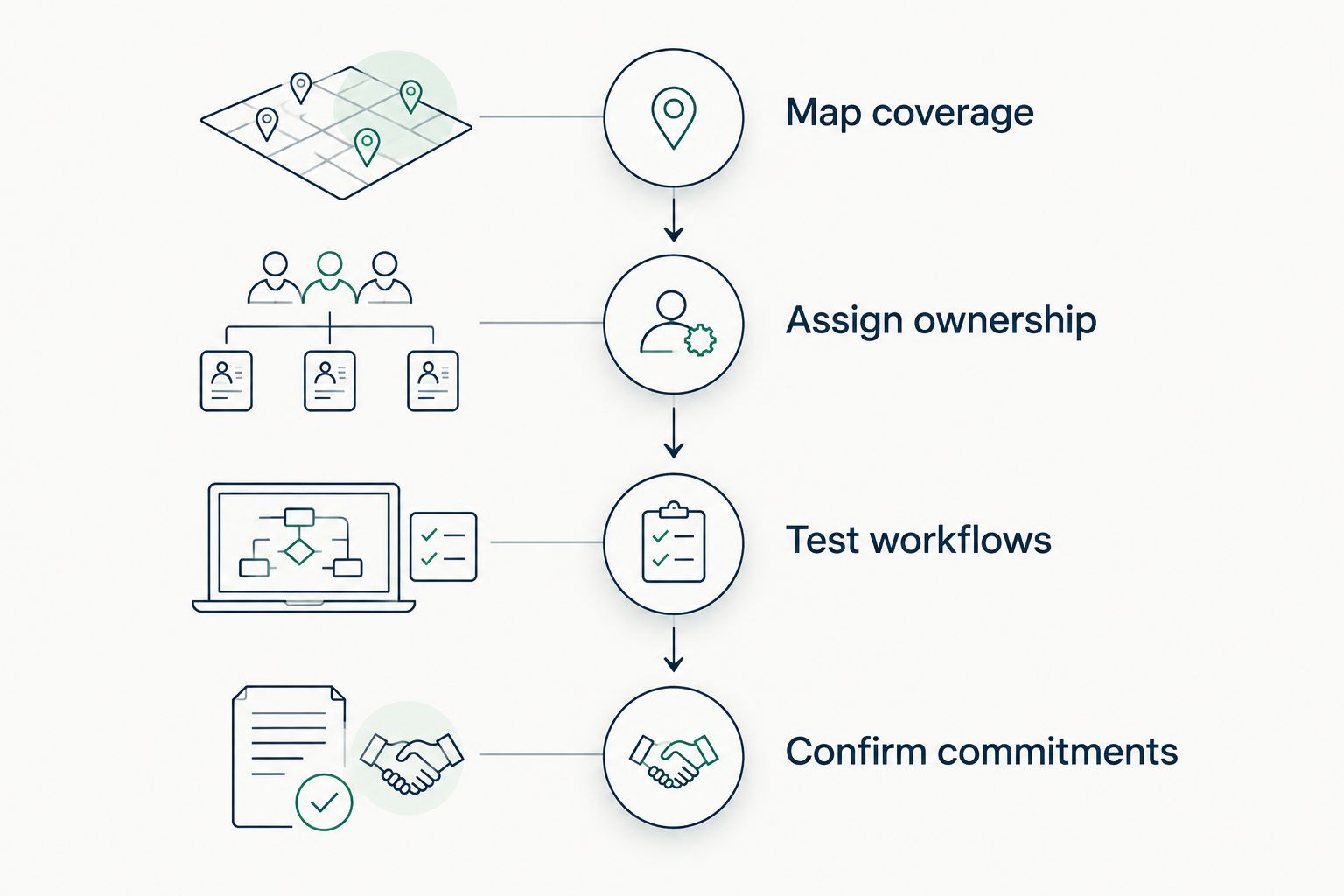
Choose software and assign operating responsibilities in the same decision.
DivergeIT's cybersecurity services fit growing businesses that also need managed IT and compliance support. The service decision is whether you need accountable operational help alongside the software, rather than another console for an already stretched team.
DivergeIT's stated service commitments include a 15-minute response in writing and a live expert in 5 minutes, or a $100 credit. Distinguish response from resolution when evaluating any provider: reaching an expert does not mean an incident is resolved. Confirm the applicable service terms and escalation responsibilities before signing.
FAQ
What's the best cybersecurity software for small businesses in 2026?
The best cybersecurity software for small businesses combines endpoint protection, identity security, email security, and tested backup recovery. Choose the tools against your actual coverage gaps and assign someone to operate them.
Is antivirus enough for a small business?
Antivirus alone does not cover account access, email handling, or backup recovery. Treat device protection as one part of your security plan rather than a substitute for the other controls.
Should a small business choose EDR or identity security first?
Choose the category that closes your immediate coverage gap, while planning for both. EDR addresses activity on protected devices; identity security addresses authentication and account access.
Does backup software stop ransomware?
Backup software provides a recovery path rather than stopping the original attack. Protect backup administration and test restoration alongside your prevention and response controls.
Can a password manager replace multifactor authentication?
A password manager does not replace multifactor authentication. Password management controls credential storage and use, while multifactor authentication adds another verification factor during authentication.
Should a small business manage cybersecurity software internally?
Manage cybersecurity software internally only when your team owns configuration, alert handling, access changes, and recovery testing. Use a service provider when those responsibilities need external operational support.
Is DivergeIT cybersecurity software or a service provider?
DivergeIT is a service provider offering managed IT, cybersecurity, and compliance support for growing small and mid-sized businesses. Evaluate its cybersecurity services alongside the operating responsibilities your software purchases create.
One last thing
Before approving cybersecurity software, ask who has authority to isolate a computer or disable an account during an incident. If the answer requires finding an unavailable executive, settle that decision now. Response ownership belongs in the purchase agreement, not in the first emergency.